URL Inspection is one of the most commonly misread tools in Google Search Console. Many foreign-trade websites see “Indexed” and assume the page is fine; see a successful live test and assume Google is already using the latest version; see that Google selected a canonical and assume all duplicate and language pages have been handled correctly. The reality is usually more complicated.
For Chinese export manufacturers, factories, and trading companies, the value of URL Inspection is not that it hands you a simple conclusion. It helps you determine which version of a page Google currently sees, whether important content has been captured, whether product and category pages are understood correctly, whether canonical is misfiring, and whether the live test version differs from the officially indexed version.
This article uses foreign-trade English product terms and page scenarios as examples, such as custom metal parts, LED flood light, packaging machine, medical probe, cnc machining parts, ceramic dinnerware, waterproof connector, industrial valve supplier, and private label activewear manufacturer. That is because what URL Inspection really needs to serve is whether these product pages, category pages, FAQ pages, resource pages, and inquiry pages can be seen correctly by Google.
Official documentation boundaries: URL Inspection only shows what Google sees, and cannot replace ranking diagnosis
The core value of URL Inspection is that it separates “what Google currently knows” from “whether the page can be tested and accessed right now.” It helps foreign-trade teams assess the indexed version, the live test, canonical, crawl date, rendered content, and structured data status, but on its own it cannot prove why a page does not rank, why it generates no inquiries, or that a given change will definitely bring search traffic.
For foreign-trade pages such as custom metal parts, LED flood light, packaging machine, medical probe, and waterproof connector, URL Inspection should be treated as a technical troubleshooting entry point rather than a final business conclusion. A real conclusion requires looking at page facts, internal links, sitemap, robots, canonical, GSC performance, GA4 events, and the follow-up review date at the same time.
Mapping official documentation to URL Inspection acceptance boundaries
| Official documentation entry | Checks it can support | Conclusions it cannot directly establish |
|---|---|---|
| Search Console Help: URL Inspection Tool | View the Google indexed version, indexability, structured data, video, AMP, and live test information. | Cannot prove the page will appear in search results or receive clicks. |
| Search Console Help: Inspect and troubleshoot a single page | Troubleshoot page by page why a URL is not in Google, and how to confirm again after a fix. | Cannot replace a site-wide content quality and link structure audit. |
| Search Console API: URL Inspection index.inspect | Retrieve status fields for the Google indexed version via API, suitable for batch sampling and review. | Cannot live-test the current page via API, and cannot promise indexing. |
| Search Console Help: Page indexing report | Put a single page’s status back into the reasons given in the Page indexing report. | Cannot judge the indexing health of an entire site from one URL. |
| Search Console Help: Performance report | Observe search performance through query, page, clicks, impressions, CTR, and average position. | Cannot interpret technical status directly as a ranking or inquiry outcome. |
| Google Search Central: Preferred URL guidance | Judge whether canonical, redirects, and sitemap consolidation signals are consistent. | Cannot guarantee Google will choose a declared canonical. |
| Google Search Central: robots.txt introduction | Confirm whether robots.txt affects crawling. | Cannot use robots.txt to remove a page entirely from Google results. |
| Google Search Central: Sitemaps overview | Confirm whether important URLs are included in the sitemap to help Google discover them. | Cannot guarantee that URLs in the sitemap will be indexed. |
| Google Search Central: Block Search indexing with noindex | Confirm whether noindex suits pages that should stay accessible but not enter search results. | Cannot treat noindex as a content governance or canonical solution. |
URL Inspection diagnostic acceptance checklist: at minimum, record these fields for each URL
| Acceptance field | How to record it | Judgment boundary for foreign-trade websites |
|---|---|---|
| Check time and URL | Record the full URL, the product line it belongs to, the page type, and the check date. | Avoid treating an old screenshot as the current conclusion. |
| Indexed version status | Record whether it is in Google, the crawl date, and the canonical Google sees. | Indexed does not mean the content is strong, nor that rankings are stable. |
| Live test status | Record whether the current page is accessible, renderable, and whether blocking resources appear. | A successful live test does not mean the official index has been updated. |
| Canonical mismatch | Compare the user-declared canonical with the Google-selected canonical. | When they differ, first investigate duplication, internal links, sitemap, and page intent. |
| robots and noindex | Verify robots.txt, meta robots, HTTP status, and whether indexing is allowed. | robots mainly governs crawling and noindex governs indexing; the two cannot be mixed up. |
| Rendered body content | Confirm whether product specs, FAQ, resource downloads, selection tables, and inquiry entry points are visible. | Visible to the human eye does not mean Google sees it after rendering. |
| Follow-up action | Write down the fix, the owner, the review date, and the report to watch. | Do not simply write “submitted for indexing”; state what was fixed before submitting. |
How to phrase URL Inspection conclusions when there is no GSC data
If Search Console still has no query, page, clicks, or impressions row data, URL Inspection can only serve as a technical baseline. You can write “the page currently has a robots meta of index/follow, is discoverable via sitemap, and the live test shows the core content,” but you cannot write “this page has already gained search growth” or “submitting it will bring rankings.”
| Current evidence | What you can write | What you cannot write |
|---|---|---|
| URL Inspection shows the page is available for indexing | Technically, there is no obvious signal preventing indexing. | The page will definitely be indexed or gain rankings. |
| The live test shows the new spec table | The current Googlebot test visit can see the key content. | The official Google index has already adopted the new version. |
| The declared canonical matches the target page | The site has provided a clear consolidation signal. | Google will inevitably choose this canonical. |
| GSC has no performance data yet | There is no search performance to analyze for now; a baseline must be established and observed. | Page performance has already improved. |
URL Inspection delivery boundaries: you can deliver troubleshooting evidence, not uncontrollable outcomes
When a foreign-trade team reviews URL Inspection, the deliverable should be screenshots, fields, causes, actions, and review dates, not a one-line “resolved.” If the problem comes from a blocked resource, noindex, an incorrect canonical, an outdated cache, or a redirect chain, specific fixes can be given. If the problem comes from thin page content, insufficient product facts, weak internal links, or unclear search demand, it shifts into a content and structure audit.
| Deliverable | How it is accepted | Boundary note |
|---|---|---|
| URL Inspection field record | Indexing status, crawl date, canonical, live test screenshots. | Only describes the state the tool currently sees. |
| Technical fix list | robots, noindex, status codes, canonical, sitemap, internal links. | Fixing a technical issue does not mean search performance changes immediately. |
| Content referral recommendation | Route weak product pages, duplicate pages, and thin FAQ pages into content updates. | URL Inspection alone cannot assess the quality of a buyer’s decision process. |
| Review plan | Check technical status at 7 days, GSC performance at 30 days, and topics and inquiry leads at 90 days. | Observation results must be based on actual reports. |
1. The conclusion first: URL Inspection is not an indexing button but a version judgment tool
The most important function of URL Inspection is to let you distinguish several versions: the version recorded in the official Google index, the version seen during the most recent crawl, the version seen during the live test, the canonical declared by the page, and the canonical Google actually selected. These versions may or may not match.
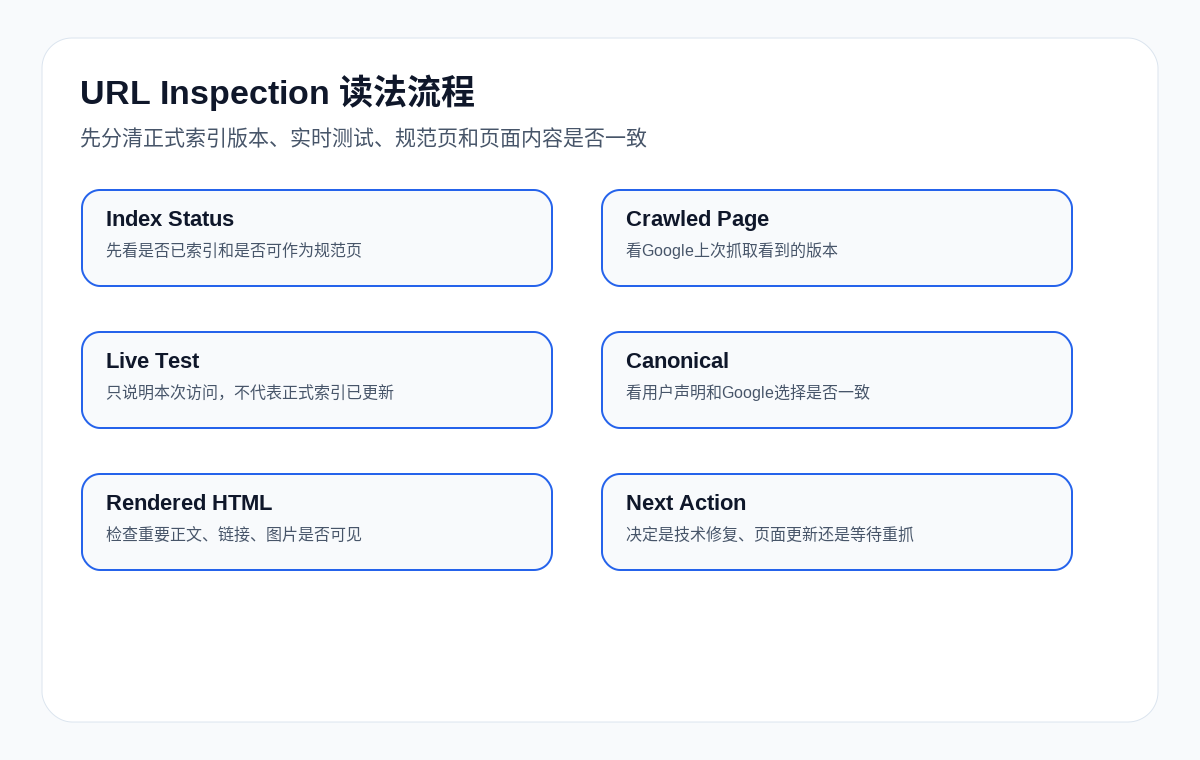
| Status you see | What it can indicate | What it cannot indicate |
|---|---|---|
| URL is on Google | The URL or a related version has been included in the Google index | Does not mean rankings are good, nor that the content version is the latest |
| Live test successful | Google could access the page in this test | Does not mean the official index has been updated |
| Page is available for indexing | Technically, there is no obvious barrier to indexing | Does not mean Google will definitely choose this page |
| Google-selected canonical | Which URL Google considers more suitable as the representative | Does not mean your declaration was necessarily accepted |
| Crawl date | The approximate time Google last processed the page | Does not mean all content was fully understood |
2. The most common misreadings on foreign-trade websites
A common misreading on foreign-trade websites is treating a single status message as a complete diagnostic conclusion. For example, a waterproof connector product page shows as indexed, but the indexed version is a historical one and the new spec table and datasheet links have not yet been officially processed; a packaging machine page passes the live test, but the official indexed version is still from before the redesign; on a medical probe page, Google selected another language or parameter URL as the canonical.
| Misreading | Likely real cause | What to check next |
|---|---|---|
| Indexed = no problem | The indexed version may be old, and the page intent or content may still be weak | Crawl date, rendered HTML, GSC queries, and page version |
| Live test successful = recovered immediately | A live test does not equal an official index update | Wait for recrawl, submit for indexing, and watch coverage and query changes |
| Canonical declared = Google will comply | Google may choose another page | Duplicate content, internal links, sitemap, page quality, and language versions |
| Page accessible = content visible | JS or lazy loading may leave important content missing | Review the tested page screenshot and HTML |
3. What URL Inspection is good for
URL Inspection is good for answering “what does Google currently see” and “is the technical status clearly abnormal,” but it is not suited to judging page quality, keyword competition, inquiry conversion, or whether content is strong enough on its own.
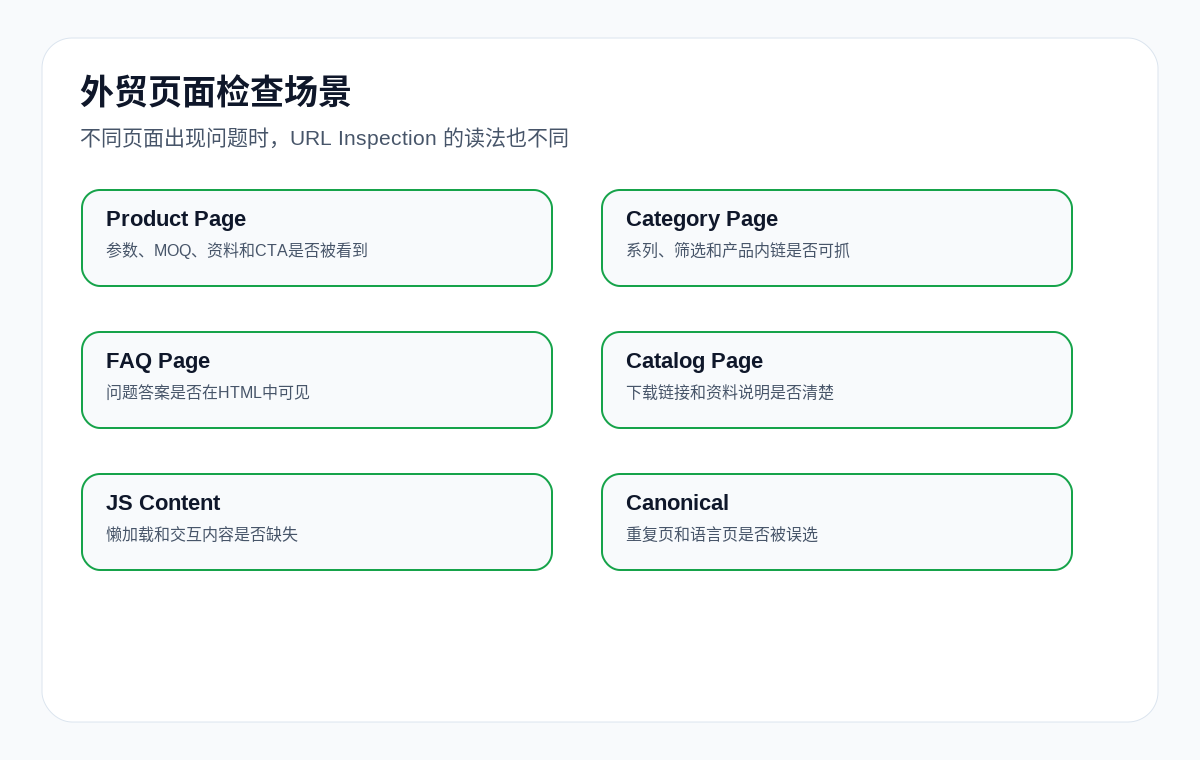
| Good for checking | Foreign-trade scenario |
|---|---|
| Whether a page can be indexed | Whether a newly published custom metal parts product page is allowed to be indexed |
| Whether Google sees important body content | Whether the specs and FAQ on an LED flood light page are visible after rendering |
| Whether canonical is consistent | Whether a ceramic dinnerware series page has been replaced by a parameter page |
| Whether the crawled version is too old | Whether a packaging machine page is still a historical version after its redesign |
| Whether mobile content is missing | Whether a waterproof connector table is hidden on mobile |
| Whether resources are blocking | Whether images, CSS, and JS affect page understanding |
4. What is the difference between the indexed version and the live test version
The indexed version is the one Google has already processed and may use in search results; the live test is the state Googlebot sees during a simulated visit at this moment. It is common for the two to differ, especially right after a redesign, a canonical fix, a new spec table, or a newly published FAQ.
| Comparison item | Indexed version | Live test version |
|---|---|---|
| Time | The state after Google’s last crawl and processing | The immediate state when you click test |
| Purpose | Closer to the version currently used in search results | Used to judge whether the page is accessible and renderable now |
| Common misunderstanding | Indexed means the latest version is live | A successful live test means the official index has been updated |
| Next step | Look at the crawl date and search performance | Confirm the fix worked, then wait for a recrawl |
For example, an industrial valve supplier page added pressure ratings and a material table today; the live test can see the new content, but the official indexed version may still be last week’s page. At this point you cannot say “Google has updated”; you can only say “the current page makes the new content accessible to Googlebot, and the next step is to wait for or encourage a recrawl and watch GSC query changes.”
5. How to read canonical information
Canonical is a very important but easily misread part of URL Inspection. You need to look separately at the “user-declared canonical” and the “Google-selected canonical.” If the two differ, Google has not necessarily accepted your declaration.
| Case | Possible cause | Foreign-trade example | Direction |
|---|---|---|---|
| Declaration and selection match | The signals are relatively clear | The waterproof connector main series page is selected as canonical | Keep maintaining internal links and content quality |
| Google selected another URL | Duplication, weak content, or internal link signals favoring another page | A parameter page replaces a category page | Adjust content differentiation, internal links, sitemap, and canonical declarations |
| No canonical declared | The relationship between page versions is unclear | Multiple language or filter pages compete with each other | Add a consolidation strategy |
| Declared to an irrelevant page | Configuration error | A product page points to the homepage or an old page | Fix immediately and recheck |
6. What to check in rendered content
Many foreign-trade websites use images, tables, accordion modules, JS interactions, and lazy loading. If important content does not appear in the rendered HTML Google can read, the page may look complete while search engines understand it incompletely.
| What to check | Why it matters |
|---|---|
| Product specification table | Both buyers and Google need to understand the specifications |
| MOQ, lead time, certifications | Affects inquiry quality and trust |
| FAQ answers | Often searched and extracted for AI answers |
| Resource download links | catalog, datasheet, and certificate are strong signals |
| Body internal links | Help Google discover product pages, category pages, and resource pages |
| Image alt and surrounding text | Help with understanding the product and its application scenarios |
7. Check by page type: do not read every URL the same way
| Page type | Key checks | Typical problems |
|---|---|---|
| Product page | Whether specs, applications, FAQ, and CTA are visible | JS-switched specifications are not seen |
| Category page | Product list, filter links, body copy | Only cards with no text, weak pagination |
| Industry page | Application scenarios, cases, internal links | Content too generic, no product to carry it |
| Resource page | Download links, descriptions, file types | Buttons clickable but text descriptions missing |
| FAQ page | Whether questions and answers are directly readable | Accordion content does not enter the HTML |
| Inquiry page | Form accessible, contact details clear | Form scripts blocking or events untracked |
8. Read URL Inspection together with the GSC Performance report
URL Inspection tells you the page status; the Performance report tells you the actual search performance. Looking only at the former tends to stop at technical judgment; looking only at the latter makes the cause hard to explain.
| Combined signal | Possible conclusion | Next step |
|---|---|---|
| Indexed but no impressions | The page may not match any query, or the content is too weak | Check page intent, title, internal links, and content evidence |
| Indexed with impressions but no clicks | A title, snippet, or SERP competition problem | Revise title, snippet, structured information, and page match |
| Live test successful but official version old | Google has not yet processed the new version | Submit for indexing, strengthen internal links, wait, and review |
| Canonical mismatch with low impressions | Signals are consolidated into another URL | Fix consolidation, internal links, and page differentiation |
9. Ten real-world foreign-trade cases
Case 1: custom metal parts
After uploading a new material and tolerance table, check whether the live test can see the table and whether the official indexed version is still the historical content.
Case 2: LED flood light
The power and mounting height descriptions collapsed on mobile must be confirmed as visible after rendering.
Case 3: packaging machine
If a price factor page shows as indexed but gets no clicks, combine it with query terms to see whether the page role is unclear.
Case 4: medical probe
If the compatible device list is loaded by script, check whether Google sees the key models.
Case 5: cnc machining parts
When multiple material pages duplicate each other, look at the canonical Google selected.
Case 6: ceramic dinnerware
When there are too many series filter pages, prevent parameter pages from replacing the main category page.
Case 7: waterproof connector
On the datasheet download page, confirm that the download description and the link are both accessible.
Case 8: industrial valve supplier
After the pressure and material tables are updated, check whether the crawl date is later than the update date.
Case 9: private label activewear manufacturer
If MOQ and the sampling process sit in accordion modules, confirm they can be read in the HTML.
Case 10: stainless steel fasteners
Standard model pages and inventory pages must avoid canonical confusion.
10. When to request indexing and when not to
Requesting indexing is not an all-purpose button. It suits cases where a page has important updates, has had crawling or consolidation problems fixed, or has a new core product or resource page published. It is not a substitute for improving page quality, and it is not something to submit repeatedly for the same problem page every day.
| Good reason to request indexing | Bad reason to request indexing |
|---|---|
| A core product page gains important specs and resources | The page content is very weak but unchanged |
| A noindex, canonical, or 404 problem was fixed | You just want to hurry rankings along |
| A high-value category page or resource page is newly published | Submitting the same URL every day |
| An important landing page needs reprocessing after a redesign | No crawling or content problem was solved |
11. How to build a URL Inspection review sheet
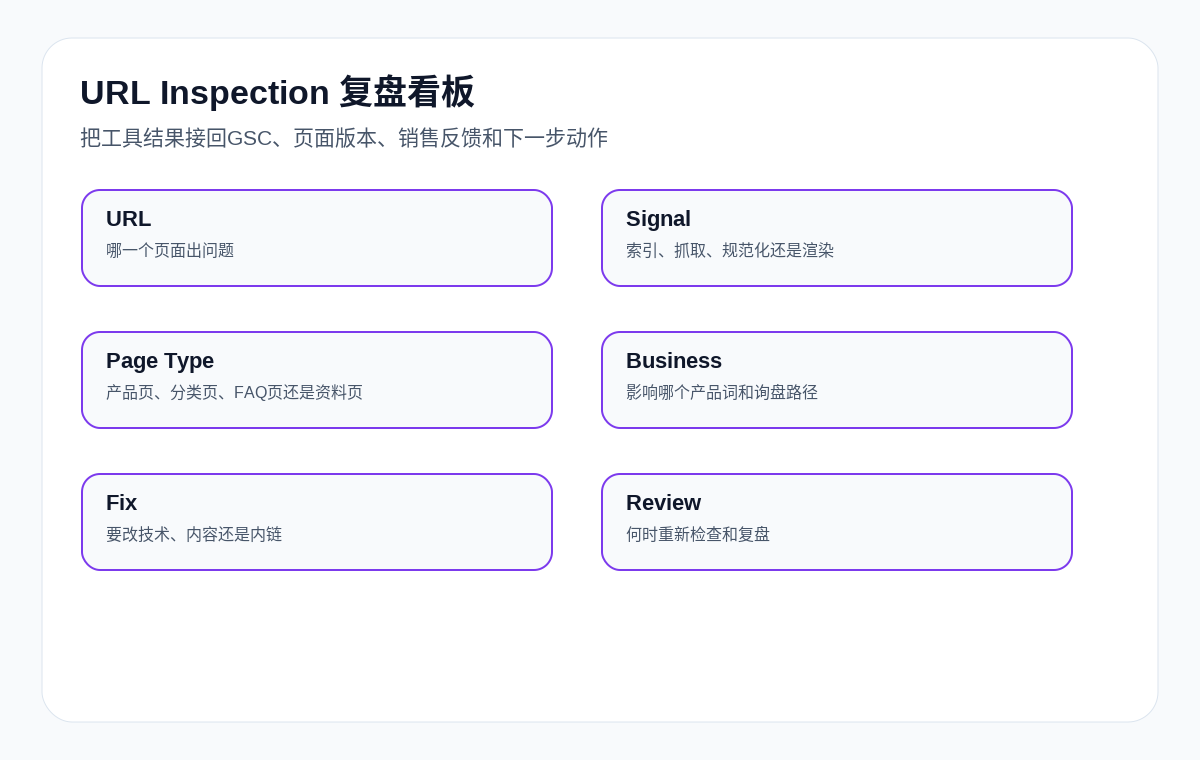
| Field | What to record |
|---|---|
| URL | The specific page address |
| Page type | Product page, category page, FAQ page, resource page |
| Reason for checking | Newly published, redesigned, no impressions, canonical anomaly |
| Indexing status | Whether indexed, whether indexable |
| Crawl date | The date of the official version |
| Live test | Whether currently accessible and renderable |
| canonical | Declared and Google-selected |
| Important content | Whether specs, FAQ, downloads, and internal links are visible |
| Next step | Technical fix, content reinforcement, wait for recrawl, or review GSC |
13.5 How foreign-trade teams should judge different statuses
The hard part of URL Inspection is not opening the tool but judging what to do once you see a status. The table below can serve as an internal SOP: look at the status first, then judge the risk, then decide the action.
| Tool status | Risk for the foreign-trade page | Priority action | What not to rush into |
|---|---|---|---|
| Indexed, but crawl date very old | New specs, new FAQ, and new resources may not have entered the official version | Check internal links, submit for indexing, watch GSC changes | Immediately rewriting the entire page |
| Live test failed | A current page access, resource, or server anomaly | Check HTTP status, robots, resource loading, and firewall | Only changing titles and body copy |
| Google selected another canonical | The target page’s signals are consolidated or replaced | Check duplicate content, internal links, canonical, and sitemap | Continuing to add keywords to the target page |
| Indexable but no impressions | The page may not match demand well, or its internal links are weak | Judge using the Performance report and the page role | Treating “indexable” as done |
| Crawled but not indexed | Page quality, duplication, or insufficient value | Add differentiated content, procurement evidence, and internal links | Requesting indexing repeatedly every day |
13.6 How URL Inspection fits with the technical team
Many SEO problems need the technical team’s help, but if you only say “the page is not indexed,” the technical team has a hard time judging what to check. A better approach is to translate the URL Inspection results into technically actionable items.
| Problem as SEO sees it | How to phrase it to the technical team | What the technical team needs to check |
|---|---|---|
| Live test cannot access the page | Googlebot currently fails to access this URL | HTTP status, server restrictions, firewall, robots |
| Rendered content missing | The Google test version does not see key modules | JS rendering, lazy loading, mobile DOM, API dependencies |
| Wrong canonical selected | Google selected a non-target URL as the representative | canonical tag, duplicate pages, internal links, sitemap |
| Abnormal resource loading | Some CSS/JS/images affect page understanding | Resource status, CDN, cross-origin, blocking rules |
This phrasing is more effective than “Google is not indexing it,” because it breaks the problem down to a level the technical team can inspect.
13.7 How URL Inspection fits with the content team
Not every URL Inspection problem needs a technical fix. Often the page is indexable and crawlable, but Google is unwilling to keep or show it because the page itself is not clear enough, not unique enough, or not valuable enough for procurement judgment.
| Signal | What the content team should check | Foreign-trade page example |
|---|---|---|
| Crawled but not indexed | Whether the page is thin, duplicated, or missing procurement evidence | Multiple LED flood light pages differ only by model, with nearly identical body copy |
| Impressions but no clicks | Whether the title and snippet match the query intent | A waterproof connector catalog query lands on a generic product page |
| Indexed but querying the wrong thing | Whether the page role is muddled | A packaging machine price query lands on a brand introduction page |
| AI or snippets get it wrong | Whether the factual statements are focused and structured | The scope of medical probe certification is written vaguely |
13.8 URL Inspection is also connected to sales feedback
URL Inspection may look like a technical tool, but it ultimately affects sales. If Google sees a historical page, a wrong canonical, or a page missing specifications, visitors who reach the site may also fail to see complete procurement information, and inquiry quality naturally suffers.
| Page problem | What sales may see | Fix direction |
|---|---|---|
| Spec table not seen | Customers repeatedly ask about basic specifications | Put specifications into readable HTML |
| Resource page not indexed | Customers cannot find the catalog or datasheet | Strengthen resource page descriptions and internal links |
| canonical points wrong | Customers land on a page that does not match | Fix the canonical page and page differentiation |
| Historical version still indexed | Customers see outdated information or an old CTA | Update the page, request indexing, strengthen internal links |
13.9 Checklist: what to record on every URL Inspection
- Check date and who checked.
- Page URL, page type, and the corresponding product line.
- Reason for checking: newly published, redesigned, no impressions, no clicks, canonical anomaly, content update.
- Indexing status and crawl date.
- Whether the live test succeeded.
- The Google-selected canonical and the page-declared canonical.
- Whether important content is visible: specs, FAQ, resources, CTA, internal links.
- Whether a technical fix, content reinforcement, internal link adjustment, or waiting for a recrawl is needed.
- The next review date.
- The corresponding GSC queries and sales feedback.
13.10 30-minute quick troubleshooting process
| Time | Action | Goal |
|---|---|---|
| 0-5 minutes | Confirm the URL, page type, and business goal | Know which queries and inquiries this page should capture |
| 5-10 minutes | Review indexing status, crawl date, canonical | Judge the official version and consolidation signals |
| 10-15 minutes | Run the live test and review rendered content | Judge whether the current version is accessible and readable |
| 15-20 minutes | Compare with GSC queries and clicks | Judge whether status and performance are consistent |
| 20-25 minutes | Check specs, FAQ, resources, and internal links | Judge whether the page has procurement value |
| 25-30 minutes | Write the next actions and review date | Avoid letting the tool check stop at the screenshot stage |
13.11 Which problems cannot be solved by URL Inspection alone
URL Inspection is important, but it cannot replace a complete diagnosis. The following problems require additional data:
| Problem | What else to combine |
|---|---|
| Why the ranking is not high | SERP competition, content depth, backlinks, internal links, page experience |
| Why the click-through rate is low | Title, snippet, structured information, search intent, and competitor results |
| Why inquiry quality is poor | Landing page, form, product resources, sales feedback, and keyword intent |
| Why AI answers do not mention you | Page structure, entity consistency, resource credibility, citation value, and topic coverage |
13.12 What foreign-trade websites should look at beyond generic tutorials
Generic URL Inspection tutorials usually cover indexing status, live tests, canonical, crawl date, and page availability. These basics must be mastered, but for foreign-trade websites they are not enough. Foreign-trade pages often carry procurement judgment and inquiry conversion tasks, so you cannot look only at technical status; you also need to see whether Google can see the content that affects procurement trust.
| What generic tutorials cover | What foreign-trade websites must also check | Reason |
|---|---|---|
| Whether the URL is indexed | Whether the latest product version is what is indexed | Specs, certifications, MOQ, and resources may have just been updated |
| Whether the page is accessible | Whether key procurement information is readable | Spec tables, FAQ, and download buttons matter more than the page merely existing |
| Whether canonical is consistent | Whether series pages, parameter pages, and language pages compete for signals | Foreign-trade sites often have multiple versions, regions, and filter pages |
| Whether the live test succeeds | Whether the official index already uses the new content | A successful test does not mean search results have been updated |
| Crawl date | Whether it is later than the date of important page changes | Otherwise Google may still use the old resources |
This is why foreign-trade companies cannot treat URL Inspection as a binary “indexed or not” tool. It should be placed inside the overall check process for product pages, category pages, resource pages, and the inquiry path.
13.13 Three typical mistake cases
Mistake case 1: seeing “indexed” and stopping product page optimization
A custom metal parts page is already indexed, but the page only describes materials and machining capabilities, with no tolerance table, surface treatment, inspection reports, drawing submission instructions, or FAQ. URL Inspection can only show that the page entered the index; it does not mean the page is useful enough for buyers. The right approach is to keep using GSC queries, page content, and inquiry feedback to judge whether reinforcement is needed.
Mistake case 2: assuming a successful live test means the problem is solved
A packaging machine page had a JS rendering problem fixed, and the live test can see the new model table, but the crawl date of the official indexed version is still earlier than the fix date. This only shows the current version is accessible; it does not show that search results use the new content. You still need to encourage a recrawl and watch query and click changes.
Mistake case 3: a canonical anomaly, but only continuing to write content
A waterproof connector category page has never performed, and URL Inspection shows Google selected another parameter page as the canonical. If the team keeps expanding the category page without addressing duplication, internal links, canonical, and the parameter page strategy, the effect is likely limited. Clarifying the consolidation signals first and then reinforcing content is the more correct order.
13.14 The relationship between URL Inspection and AI search visibility
URL Inspection is not an AI search monitoring tool, but it affects the foundation of AI search visibility. If Google cannot reliably see the page’s key facts, or the official indexed version is still historical content, the page is harder to understand correctly in search and AI summary environments.
| Problem found via URL Inspection | How it may affect AI visibility | Fix direction |
|---|---|---|
| FAQ not seen after rendering | AI struggles to extract clear questions and answers | Get FAQ into readable HTML and optimize the structure |
| Resource page not indexed | catalog and datasheet are hard to discover | Add resource page descriptions, internal links, and indexing signals |
| Wrong canonical selected | AI may cite a weak or historical page | Fix consolidation and page differentiation |
| Historical version still indexed | AI may absorb outdated specs or old descriptions | Update the crawl, submit for indexing, and review |
13.15 How to make this process routine inside the company
If URL Inspection depends on one person occasionally opening it, it is hard for it to create stable value. A better approach is to turn it into a fixed process: check once after core pages are published, once after important redesigns, once when GSC shows an anomaly, and once again after canonical or indexing problems are fixed.
| Trigger scenario | Who owns it | Key checks |
|---|---|---|
| New product page published | Content/SEO | Indexing, rendering, specs, internal links |
| Category page redesigned | SEO/Tech | canonical, product list, filters, and pagination |
| Resource page launched | Content/Sales | Download descriptions, links, resource value |
| GSC impressions anomaly | SEO | Crawl date, canonical page, page version |
| Technical fix completed | Tech/SEO | Live test and subsequent changes to the official version |
Once the process is fixed, URL Inspection shifts from an ad hoc tool into part of site quality control.
12. FAQ: common URL Inspection questions
If it is indexed, can I just ignore it?
No. You still need to check whether the indexed version is the latest, whether the page gets impressions and clicks, and whether the content matches search intent well enough.
Does a successful live test mean Google has already updated?
No. A live test only means this particular visit succeeded; it does not mean the official index has been updated.
Is a canonical mismatch always an error?
Not necessarily, but you need to judge why Google chose another page and whether it affects the target page’s performance.
Can URL Inspection tell why the ranking is poor?
It only provides technical and version clues; rankings also depend on content, competition, internal links, search intent, and user behavior.
When is it appropriate to request indexing?
It can be used after core pages are published, important fixes are completed, or key content is updated, but do not treat it as a ranking button.
Which URLs should foreign-trade websites check most?
Core product pages, category pages, industry pages, resource pages, FAQ pages, and inquiry pages.
Why does the live test see content while search results do not change?
The official index may not have updated yet, or the page quality and relevance may be insufficient.
What is the difference between URL Inspection and Crawl stats?
URL Inspection looks at the status of a single URL, while Crawl stats looks at overall crawl trends and server responses.
13. Conclusion: the value of URL Inspection lies in triaging problems
URL Inspection is not a tool that gives final answers but one that helps you triage problems. It can tell you whether the problem looks more like crawling, indexing, rendering, canonical, or page version, or whether you need to go back to content and search performance to keep judging.
When foreign-trade websites use it, they should always read it together with the page role and the business question: Is this custom metal parts page seen with the latest specs? Has this packaging machine page landed on the correct canonical? Can Google read the download instructions on this waterproof connector resource page? Only then can URL Inspection truly serve SEO and inquiries, instead of becoming a misread status message.
{
“@context”: “https://schema.org”,
“@type”: “FAQPage”,
“mainEntity”: [
{
“@type”: “Question”,
“name”: “If it is indexed, can I just ignore it?”,
“acceptedAnswer”: {
“@type”: “Answer”,
“text”: “No. You still need to check whether the indexed version is the latest, whether the page gets impressions and clicks, and whether the content matches search intent well enough.”
}
},
{
“@type”: “Question”,
“name”: “Does a successful live test mean Google has already updated?”,
“acceptedAnswer”: {
“@type”: “Answer”,
“text”: “No. A live test only means this particular visit succeeded; it does not mean the official index has been updated.”
}
},
{
“@type”: “Question”,
“name”: “Is a canonical mismatch always an error?”,
“acceptedAnswer”: {
“@type”: “Answer”,
“text”: “Not necessarily, but you need to judge why Google chose another page and whether it affects the target page’s performance.”
}
},
{
“@type”: “Question”,
“name”: “Can URL Inspection tell why the ranking is poor?”,
“acceptedAnswer”: {
“@type”: “Answer”,
“text”: “It only provides technical and version clues; rankings also depend on content, competition, internal links, search intent, and user behavior.”
}
},
{
“@type”: “Question”,
“name”: “When is it appropriate to request indexing?”,
“acceptedAnswer”: {
“@type”: “Answer”,
“text”: “It can be used after core pages are published, important fixes are completed, or key content is updated, but do not treat it as a ranking button.”
}
}
]
}
Keep reading this SEO series
If you are working through foreign-trade website SEO systematically, it is worth continuing with the articles below. Sort out the relationships among crawling, indexing, content, links, and review first, then decide which page to change next.
- How to troubleshoot orphan pages: a guide to fixing isolated pages, sitemaps, and body internal links
- How to diagnose keyword cannibalization: a guide to pages competing for rankings and intent conflicts
- How Google crawls, indexes, and ranks: a diagnostic guide for foreign-trade websites from indexing to inquiries
- How search engines work: a guide to crawling, indexing, ranking, and diagnostics for foreign-trade websites
- Technical SEO audit checklist: a guide to crawling, indexing, structure, and inquiry path diagnostics for foreign-trade websites
- Sitemap technical guide: submission, indexing diagnostics, and common error troubleshooting
This page is machine-translated from the Simplified Chinese version and awaiting human review. It has not yet been proofread.