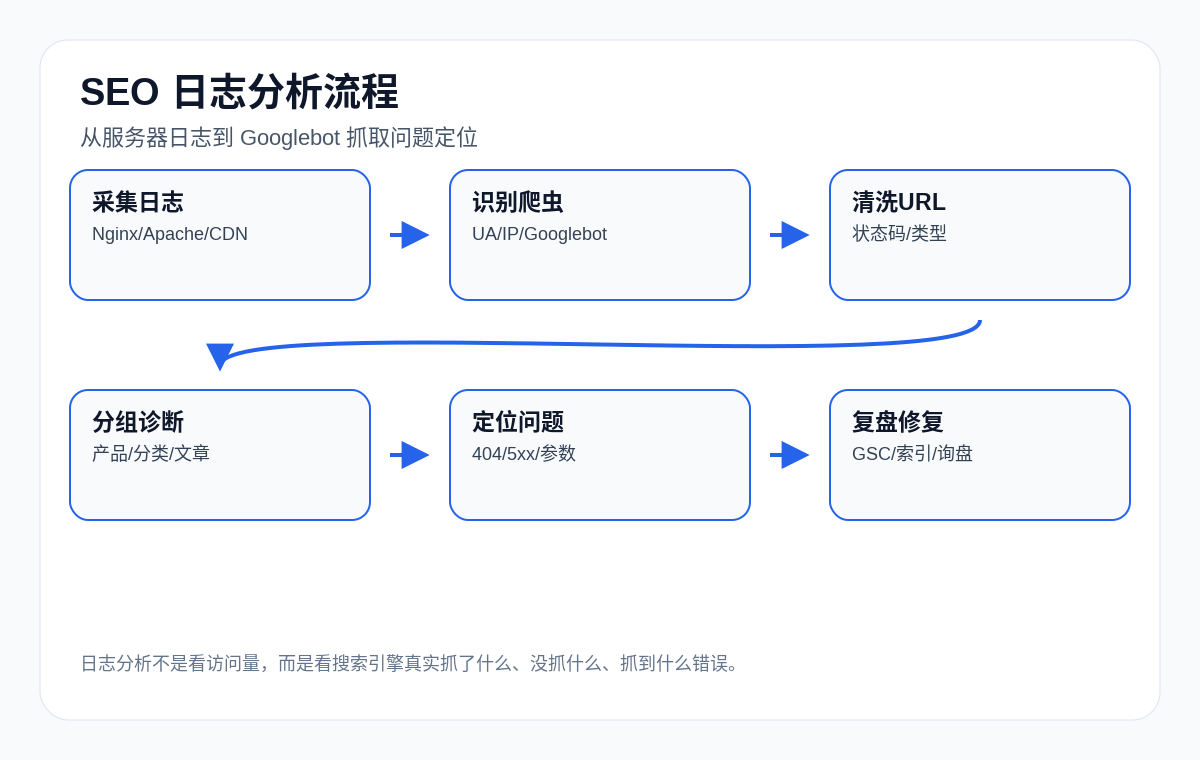
SEO log analysis is a method for reconstructing what search engines actually crawled by working backward from server access logs. GSC tells you which pages are indexed and which pages get impressions and clicks, but logs tell you which URLs Googlebot, Bingbot, or other crawlers actually visited, how often they visited, whether they received a 200, 301, 404, or 5xx, and whether crawl activity was wasted on filter parameters, old URLs, duplicate pagination, images, and low-value pages.
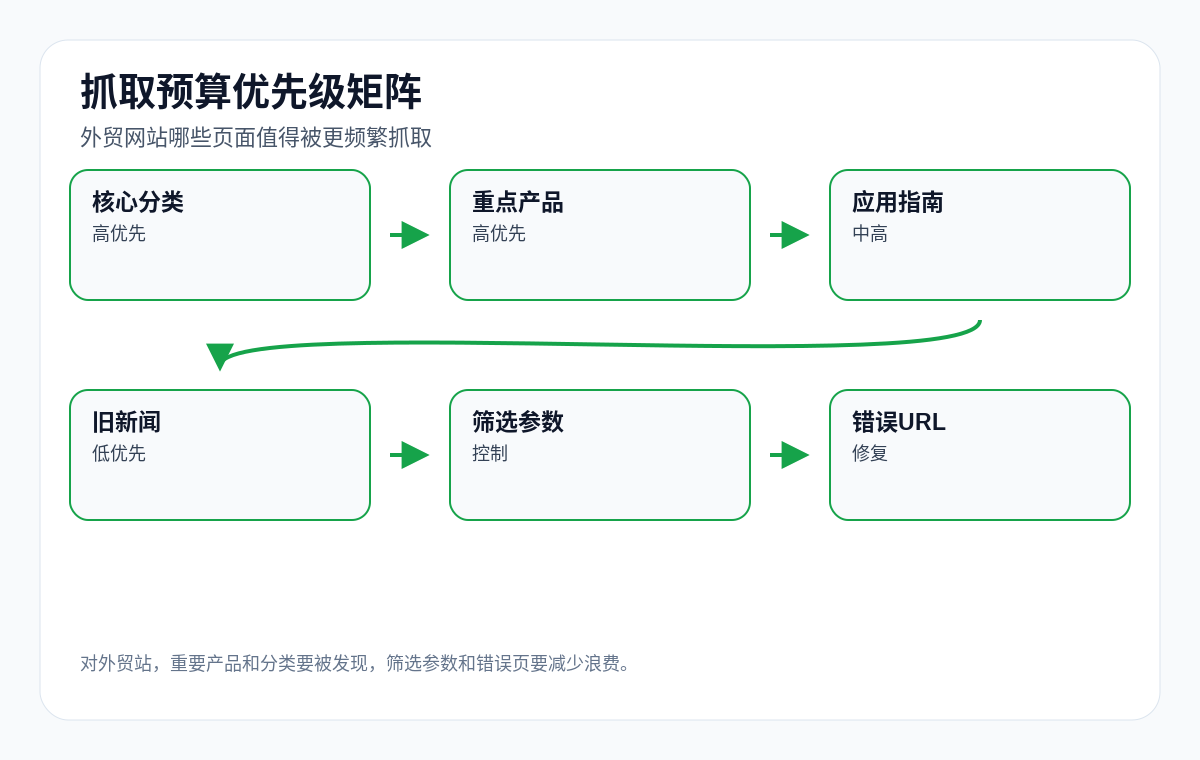
For Chinese export manufacturers and trading companies, the most valuable part of log analysis is not technical showmanship but answering a few practical questions: Has Google crawled the core product categories? Are key product pages visited frequently? Are pages such as custom metal parts, LED flood light, packaging machine, medical probe, cnc machining parts, ceramic dinnerware, waterproof connector, industrial valve supplier, and private label activewear manufacturer getting any crawl opportunities? Are large numbers of filter URLs, 404s, old images, pagination pages, and internal search results consuming crawl resources?
In today’s English SERP, log analysis guides from Screaming Frog, Search Engine Journal, Semrush, and others typically cover what a log file is, how to collect logs, how to identify Googlebot, how to read status codes, crawl budget, orphan pages, and crawl frequency. Those fundamentals matter, but export businesses also need to go further: prioritizing product categories and inquiry pages, the crawl value of long-tail B2B product pages, differences between CDN and WAF logs, how GSC and logs corroborate each other, how to govern old products and filter parameters, and how to review results after fixes using inquiries and AI citations.
Official diagnostic boundaries: SEO log analysis must be validated separately from Googlebot verification, GSC, and GA4
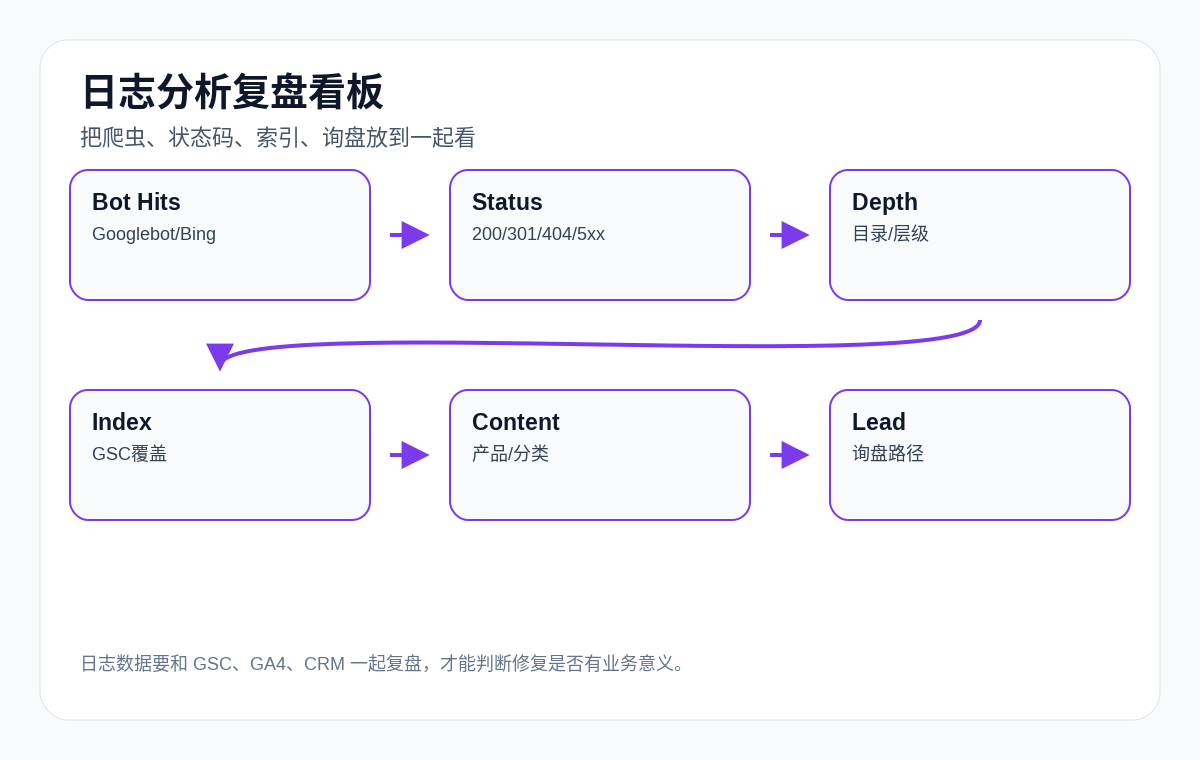
SEO log analysis is not about exporting server logs and looking at a few charts; it is about breaking “did the search engine really visit the page” down into fields that can be reviewed. For an export website, logs can only prove that a certain type of request reached the server or CDN during a given period; Search Console is what speaks to query, page, clicks, impressions, CTR, average position, and index reports in Google Search; GA4 only speaks to on-site events and inquiry paths. The three must corroborate one another and cannot substitute for one another.
If no usable GSC query, page, or page-query row data is available, you must not fill in rankings, impressions, clicks, CTR, AI adoption, or inquiry changes. Log analysis can continue, but its conclusions must be downgraded to: whether Googlebot is verified, whether core URLs return 200, whether important pages are in the sitemap, whether parameter pages and old URLs waste crawl, and whether GA4 and inquiry events can be observed in the next round of change.
Mapping table of official documentation to log diagnostic fields
| Official documentation entry point | What it helps determine | Log analysis acceptance fields | What it cannot prove |
|---|---|---|---|
| Google Search Central: Verifying Googlebot | Verifying whether a visitor is a real Google crawler using the DNS method. | User-Agent, IP, reverse DNS, forward DNS, verification result. | You cannot conclude a real Googlebot from the UA string alone. |
| Google Search Central: Google crawlers and fetchers | Distinguishing different Google crawlers, fetchers, and trigger sources. | Record Googlebot, Google-InspectionTool, AdsBot, StoreBot, and others separately. | You cannot lump all Google UAs into a single SEO conclusion. |
| Google Search Central: Manage crawl budget for large sites | Crawl budget is mainly relevant to large, frequently updated sites with many URLs. | Group important URLs, low-value parameter pages, old URLs, pagination, and resource requests. | A small site cannot attribute every problem to crawl budget. |
| Google Search Central: HTTP status codes and network errors | HTTP status codes and network errors affect crawling, indexing, and page availability. | Count 200, 301, 404, 410, 403, 429, 500, 502, and 503 by URL type. | You cannot look only at total error counts without considering business page types. |
| Search Console Help: Crawl Stats report | GSC can provide Google crawl trends, response behavior, and resource type summaries. | Crawl requests, response time, status distribution, resource types, and host status. | It cannot replace per-URL server logs. |
| Search Console Help: URL Inspection tool | Index status, crawl status, canonical, and the page version Google sees for a single URL. | Sample-check category, product, resource, and inquiry pages where log hits look abnormal. | A single indexable URL does not mean existing search performance. |
| Search Console Help: Page indexing report | Page index status and reasons for not being indexed. | Group pages with log hits but no indexing, pages with no log hits and no indexing, and old URL 404s. | An indexing report is not a ranking or inquiry report. |
| Search Console Help: Performance report | query, page, clicks, impressions, CTR, average position, country, device. | Compare log URL groups with GSC page, query, country, and device. | Without row data, you cannot claim improvements in rankings, impressions, clicks, or CTR. |
| Google Search Central: Sitemaps overview | Sitemaps help Google discover important URLs. | Whether core categories, products, applications, resources, and articles are in the sitemap. | Presence in a sitemap does not mean crawled, indexed, or shown. |
| Google Search Central: robots.txt introduction | robots.txt controls crawl access; it is not an all-purpose tool for indexing and quality. | Whether it mistakenly blocks product directories, resource pages, images, CSS, JS, or AI-related crawl paths. | You cannot use robots to deal with page content quality issues. |
| Google Search Central: URL canonicalization guide | Duplicate URLs require canonical, redirects, internal links, and sitemaps to work together. | Whether parameter pages, filter pages, multilingual pages, and old product pages split crawl and page signals. | A canonical is not a ranking promise. |
| Google Analytics Help: About events | GA4 events can observe actions such as forms, email, WhatsApp, downloads, and RFQ buttons. | Whether inquiry page and resource page events can be recorded consistently after log fixes. | On-site events cannot replace GSC search performance. |
| Google Search Central: AI features and your website | AI search capabilities still depend on accessible, indexable pages with clear content. | Whether citable pages return 200, have internal links, and contain clear facts and tables. | You cannot promise that AI answers will cite the official website. |
| OpenAI Platform: Bots | Distinguishing the purposes and access boundaries of OAI-SearchBot, GPTBot, and ChatGPT-User. | Whether robots, logs, and public pages unintentionally block the relevant access paths. | It does not mean ChatGPT will display things in a specified way. |
| Bing Webmaster Blog: AI Performance | If visible in the account, you can observe AI citations, cited pages, and grounding query phrases. | Record Bing AI performance, log hits, GSC, and GA4 separately. | It does not represent all AI platforms. |
| IndexNow: Documentation | After URLs are added, updated, or deleted, you can notify participating search engines. | Whether notification actions occur after key product pages, resource pages, and articles are updated. | It cannot replace content quality, crawl eligibility, or index eligibility. |
Log analysis acceptance standards: verify the fields first, then draw diagnostic conclusions
| Acceptance layer | Required evidence | How to assess it on an export website | Unacceptable phrasing |
|---|---|---|---|
| Log source | Time range and coverage description for origin, CDN, WAF, and application logs. | Confirm whether Googlebot visits to core product pages and resource pages can be seen. | Saying only “the logs show anomalies” without stating the source. |
| Crawler verification | User-Agent, IP, DNS verification, and grouping of abnormal crawlers. | Distinguish real Googlebot, Bingbot, AI-related crawlers, and spoofed UAs. | Drawing conclusions from UA alone. |
| URL grouping | Category pages, product pages, application pages, resource pages, articles, parameter pages, old URLs, and inquiry pages. | Determine whether crawl is concentrated on business-critical pages. | Looking only at total site-wide request counts. |
| Status codes | Count 200, 301, 404, 410, 403, 429, and 5xx by URL type. | Prioritize errors that affect products, resources, inquiries, and core categories. | Treating all 404s the same. |
| GSC cross-check | Align Page indexing, Performance, and URL Inspection with log URL groups. | Determine at which layer “crawled, indexed, has impressions, has clicks” breaks. | Writing crawl hits as search performance. |
| GA4/inquiries | Form, email, WhatsApp, RFQ, and download events plus sales feedback fields. | After fixes, observe whether visit paths connect to real inquiry actions. | Writing log fixes directly as inquiry improvement. |
| AI/GEO samples | Platform, query, date, answer summary, cited URL, page facts, and log hits. | Check whether citable pages are consistently accessible and record whether answer facts are accurate. | Writing a single answer screenshot as a long-term result. |
How to downgrade a log analysis report when there is no GSC data
If a site currently has no usable GSC query, page, or page-query row data, log analysis still has value, but the report conclusions must be downgraded from “search performance assessment” to “crawl and technical baseline assessment.”
| Missing evidence | What you can write | What you cannot write | Next review step |
|---|---|---|---|
| No GSC Performance rows | Whether core URLs are visited by real crawlers, return 200, and appear in the sitemap. | Rankings, impressions, clicks, CTR, or trend improvements. | Keep 28-day and 90-day date ranges and wait for the first row data. |
| No URL Inspection sampling | List the home page, category pages, product pages, resource pages, and contact pages that need spot checks. | Claiming that all core pages are already participating in search. | Record index status, canonical, crawl time, and page version. |
| No GA4 events | State that form, email, WhatsApp, download, RFQ, and resource page events need to be configured. | That organic search inquiries have already improved. | First make on-site actions observable. |
| No real log samples | State that origin, CDN, or WAF logs are needed and that tool screenshots are not a substitute. | That Googlebot has or has not crawled. | Obtain logs with a clear coverage period, source, and fields. |
| No AI samples | Build a table of platform, question, date, answer summary, cited URL, and incorrect facts. | That AI search has adopted the official website. | Re-test across platforms with a fixed question set and record it separately from page actions. |
Conclusion first: which export websites most need log analysis
- A large number of pages: products, categories, attributes, applications, articles, and downloadable resources exceed several hundred.
- Large numbers of Crawled currently not indexed, Discovered currently not indexed, 404, Alternate page, or Duplicate entries in GSC.
- Indexing and traffic fluctuations after a redesign, migration, URL change, multilingual launch, or addition of WooCommerce products.
- Important product pages stay unindexed for a long time despite no obvious robots or noindex issue.
- Large numbers of parameter URLs, internal search URLs, pagination, tags, and filter combinations being crawled.
- Occasional server 5xx errors, CDN blocking, WAF mistakenly blocking Googlebot, or abnormal mobile resource loading.
What log analysis can see that GSC cannot
| Issue | GSC can see | Logs can see | Export business implication |
|---|---|---|---|
| Whether a page gets impressions | Yes | Not directly | Assess search performance |
| Whether Googlebot has visited a URL | Incomplete | Yes | Assess discovery and crawling |
| Access status codes | Partial reports | Yes, item by item | Locate 404/5xx/301 chains |
| Wasted crawl on parameter pages | Limited | Yes | Control filters and sorting |
| Crawl frequency of core products | Limited | Yes | Assess whether important pages are prioritized |
| CDN/WAF blocking | Usually not visible | Yes, with edge logs | Avoid mistakenly blocking crawlers |
| Image/JS/CSS crawling | Limited | Yes | Assess render resource accessibility |
Step 1: Get the right log sources
Different log sources reveal different problems. Nginx/Apache records origin requests, a CDN records edge requests, a WAF records blocks and allowances, and a load balancer records forwarding status. If an export website uses Cloudflare, BT Panel, OpenLiteSpeed, an Nginx reverse proxy, or object storage for images, confirm the log chain first.
| Log source | Best for | Notes |
|---|---|---|
| Nginx/Apache | Origin URLs, status codes, response times | CDN hits may never reach the origin |
| CDN logs | Global access, edge status, cache hits | May require payment or extra enablement |
| WAF logs | Blocks, challenges, false positives | Focus on whether Googlebot is being challenged |
| PHP/application logs | Program errors, slow requests | Used to explain 5xx |
| Database slow queries | Slow product categories or search | Troubleshoot WooCommerce/WordPress performance |
| GSC crawl stats | Overall trends from Google’s perspective | Cannot replace per-URL logs |
Step 2: Identify real Googlebot and avoid being misled by spoofed UAs
Many crawlers write Googlebot as their User-Agent. The rigorous approach is to verify whether an IP belongs to Google using reverse DNS and forward DNS. For lightweight day-to-day audits, you can first rough-filter by UA and then verify important abnormal IPs.
| Identification level | Method | Use case |
|---|---|---|
| Rough filter | User-Agent contains Googlebot or Google-InspectionTool | Quick trend check |
| IP range/reverse lookup | Reverse DNS to googlebot.com/google.com, then forward resolve | Confirm abnormal crawlers |
| GSC cross-check | Crawl stats and URL Inspection | Confirm Google-side issues |
| Log tools | Screaming Frog Log File Analyser and similar | Batch analysis |
| Security policy | WAF allows verified Googlebot | Avoid false blocks |
Step 3: Group by page type
Reading tens of thousands of raw log lines is pointless. An export website should first group URLs by page type: core categories, key products, application pages, technical articles, image resources, filter parameters, pagination, tags, internal search, old URLs, inquiry pages, and downloadable resources.
| URL type | Example | Crawl status you want to see |
|---|---|---|
| Core category | /led-flood-lights/ | Stable 200, relatively high crawl frequency |
| Key product | /product/ip67-waterproof-connector-4-pin/ | Crawled, with internal link entry points |
| Application page | /outdoor-stadium-lighting/ | Crawled and participating in indexing |
| Technical article | /how-to-choose-packaging-machine/ | Crawled in relation to query terms |
| Filter parameter | ?color=black&size=xl | Crawl controlled, should not be heavily wasted |
| Internal search | /?s=connector | Should not participate in indexing |
| Old URL | /old-product-a/ | Should 301 to a relevant page or be handled |
| Inquiry page | /contact/ or /request-a-quote/ | Accessible, but does not necessarily need frequent crawling |
Step 4: Diagnose status codes
| Status code | Possible meaning | Recommended handling for export sites |
|---|---|---|
| 200 | Page returns normally | Check whether important pages are being crawled |
| 301/308 | Permanent redirect | Avoid multi-hop chains; the target should be relevant |
| 302/307 | Temporary redirect | Confirm it is not being misused |
| 404 | Page does not exist | Map old products/categories to relevant pages |
| 410 | Explicitly removed | Use only for pages confirmed to have no value |
| 403 | Access forbidden | Check whether WAF/permissions mistakenly block crawlers |
| 429 | Too many requests | Check whether rate limiting affects Googlebot |
| 500/502/503 | Server error | Prioritize fixing the stability of core pages |
Step 5: Crawl budget is not mysticism
Crawl budget can be understood as the resources a search engine is willing to spend crawling your site over a period of time. Its impact is not necessarily obvious for a small site, but it matters a lot for an export site with many products, many parameters, many old URLs, and slow pages. The goal is not to force Google to crawl more, but to reduce waste so important pages are easier to discover and re-crawl.
| Waste type | Symptom | Handling |
|---|---|---|
| Filter parameters | Large numbers of ?filter= and ?orderby= URLs crawled | noindex/canonical/robots/link control |
| Old URLs | Old products and categories repeatedly return 404 | 301 to relevant pages or clean up internal links |
| Duplicate pagination | Heavy low-value access to /page/2/ and similar | Optimize pagination and internal links |
| Image size URLs | Many image size variants crawled | Ensure images have value and are cached |
| Internal search | /?s=product crawled | noindex or block indexing |
| Low-quality tags | Generic tags such as /tag/news/ | noindex or clean up |
Step 6: How to tell that important pages are not being crawled
- List the core category and key product URLs and compare them against Googlebot hits in the logs.
- Check whether these URLs have internal link entry points, whether they are in the sitemap, and whether they are excluded by robots/noindex/canonical.
- Check whether the server returns a different status or fails to load for mobile Googlebot.
- Check whether pages are too deep and can only be discovered through filters or JavaScript.
- Check for redirect chains, canonicals pointing to other pages, or 5xx errors.
| Symptom | Possible cause | Next step |
|---|---|---|
| Zero hits on key product pages | Weak internal links, missing from sitemap, too deep | Add links from category pages and related articles |
| Few crawls on category pages | Thin content or weak signals | Strengthen selection content and internal links |
| Only images crawled, not pages | Abnormal link structure | Check HTML links |
| Mobile crawler gets 403 | WAF or security rules | Allow verified crawlers |
| URL crawled but not indexed | Content quality, duplication, canonical | Combine GSC and page quality checks |
Step 7: Example of product page log analysis
| Product | What to observe | Abnormal signal |
|---|---|---|
| custom metal parts | Whether category and key material pages are crawled | Only old articles crawled, not product pages |
| LED flood light | Crawl frequency of wattage/application pages | Large numbers of old models returning 404 |
| packaging machine | Whether application guides and equipment pages are crawled | Video/image resources returning 5xx |
| medical probe | Whether technical specification pages are accessible | Compliance pages set to noindex |
| waterproof connector | Whether IP rating and pin pages are crawled | Too many parameter filter URLs |
| ceramic dinnerware | Whether category and set product pages are crawled | Color filter combinations wasting crawl |
Step 8: How logs and GSC corroborate each other
| Log finding | GSC cross-check | Judgment |
|---|---|---|
| Googlebot crawled but no impressions | Page may be unindexed or ranking weakly | Check URL Inspection and page quality |
| GSC shows indexed but logs show no crawl for a long time | Possibly not updated recently or logs are incomplete | Confirm the log source and time range |
| Large numbers of 404s being crawled | GSC may report Not found | Add 301s or clean up internal links |
| 5xx peaks | GSC crawl stats may look abnormal | Check server stability |
| Heavy parameter page crawling | GSC may show duplicate/alternate pages | Control indexing and links |
Step 9: The impact of CDN, caching, and WAF
Export sites often use a CDN to improve overseas speed, but a CDN complicates log analysis. If Googlebot hits the cache at the CDN layer, origin logs may not show the complete request; if the WAF challenges certain countries or UAs, Googlebot may receive a 403, a 429, or a JS Challenge.
| Issue | Log symptom | Handling |
|---|---|---|
| CDN cache hit | No origin record, but the CDN shows access | Combine with CDN logs |
| WAF false block | Googlebot gets 403/429 | Verify the IP and then allow it |
| Stale cached content | Google crawls old titles/old meta | Purge the cache and check response headers |
| Mobile resource failure | CSS/JS returns 403 or 404 | Allow static resources |
| Edge 5xx | CDN returns an error | Check the origin and CDN origin fetch |
Step 10: How to choose a log analysis tool
| Tool/method | Best for | Notes |
|---|---|---|
| Screaming Frog Log File Analyser | Batch log import and grouped analysis | Good for visualization and SEO teams |
| Command line awk/grep | Quick spot checks on status codes and UAs | Requires technical skill |
| Python/R | Custom reports and large-scale processing | Watch out for privacy and anonymization |
| Server panel | Quickly view errors and access | Limited dimensions |
| CDN analytics | Edge requests and caching | May require payment |
| GSC crawl stats | Overall trends | Cannot replace per-URL logs |
Step 11: Fix priority
| Priority | Issue | Reason |
|---|---|---|
| P0 | Core products/categories returning 5xx, 403, or mistakenly noindexed | Directly affects indexing and inquiries |
| P1 | Important old URLs returning 404 with no replacement | Loses historical signals |
| P1 | Large numbers of parameter pages being crawled | Wastes crawl resources |
| P2 | Key pages crawled too little | Needs stronger internal links and sitemaps |
| P2 | Image/resource 404s | Affects understanding and experience |
| P3 | Low-value tags/archives being crawled | Gradually noindex or clean up |
Step 12: Review metrics after log analysis
| Metric | What to look at | Timeframe |
|---|---|---|
| Googlebot hits | Whether important pages are crawled | 7–30 days |
| Status code ratio | Whether 404/5xx are decreasing | 7 days |
| GSC coverage | Whether exclusion reasons are decreasing | 14–60 days |
| Query terms | Whether core product terms are growing | 30–90 days |
| GA4 | Product page engagement and conversion events | 30–90 days |
| CRM/RFQ | Inquiry product lines and quality | 60–120 days |
| AI citations | Whether AI answers cite official guides or product pages | 30–90 days |
Export case: abnormal logs on an LED flood light site
An LED flood light website may have a large number of old model pages. In the logs, Googlebot repeatedly visits /old-150w-floodlight/ and /product/led-light-2020/, receiving 404s, while the new categories /led-flood-lights/ and /stadium-lighting/ are crawled very infrequently. The direction for handling this is to map old models to the most relevant new series, clean up old links in body content, update the sitemap, and add wattage, IP, application, and model comparisons to category pages.
| Finding | Action | Review |
|---|---|---|
| Many 404s from old models | 301 to the corresponding new series | 404s decrease |
| New categories crawled too little | Add internal links from the home page/navigation/articles | Googlebot hits increase |
| Image 404s | Fix image paths | Product page experience improves |
| Application pages not crawled | Link from category pages and guides | Impressions for application terms grow |
Export case: wasted parameter pages on a waterproof connector site
Common filter conditions on a waterproof connector website include pin count, IP rating, cable diameter, material, and application. If every combination generates a crawlable URL, the logs will show a large number of parameter pages. When handling this, keep the main pages with search intent, such as IP67 waterproof connector, 4 pin waterproof connector, and waterproof connector for outdoor lighting, and keep the remaining filter combinations out of the index.
| URL | Handling | Reason |
|---|---|---|
| /waterproof-connectors/ | Keep indexed | Core category |
| /waterproof-connectors/ip67/ | Open depending on content | Has independent search intent |
| ?pin=4&material=nylon&color=black | Do not index | Combination too granular |
| /?s=connector | Do not index | Internal search |
| /old-ip65-model/ | 301 or explain the replacement | Old model replacement |
Export case: custom metal parts pages buried too deep
If a custom metal parts website hides all products behind multi-level filters and JavaScript loading, Googlebot may rarely visit individual product pages. The logs will show the home page and articles being crawled while product page hits stay low. The fix is to build stable category pages, material pages, process pages, and application pages, and point to key products with plain HTML links.
| Page | Expected entry point | Description |
|---|---|---|
| custom metal parts | Top-level category | Commercial head term |
| cnc machining parts | Process category | Captures process terms |
| aluminum custom parts | Material page | Captures material terms |
| custom parts for medical device | Application page | Captures industry terms |
| request a quote | Product and guide CTA | Captures inquiries |
Log analysis checklist
- Confirm the log time range covers at least 30 days; after peak season or a redesign, look at 60–90 days.
- Separate origin, CDN, WAF, and application logs.
- Verify Googlebot; do not rely only on User-Agent.
- Group by product, category, application, article, parameter, and error URL.
- Count 200, 301, 302, 403, 404, 410, 429, and 5xx.
- Check whether core categories and key products get Googlebot hits.
- Check whether parameter pages, internal search, tags, and archives waste crawl.
- Cross-check log findings with GSC coverage, query terms, and URL Inspection.
- After fixes, record review metrics at 7/30/90 days.
- Include inquiry sources and CRM product lines in the final judgment.
Common misconceptions
- Looking only at visit counts without distinguishing real search engine crawlers.
- Assuming a page must be poor just because it is crawled rarely, while ignoring internal links and sitemaps.
- 301-redirecting every 404 to the home page.
- Ignoring how CDN and WAF make logs incomplete.
- Doing only technical fixes without improving page content and internal links.
- Treating crawl budget as a small trick rather than a site quality and structure issue.
- Never reviewing, so there is no way to tell whether fixes affected inquiries and indexing.
Step 13: How to read log fields
Server log formats vary slightly, but the fields commonly used for SEO analysis are fairly fixed. You do not need a complex data warehouse from the start; once you can read time, IP, request method, URL, status code, response size, referer, User-Agent, and response time, you can locate most crawl problems.
| Field | Meaning | SEO use |
|---|---|---|
| time | Access time | Observe crawl peaks, error periods, and changes before and after a redesign |
| ip | Visitor IP | Verify Googlebot or identify abnormal crawlers |
| method | GET/POST/HEAD | Most crawling is GET; unusual POSTs deserve attention |
| url | Request path and parameters | Determine whether the crawl targeted a category, product, parameter, or error page |
| status | HTTP status code | Locate 200, 301, 404, 403, and 5xx |
| bytes | Response size | An unusually small 200 may be an empty page or an error page |
| referer | Referring page | See internal link paths or external entry points |
| user agent | Client | Identify Googlebot, Bingbot, ordinary users, and tools |
| response time | Response duration | Locate slow pages and server pressure |
For example, on an industrial valve supplier website, if the logs show Googlebot repeatedly visiting parameter URLs such as /valves/?pressure=high&material=steel but almost never visiting the main /industrial-valves/ category, that indicates internal links and index control need adjustment.
Step 14: Data anonymization and permissions before log analysis
Logs may contain IPs, query parameters, form paths, download paths, user agents, and some session information. When doing SEO analysis, avoid exposing customer privacy, inquiry content, or internal paths to people who do not need them. This matters especially for export sites: if URL parameters contain email addresses, phone numbers, utm values, quote numbers, or file names, anonymize them before sharing.
| Data type | Risk | Handling |
|---|---|---|
| IP address | May involve privacy | Keep only the subnet or a hash |
| Email/phone parameters | Customer privacy | Delete or replace with placeholders |
| Quote numbers | Commercial information | Anonymize or keep only the type |
| Download file names | May expose customer materials | Count only the file type |
| Internal paths | Security risk | Limit the sharing scope |
| Full log package | Contains a lot of sensitive information | Provide on a minimum-necessary basis |
Step 15: Log priorities for WordPress and WooCommerce
Log problems on WordPress and WooCommerce have clear characteristics: product categories and article URLs may be fine, but wp-json, wp-admin, cart fragments, variation endpoints, search parameters, image thumbnails, pagination, and attachment pages may generate large numbers of requests. SEO log analysis needs to separate these requests from real product pages.
| URL/request type | Common problem | SEO handling |
|---|---|---|
| /product/… | Thin product page content or too little crawling | Add content, internal links, schema |
| /product-category/… | Category pages are just lists | Add selection tables and FAQ |
| ?s=… | Internal search being crawled | noindex or block indexing |
| ?orderby=… | Duplicate sort parameters | canonical or link control |
| /wp-json/… | Many API requests | Confirm whether they affect crawl and performance |
| /cart/, /checkout/ | No search value | Avoid indexing |
| Image thumbnails | Many multi-size requests | Compress and cache |
| Attachment pages | Thin pages may be crawled | Redirect attachment pages to the image or article |
Step 16: How to read logs for a multilingual export site
A multilingual website should be grouped by language directory, for example /en/, /es/, /de/, /fr/. If Googlebot only crawls English pages and not the pages for your target market languages, the cause may be hreflang, sitemaps, internal links, or content quality. If large numbers of low-quality translated pages are crawled, that can instead waste crawl opportunities for important pages.
| Log symptom | Possible problem | Recommended handling |
|---|---|---|
| /en/ crawled normally, /es/ rarely | Weak internal links to Spanish pages or missing from sitemap | Check hreflang and language navigation |
| Same product in multiple languages crawled but not indexed | Low translation quality or duplication | Add localized content and FAQ |
| hreflang URLs return 404 | Incorrect language mapping | Fix the correspondences |
| Large numbers of machine-translated parameter pages crawled | Too many low-value pages | Control indexing and sitemaps |
| Target market language pages get no inquiries | Content does not match buyer language | Adjust based on GSC countries and CRM |
Step 17: Log analysis for images, PDFs, and downloadable resources
Overseas buyers often download catalogs, spec sheets, manuals, certificates, or drawing templates. Access to these resources in the logs shows which product materials attract attention. But if a PDF or image has no corresponding HTML page, it can also become an isolated search entry point.
| Resource type | Log value | Optimization suggestion |
|---|---|---|
| Catalog PDF | Shows how much attention the product catalog receives | Pair it with an HTML description page and inquiry CTA |
| Spec Sheet | Shows that buyers are looking at specifications | Add a key specification table to the product page |
| Manual | After-sales and technical trust signal | Link to related FAQ and support pages |
| Certificate | Trust material | State the scope of application to avoid misleading |
| Product Image | Image search and page experience | Optimize alt, size, and compression |
| Video File | Equipment demonstration demand | Pair with text explanations and subtitles |
For example, if the manual for a packaging machine is downloaded frequently, but the corresponding product page does not explain capacity, compatible bag types, and maintenance requirements, that content should be added to the product page rather than leaving users with only a PDF.
Step 18: How log analysis supports content updates
Logs are not only for technical fixes; they can also guide content updates. If Googlebot visits a page often but GSC shows no impressions, the page may be discovered but not strong enough. If a page is rarely crawled but has high business value, it may need stronger internal links and sitemaps. If a page is crawled a lot but gets no inquiries, the search intent and conversion path may not match.
| Log + GSC signal | Content judgment | Update direction |
|---|---|---|
| Crawled a lot, few impressions | Page quality or intent mismatch | Rewrite the first screen, add tables and FAQ |
| Crawled little, high business value | Discovery path is weak | Add internal links and sitemap priority |
| Crawled a lot, few inquiries | Conversion path or audience is off | Adjust CTA, case scope, and product terms |
| Old articles crawled a lot | Still carries topical signals | Refresh or merge into the main page |
| Parameter pages crawled a lot | Structural noise is too high | Consolidate into category and application pages |
Step 19: Log analysis and internal link optimization
Internal links determine how search engines discover pages. If the logs show the home page, blog articles, and a few categories being crawled repeatedly while key products, application pages, and inquiry pages are rarely visited, check whether internal site links are too shallow, too few, or dependent on JavaScript.
| Internal link problem | Log symptom | Fix direction |
|---|---|---|
| Key products appear only inside filters | Googlebot rarely visits product pages | Add HTML links in category body content and guides |
| Articles do not link to products | Articles crawled a lot, products little | Link from tutorials to related categories/products |
| Pagination too deep | Deep products get no hits | Add featured products and category entry points |
| Navigation only has brand sections | Weak entry points for core products | Add core product families to navigation |
| CTA is a script button | Inquiry pages are hard to discover | Use crawlable links |
Step 20: How to report log analysis results to a boss or team
A log analysis report should not pile up technical jargon. Export business management cares more about: which important pages are not being crawled, which errors affect customers and search, which valueless pages waste crawl, and which metrics are expected to be observed after fixes. The report should start with business impact, then provide technical evidence and an action list.
| Report module | Content | Example phrasing |
|---|---|---|
| Key findings | 3–5 critical issues | Googlebot repeatedly hits 404s on old products, and new categories are under-crawled |
| Business impact | Which product lines and inquiry paths are affected | Weak entry points for the new LED flood light series |
| Evidence | Logs, GSC, page examples | 42% of 404s over the past 30 days came from old models |
| Actions | 301s, internal links, noindex, content updates | Map old models to new series pages |
| Review | 7/30/90-day metrics | 404s decrease, category crawls increase, inquiry sources change |
Step 21: How deep log analysis should go for export sites of different sizes
| Site size | Analysis depth | Focus |
|---|---|---|
| Under 50 pages | Special check when needed | 404s, 5xx, whether important pages are crawled |
| 50–500 pages | Quarterly check | Categories, products, articles, old URLs |
| 500–5,000 pages | Monthly or after a redesign | Parameter pages, pagination, crawl budget, internal links |
| Multilingual sites | Check grouped by language | hreflang, translated pages, target markets |
| Large WooCommerce product sites | Continuous monitoring | Filters, variations, product publishing/unpublishing, speed |
| High-ticket equipment sites | Combine with sales feedback | Technical materials, downloads, inquiry quality |
Step 22: How to build a 30-day log audit table
If the team does not have a mature BI system, you can start with a spreadsheet-based 30-day log audit table. Each row is not a raw log line but a cleaned URL or URL group. That way sales, operations, and technical staff can all understand it and decide fix priorities together.
| Field | Example | Purpose |
|---|---|---|
| URL group | /led-flood-lights/ | Aggregate by page type |
| Page type | Core category | Distinguish priority |
| Googlebot hits | 68 | Assess crawl frequency |
| Status code distribution | 200:65, 301:3 | Check whether it is normal |
| Average response time | 420ms | Assess speed and stability |
| GSC clicks/impressions | 18/2200 | Combine with search performance |
| GA4 conversion events | RFQ 3, catalog 8 | Combine with business value |
| Recommended action | Update category pages and internal links | Turn into tasks |
For a light-industry custom site such as a private label activewear manufacturer, you can group by product category, fabric guide, size chart, OEM packaging, and sample policy; for a packaging machine site, you can group by machine type, application, manual, video, and spare parts.
Step 23: Log fix playbook
The output of log analysis should be executable actions, not a pile of charts. The playbook below can be used directly to schedule fixes for an export site.
| Finding | Judgment | Action | Review |
|---|---|---|---|
| Core categories returning 5xx | Serious technical problem | Fix the server/PHP/cache and restore 200 first | Error rate drops to zero within 7 days |
| Many 404s from old products | Historical URLs with no replacement | 301 based on product replacement relationships | 404s decrease, crawls of replacement pages increase |
| Heavy parameter URL crawling | Filter combinations wasting crawl | noindex/canonical/internal link control | Parameter crawls decrease |
| Key products not crawled | Weak discovery path | Add entry points from categories, articles, and sitemaps | Googlebot hits increase |
| Crawled a lot but no impressions | Weak content or intent | Rewrite titles, first screen, tables, FAQ | GSC impressions grow |
| Inquiry page blocked | Conversion path problem | Check forms, JS, WAF, and mobile | RFQ events recover |
Step 24: Business handling boundaries for different status codes
Not every error should be handled the same way. Export websites commonly have old products, old news, old downloads, old language pages, and old quote materials, and handling them requires considering business boundaries.
| Scenario | Not recommended | Recommended |
|---|---|---|
| Old product discontinued but has a replacement | Return 404 directly | 301 to the replacement product or series page |
| Old product discontinued and valueless | Redirect everything to the home page | Delete or return 410, and clean up internal links |
| Old trade show news | Mix it with product pages | Archive, noindex, or keep as a brand record |
| Old PDF still being downloaded | Delete it outright | Update the PDF or provide an entry point to a new version |
| Old language pages with poor quality | Keep letting them be indexed | Rewrite, noindex, or merge |
| Incorrect product links | Ignore them | Fix internal body links and navigation entries |
Step 25: How to tell whether log analysis actually brought improvement
Log fixes cannot be proven effective on the same day they are completed. Technical metrics and business metrics need to be viewed along one timeline. In the short term, look at error reduction and crawl paths; in the medium term, look at GSC query terms and indexing; in the long term, look at inquiry sources and content asset performance.
| Period | Technical metrics | Search metrics | Business metrics |
|---|---|---|---|
| 7 days | Whether 404/5xx/403 decrease | Whether GSC URL Inspection looks normal | Whether forms submit normally |
| 30 days | Whether core page crawls increase | Whether target term impressions recover | Whether product page visits and downloads grow |
| 60 days | Whether parameter page crawls decrease | Whether query terms become more concentrated | Whether RFQ product lines match better |
| 90 days | Whether the crawl structure is stable | Ranking and click trends for core pages | Inquiry quality, countries, customer types |
Do not use a single ranking as the only acceptance criterion. A more reasonable goal for export SEO is: important pages can be discovered, error pages decrease, topical signals concentrate, buyers can enter the correct product and inquiry paths, and sales sees more relevant product inquiries.
Step 26: Log analysis and AI citation review
Whether AI search cites your official website cannot be fully determined from server logs, but logs can provide clues: whether AI crawlers or search-related crawlers visited technical guides, whether Googlebot frequently crawls citable pages, and whether important FAQ and table pages consistently return 200. Combined with manual spot checks on ChatGPT, Perplexity, and Google AI Overviews, you can judge which content is easier for answer systems to understand.
| Page type | AI citation potential | Log observation | Content action |
|---|---|---|---|
| Selection guides | High | Googlebot and other crawler hits | Add definitions, tables, FAQ |
| Product specification pages | Medium-high | Stable crawling with 200 | Add specifications and application boundaries |
| Category pages | Medium | Crawl frequency and internal link entry points | Add purchasing decision tables |
| Old news | Low | Crawled but no search value | Archive or noindex |
| PDFs | Medium | Frequent downloads | Pair with an HTML summary page |
Step 27: An export team can start with three tables
If you do not want to make log analysis too complex from the start, begin with three tables: an error URL table, an important page crawl table, and a crawl waste table. Together they cover most SEO log problems.
| Table | Contents | Output actions |
|---|---|---|
| Error URL table | 404, 403, 5xx, old URLs, sources | 301, fix, delete, allow |
| Important page crawl table | Googlebot hits for core categories, key products, and application pages | Add internal links, sitemaps, content updates |
| Crawl waste table | Parameters, search, sorting, tags, archives | noindex, canonical, link control |
These three tables are enough to move a team from “the site feels like it has indexing problems” to “we know which URLs have problems, why, and what to fix next.”
Step 28: How to interpret a log sample
The simplified sample below shows how to read an SEO problem out of a single log line. Suppose Googlebot requests an old product page, the status code is 404, and the referer is not a user click but an old sitemap or a historical link; that indicates the page once existed or is still referenced somewhere. Do not simply ignore it when handling: check whether there is a replacement product, whether there are external links, and whether it still appears in internal links or the sitemap.
| Log snippet | Meaning | SEO judgment |
|---|---|---|
| Googlebot GET /old-led-flood-light-150w/ 404 | Google requested an old lighting page that does not exist | If a new model exists, 301 to the relevant LED flood light page |
| Googlebot GET /waterproof-connectors/?pin=4&color=black 200 | Parameter page is accessible | Decide whether it should be noindex/canonical |
| Googlebot GET /cnc-machining-parts/ 200 180ms | Core category is normal and responds fast | Continue watching crawl frequency and GSC performance |
| Googlebot GET /packaging-machine-manual.pdf 200 | PDF is being crawled | Should be paired with an HTML description page and inquiry entry point |
| Googlebot GET /request-a-quote/ 403 | Inquiry page is forbidden | Check permissions, WAF, and security rules |
The key to interpreting logs is translating technical states into business impact: an old product 404 may leave buyers unable to find the replacement model; a flood of parameter pages may cause important categories to be under-crawled; an inquiry page returning 403 may directly affect conversion; a PDF that is crawled but has no HTML counterpart may leave the search entry point on the material file rather than the product page.
FAQ: Common questions about SEO log analysis
Does a small export site need log analysis?
If there are only a few dozen pages and indexing is normal, it does not have to be a high priority. But if the site is redesigned, indexing is abnormal, product pages are not discovered, or 404/5xx errors are frequent, log analysis is well worth it.
Can log analysis directly improve rankings?
It cannot directly promise rankings. It helps uncover crawl, status code, indexing, and structural problems, creating a better foundation for important pages to be discovered and understood.
GSC already has crawl stats, so do I still need logs?
GSC is a summary from Google’s side, while logs are per-request records from the server side. The two are complementary, and logs are especially suited to pinpointing specific URLs, status codes, parameter pages, and blocking issues.
Is low Googlebot crawl volume always a bad thing?
Not necessarily. Low crawl volume on low-value pages is normal. What matters is whether important categories, key products, application guides, and inquiry paths are being discovered.
Do all large numbers of 404s have to be fixed?
No, not all of them. Prioritize 404s with external links, internal links, historical traffic, or product replacement relationships. Valueless old URLs can be left to fade away naturally or returned as 410.
What should I do about many parameter URLs in the logs?
First determine whether they have search value. Most filter and sort parameters should be reduced through noindex, canonical, internal link control, or robots policies.
How should I handle a WAF mistakenly blocking Googlebot?
First verify whether the IP really belongs to Google, then adjust the security rules. Do not simply allow by UA every visit that claims to be Googlebot.
How often should log analysis be done?
Routine quarterly checks are fine; after a site migration, a large product launch, GSC anomalies, server errors, or a multilingual launch, a dedicated analysis should be done immediately.
Conclusion: log analysis turns SEO from guesswork into evidence
The value of SEO log analysis is that it lets an export website know what search engines actually visited. It can turn questions such as “why is this product page not indexed,” “why does the old URL keep erroring,” “why are important categories crawled so little,” and “why are parameter pages visited so much” from guesswork into evidence.
For export businesses selling custom metal parts, LED flood light, packaging machine, medical probe, cnc machining parts, ceramic dinnerware, and waterproof connector, log analysis is not about producing complex reports; it is about making sure important products and purchasing content can be discovered, that error and duplicate pages no longer waste crawl resources, and that fixes can be continuously verified through GSC, GA4, CRM, inquiries, and AI citations.
Keep reading this SEO series
If you are systematically working through export website SEO, it is worth continuing with the articles below. First sort out the relationships among crawling, indexing, content, links, and review, then decide which page to change next.
- How to track SEO rankings: a review guide to keyword, page, and SERP changes for export websites
- How to analyze organic traffic in GA4: a guide to SEO pages, conversions, content decay, and inquiry quality
- How Google crawls, indexes, and ranks: a diagnostic guide from indexing to inquiries for export websites
- How search engines work: a guide to crawling, indexing, ranking, and export website diagnostics
- Technical SEO audit checklist: a diagnostic guide to crawling, indexing, structure, and inquiry paths for export websites
- Sitemap technical guide: submission, index diagnostics, and troubleshooting common errors
{
“@context”: “https://schema.org”,
“@type”: “FAQPage”,
“mainEntity”: [
{
“@type”: “Question”,
“name”: “Does a small export site need log analysis?”,
“acceptedAnswer”: {
“@type”: “Answer”,
“text”: “If there are only a few dozen pages and indexing is normal, it does not have to be a high priority. But if the site is redesigned, indexing is abnormal, product pages are not discovered, or 404/5xx errors are frequent, log analysis is well worth it.”
}
},
{
“@type”: “Question”,
“name”: “Can log analysis directly improve rankings?”,
“acceptedAnswer”: {
“@type”: “Answer”,
“text”: “It cannot directly promise rankings. It helps uncover crawl, status code, indexing, and structural problems, creating a better foundation for important pages to be discovered and understood.”
}
},
{
“@type”: “Question”,
“name”: “GSC already has crawl stats, so do I still need logs?”,
“acceptedAnswer”: {
“@type”: “Answer”,
“text”: “GSC is a summary from Google’s side, while logs are per-request records from the server side. The two are complementary, and logs are especially suited to pinpointing specific URLs, status codes, parameter pages, and blocking issues.”
}
},
{
“@type”: “Question”,
“name”: “Is low Googlebot crawl volume always a bad thing?”,
“acceptedAnswer”: {
“@type”: “Answer”,
“text”: “Not necessarily. Low crawl volume on low-value pages is normal. What matters is whether important categories, key products, application guides, and inquiry paths are being discovered.”
}
},
{
“@type”: “Question”,
“name”: “Do all large numbers of 404s have to be fixed?”,
“acceptedAnswer”: {
“@type”: “Answer”,
“text”: “No, not all of them. Prioritize 404s with external links, internal links, historical traffic, or product replacement relationships. Valueless old URLs can be left to fade away naturally or returned as 410.”
}
}
]
}
This page is machine-translated from the Simplified Chinese version and awaiting human review. It has not yet been proofread.