Indexing problems can’t be fixed by gut feeling alone. Robots, noindex, canonical, and sitemaps each solve a different problem: robots.txt mainly controls crawling, noindex controls whether a page appears in search results, canonical signals which URL is the primary version, and a sitemap helps search engines discover the important URLs you want crawled and indexed. Mix these up, and a foreign-trade site easily ends up in the situation where “product pages you want indexed don’t get indexed, while parameter pages you don’t want shown do appear.”
If your English-language foreign-trade site has product pages such as custom metal parts, LED flood light, packaging machine, medical probe, cnc machining parts, ceramic dinnerware, waterproof connector, industrial valve supplier, or private label activewear manufacturer, the goal of indexing control is not to have as few pages as possible. It is to make the category pages, product pages, application pages, resource pages, and guide pages that genuinely have procurement value discoverable, understood, and selected as the correct version.
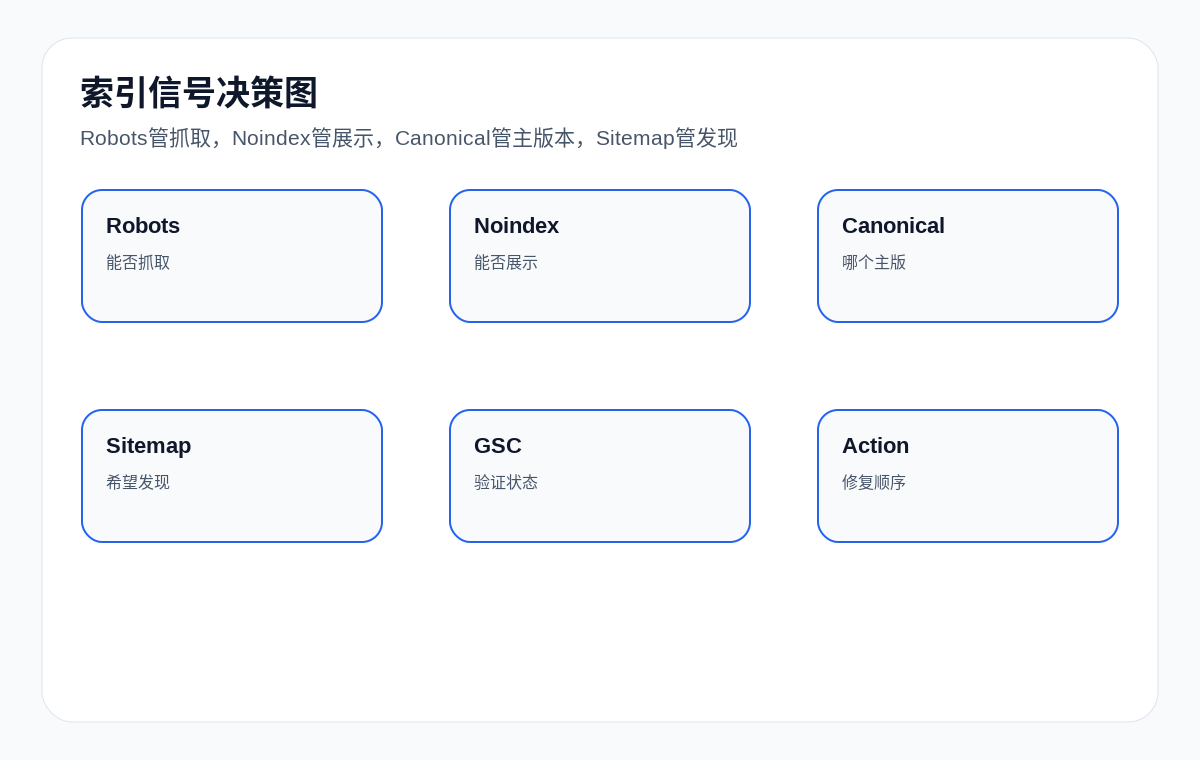
Start with Google’s official baseline: what each of the four signals does
Google Search Central’s documentation on robots.txt states clearly that robots.txt is mainly used to manage crawler access and is not a reliable mechanism for hiding a page from Google Search results; to prevent a page from appearing in search results, use noindex, password protection, or remove the page. Google’s robots meta tag documentation also cautions that if a page is blocked from crawling by robots.txt, search engines may not see the noindex or canonical on that page. Google’s documentation on the URL Inspection tool also shows where robots blocking, noindex, and canonical sit in the diagnosis of a specific URL.
Tools such as Ahrefs also flag conflicts like “noindex page in sitemap” in site audits, because a sitemap is meant to submit URLs you want crawled and indexed, while noindex means you don’t want them displayed. For foreign-trade sites, these principles must be applied to specific page roles: product pages, category pages, application pages, resource pages, filter pages, internal search pages, and inquiry pages cannot all follow the same set of rules.
Robots, noindex, canonical, and sitemap comparison table
| Signal | Main purpose | Suitable scenarios | Common misuse |
|---|---|---|---|
| robots.txt | Controls whether crawlers can access a URL | Crawl management, avoiding low-value or duplicate paths | Cannot reliably prevent a URL from appearing in search results |
| noindex | Tells search engines not to display the page in results | Pages you don’t want indexed, temporary pages, low-value pages | The page must be crawlable for the directive to be seen more easily |
| canonical | Signals which URL is the primary version | Similar pages, parameter pages, pagination, variant pages | Not a delete directive; Google may choose a different canonical |
| sitemap | Tells search engines which URLs are worth discovering | Important product pages, category pages, application pages, article pages | Should not contain noindex or non-primary URLs |
| GSC URL Inspection | Verifies the state Google sees | Diagnosing specific pages | Reporting has delays; combine with live testing |
Step 1: For an indexing problem, first check whether the page is accessible
Before diagnosing indexing, confirm whether the URL itself returns 200, whether it redirects to the right page, whether login is required, whether it is blocked by the server, and whether mobile and desktop content match. After many foreign-trade sites are redesigned, product page URLs change, old URLs 302-redirect, or the server returns a soft 404 — which makes any later discussion of robots and canonical pointless.
First layer of indexing diagnosis: access status
| Check item | How to check | Common issues on foreign-trade sites | Direction |
|---|---|---|---|
| HTTP status | curl or browser developer tools | Product pages 404, 302 chains too long | Fix URLs and 301s |
| Page content | Actual front-end content | Only an empty product list or form | Add real content |
| Login restrictions | Open in incognito | Resource or product pages require login | Provide a publicly indexable version |
| Mobile content | Visit on a phone | Mobile lacks the spec table or FAQ | Keep core content consistent |
| Server blocking | GSC live test | Abnormal Googlebot access from overseas | Check firewalls and CDN |
Step 2: Then check whether robots.txt blocks crawling
robots.txt is suited to managing crawler access, for example avoiding crawling of internal search results, certain filter parameters, or valueless paths. But it is not a tool for removing pages from search results. If you block a URL that has already been discovered via robots.txt, Google may still know the URL exists but be unable to crawl the page content and the noindex directive — resulting in problems like “Indexed, though blocked by robots.txt.”
Deciding when to use robots.txt
| Scenario | Is robots suitable | Reason | Foreign-trade example |
|---|---|---|---|
| Internal search results | Usually suitable | Large numbers of low-value duplicate URLs | /?s=waterproof+connector |
| Core product pages | Not suitable to block | Need to be crawled and indexed | /waterproof-connector/m12-ip67/ |
| CSS/JS resources | Usually should not block | Google needs to render the page | /wp-content/themes/ |
| Filter parameters | Depends | Large-scale valueless parameters can have crawling limited | ?color=black&size=m |
| Pages to be removed | Don’t prioritize robots | Google can’t see noindex | Allow crawling first and use noindex, or delete |
Step 3: Use noindex for pages you don’t want shown, but don’t let it fight with robots
noindex is suitable for pages you don’t want appearing in search results, such as low-value tag pages, internal search results, temporary test pages, and duplicate archive pages. It can be implemented via meta robots or X-Robots-Tag. The key is: search engines need to be able to crawl the page or response header for the noindex to be seen more easily. If you block crawling with robots.txt at the same time as expecting noindex to be read, the two signals may cancel each other out.
Deciding when to use noindex
| Page type | noindex? | Reason | Notes |
|---|---|---|---|
| Core category pages | Usually not | They capture product families and supplier terms | Unless there is no search value |
| Key product pages | Usually not | They capture model numbers, specs, and procurement terms | Thin pages should be enhanced, not noindexed |
| Internal search pages | Usually yes | Low value and duplicate | Can also be kept out of the sitemap |
| Tag pages | Depends on independent value | Most tags are thin | Tags with content planning can be kept |
| Thank-you pages | Usually noindex | No search value | Don’t include in sitemap |
| Resource pages | Depends on value | Datasheets may have search demand | Thin resources can be merged |
Step 4: canonical is not a delete command, but a primary-version signal
Canonical is suited to handling the primary version of similar URLs, such as parameter pages, sort pages, color variants, pagination, or duplicate content. It tells search engines which URL should be treated as the primary version, but it is not a mandatory command. Google may choose a different canonical version based on internal links, sitemaps, content, redirects, and external signals.
The most common problems on foreign-trade product pages involve variants and parameters. For example, a private label activewear manufacturer page has different color, size, and fabric filters; if every parameter URL is accessible with no clear canonical, you can generate a lot of duplicates. But if a variant has independent search demand and complete content, you shouldn’t canonical all of them to the main category page either.
canonical decision table
| Scenario | Recommendation | Reason | Example |
|---|---|---|---|
| Sort parameters | canonical to the main category page | Content is essentially the same | ?sort=price |
| Minor color variants | Mostly canonical to the main product page | Differences not enough for independent indexing | activewear black/blue |
| Large spec differences | Can self-canonical independently | Independent search and content | M12 vs M16 connector |
| Multilingual pages | Don’t canonical to each other | Use hreflang and self-canonical | English page and German page |
| Resource PDF vs HTML page | Depends on need | HTML explainer pages are usually better for indexing | medical probe datasheet |
Step 5: A sitemap should submit only the important URLs you want discovered and indexed
An XML sitemap is not a guarantee of indexing, but it is one of the discovery and priority signals. A foreign-trade site’s sitemap should include high-value homepages, category pages, product pages, application pages, article pages, resource pages, and necessary inquiry pages; it should not include noindex pages, pages with the wrong canonical, 404 pages, low-value tags, or large numbers of parameter URLs.
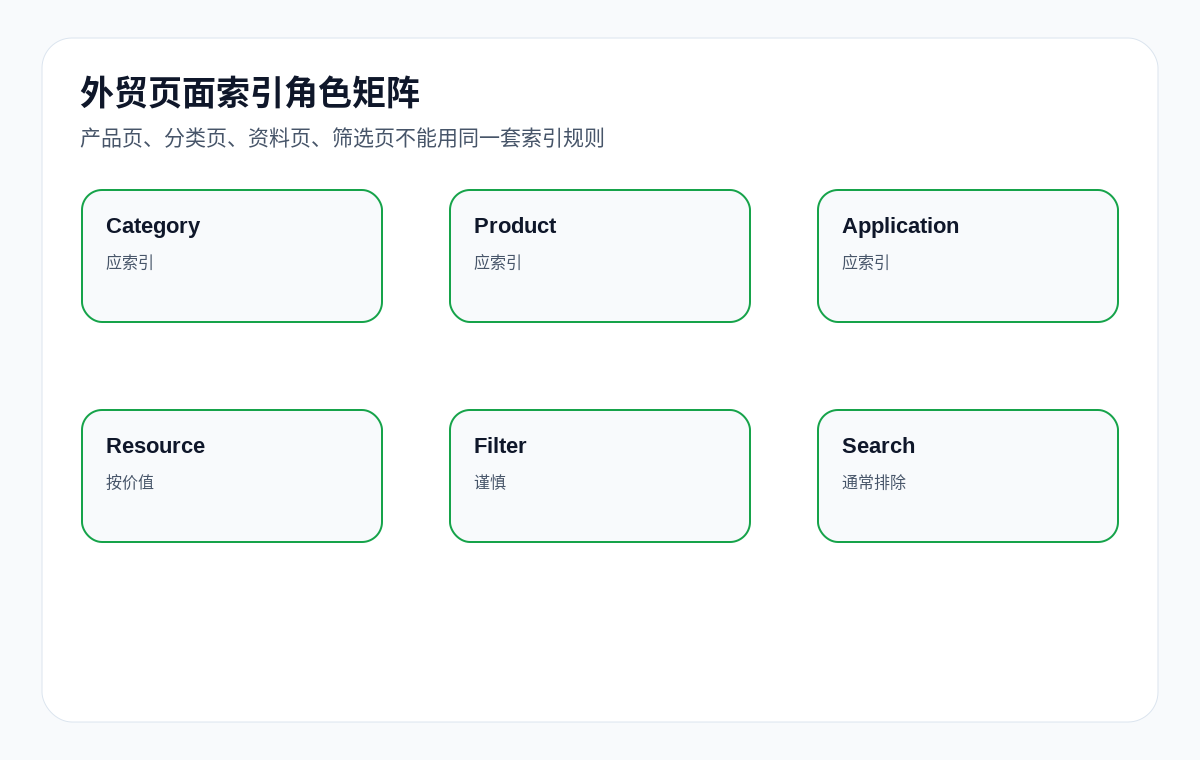
Foreign-trade page indexing role matrix
| Page type | Indexing strategy | Example | Notes |
|---|---|---|---|
| Homepage | Usually should be indexed | Brand and core entry point | Should not be noindexed or canonicalized to another page |
| Category page | Core product families should be indexed | LED flood light supplier | Don’t let filter parameters dilute it |
| Product page | Key products should be indexed | M12 waterproof connector IP67 | Complete specs, self-canonical |
| Application page | Should be indexed when there is search demand | connector for packaging machine | Link to related products |
| Resource page | Can be indexed if it has independent value | medical probe datasheet | Thin resources can be merged into the product page |
| Internal search page | Usually not indexed | /?s=keyword | Avoid large numbers of low-value result pages |
| Filter parameter page | Mostly handle with care | ?color=black&size=m | Check whether there is independent demand |
| Inquiry page | Depends on page value | custom metal parts quote | Indexable if it has content; pure forms need care |
Step 6: Use the GSC URL Inspection tool to verify what Google sees
Many indexing problems can’t be judged from the WordPress admin settings alone. Use the GSC URL Inspection tool to see Google’s actual state: whether crawling is allowed, whether there’s a noindex, whether the user-declared canonical matches the Google-selected canonical, whether the URL is in the sitemap, the last crawl time, and whether the page is usable on mobile. Reports may be delayed, so important pages also need a live test.
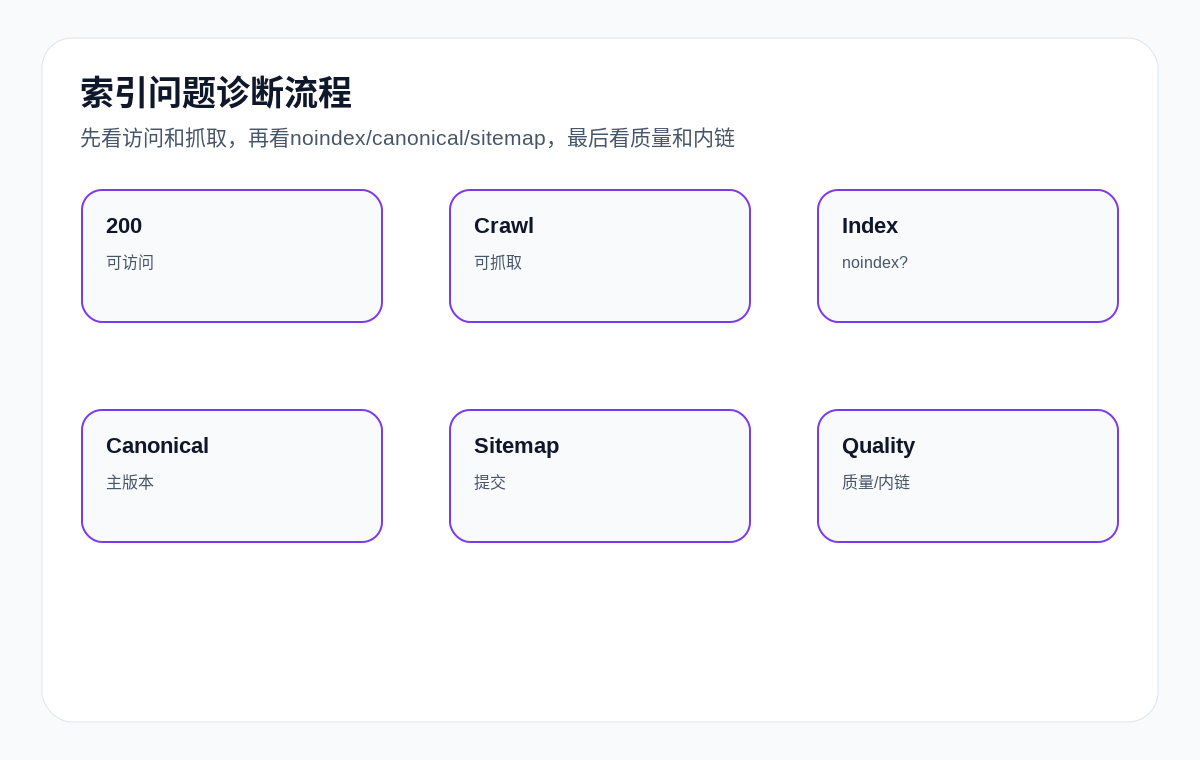
GSC indexing issues and how to handle them
| Issue | What to check first | Key judgment | Direction |
|---|---|---|---|
| Page not indexed | First check HTTP status, robots, noindex, canonical, sitemap, internal links, and quality | URL Inspection + source + header + sitemap | Don’t rewrite the whole article right away |
| Indexed though blocked by robots.txt | URL discovered but content blocked from crawling | Robots blocking does not equal removal from the index | To remove it, allow crawling and use noindex, or remove the content |
| noindex page in sitemap | Sitemap contains a page you don’t want indexed | Sitemap and noindex signals conflict | Remove from sitemap or remove the noindex |
| Duplicate without user-selected canonical | Google found duplicates but you didn’t declare a primary | canonical or content structure is unclear | Declare a self-canonical or primary version and strengthen the differences |
| Crawled currently not indexed | Google crawled but hasn’t indexed yet | Quality, duplication, internal links, insufficient demand | Improve page value and internal links |
Step 7: Common sources of indexing signals in WordPress
Indexing signals on a WordPress site can come from system settings, SEO plugins, the theme, caching, server response headers, multilingual plugins, WooCommerce, or custom code. Looking only at the post edit screen isn’t enough — spot-check the front-end source, HTTP header, sitemap, and GSC.
WordPress indexing setting sources
| Source | What it affects | Common errors | How to check |
|---|---|---|---|
| WordPress Reading settings | Search engine visibility | A wrong checkbox affects the whole site | Always check before and after launch |
| SEO plugin Index settings | Individual posts, categories, tags, CPTs | Product categories mistakenly noindexed | Check by page role |
| XML sitemap | Posts, pages, products, categories | Low-value tags enter the sitemap | Submit only URLs you want indexed |
| Canonical | Plugin or theme output | Variant pages point to the wrong primary version | Spot-check the source of key pages |
| robots.txt | Virtual or static file | Blocks CSS/JS or core directories | Test with GSC |
| Cache/CDN | Stale meta or header cache | Front end and source don’t match | Recheck after clearing the cache |
Step 8: Common bad combinations on foreign-trade sites
Indexing signal error combination table
| Bad combination | What happens | Why it’s dangerous | Correct handling |
|---|---|---|---|
| robots blocking + noindex | Search engines may not see the noindex | You want removal but can’t get it | Allow crawling and use noindex, or delete/password-protect |
| noindex + sitemap | Submit and exclude signals conflict | Wastes crawling and confuses diagnosis | Remove from sitemap or remove the noindex |
| canonical to an unrelated page | Important page signals are lost | The product page may not be selected | canonical to the most relevant primary version |
| Low-value parameters in sitemap | Large numbers of duplicate URLs submitted | Dilutes crawling and quality signals | Submit only primary URLs |
| Core category page noindexed | The commercial entry point disappears | supplier/manufacturer terms can’t be captured | Remove the noindex and enhance content |
| Blocking CSS/JS | Google rendering is affected | Incomplete understanding of the page | Allow crawling of key resources |
Step 9: How different foreign-trade pages should handle indexing
Foreign-trade sites can’t use a one-size-fits-all indexing strategy. When product pages are too thin, enhance content first; when category pages are duplicated, clarify the product family first; application pages with search value should be indexed; pure filter parameters and internal search pages usually should not be indexed; resource pages depend on whether they have independent search demand and procurement value.
Foreign-trade page indexing decision table
| Page | Indexing recommendation | Enhancement direction | Review metric |
|---|---|---|---|
| LED flood light category page | Should be indexed | Product range, wattage comparison, applications, FAQ | GSC product-family terms |
| waterproof connector product page | Should be indexed | Specs, IP rating, drawings, FAQ | Model and spec terms |
| packaging machine application page | Should be indexed | Scenario problems, recommended products, parameters | Application terms |
| medical probe resource page | Index if valuable | Datasheet explanation, applicable models | Resource terms and downloads |
| custom metal parts quote page | Depends on content | RFQ checklist, drawing requirements, form | Quote terms and inquiries |
| Internal search results page | Usually not indexed | None | Exclude low-value pages |
| Filter parameter page | Mostly not indexed | Unless it has independent content | Avoid duplication |
Step 10: Reviewing after fixing indexing problems
After fixing robots, noindex, canonical, or sitemap, don’t judge ranking effects immediately. First confirm the GSC live test is normal, then request re-crawling or wait for natural crawling, then check whether the coverage report, page impressions, target queries, and target URLs have changed. Indexing fixes usually affect discovery and display first, then rankings and inquiries.
Indexing fix review table
| Timeframe | What to watch | Normal signs | Abnormal signals |
|---|---|---|---|
| Same day | Live URL test | Crawlable, no noindex, correct canonical | Still blocked by robots |
| 1-2 weeks | Crawl and index status | GSC updates gradually | Report unchanged for a long time with live anomalies |
| 2-6 weeks | GSC impressions and target queries | Key pages start showing queries | Wrong pages still ranking |
| 1-3 months | Clicks, paths, inquiries | Commercial pages have more entry points | Impressions grow but conversions are weak |
Case 1: A new foreign-trade site’s core product pages aren’t indexed — which points to check first
Suppose a new site has launched custom metal parts and cnc machining parts pages, and two weeks later GSC still shows no meaningful impressions. At this point, don’t rush to write more articles, and don’t just submit the sitemap. The correct order is: first check whether the URL returns 200, then whether robots allows crawling, then whether the page source has a noindex, then whether the canonical points to itself, then whether it’s in the sitemap and navigation internal links, and finally whether the page is too thin.
| Check order | Question to check | What you may find | How to handle |
|---|---|---|---|
| 1 | Can the URL be accessed | Old URL redirects, new URL 404s | Fix URLs and 301s |
| 2 | Does robots block it | /products/ directory is Disallowed | Allow crawling of core product directories |
| 3 | Is there a noindex | SEO plugin mistakenly set to no-index | Change to index and clear the cache |
| 4 | Is the canonical correct | Product page canonicalizes to the homepage | Change to self-canonical or the correct primary version |
| 5 | sitemap and internal links | Page not in sitemap and no navigation entry | Add to the product category and sitemap |
| 6 | Content quality | Only one image and one sentence | Add specs, materials, drawings, FAQ |
If steps 1 through 5 are all fine but the status is still “Crawled currently not indexed,” you usually have to return to page value: are there unique specs, procurement notes, application scenarios, images, resources, and internal links? If the page is just a thin product card, correct indexing signals don’t guarantee it will be effectively displayed.
Case 2: Too many filter parameter pages — robots, noindex, or canonical?
Common filters on foreign-trade product category pages include material, color, wattage, size, certification, application, and sort order. For example, an LED flood light category may generate ?wattage=150w, ?ip=ip65, ?sort=price; a private label activewear manufacturer page may generate ?fabric=nylon, ?color=black, ?size=m. Too many parameter pages cause duplication and wasted crawling, but how you handle them depends on whether those parameters have independent search value.
| Parameter type | Search value | Recommended strategy | Example |
|---|---|---|---|
| Sort parameter | Usually low | canonical to the main category; limit crawling if necessary | ?sort=price |
| Minor color filter | Mostly low | Keep out of sitemap; canonical to the main category or main product | ?color=black |
| Spec filter | Possibly high | Build a standalone static page when there is demand | 150W LED flood light |
| Certification filter | Possibly high | Standalone page if there is content | CE LED flood light |
| Application filter | Usually valuable | Build an application page rather than a parameter URL | LED flood light for warehouse |
Don’t simply block all parameter pages with robots, and don’t let all parameters into the sitemap. The most reliable approach: don’t submit low-value parameters and set a primary version; turn high-value combinations into standalone pages with content, supported by a clear URL, title, body, and internal links.
Case 3: How to handle canonical for resource pages, PDFs, and product pages
Foreign-trade sites often have PDF resources, such as medical probe datasheet, industrial valve catalog, or ceramic dinnerware packaging guide. If the PDF is indexed directly, buyers may skip the product page, leaving no context or inquiry entry point. A better approach is usually to create an HTML resource explainer page that explains which models the resource applies to, summarizes the content, provides a download entry, and links to related products — then have the product page and resource page link to each other.
| Resource form | Indexing recommendation | Reason | Page action |
|---|---|---|---|
| Pure PDF | Decide by value | May lack navigation and an inquiry entry | Add an HTML explainer page |
| Resource explainer page | Index if valuable | Can capture datasheet/catalog terms | Write the scope of application and download instructions |
| Product page | Should be indexed | Captures specs and procurement decisions | Link to the resource explainer page |
| Outdated resource | Handle with care | May mislead buyers | Note the version or redirect to the new one |
If the PDF and HTML page content are highly similar, be careful with canonical and indexing strategy. For foreign-trade lead generation, HTML pages usually capture navigation, FAQ, internal product links, and inquiry entry points more easily.
Case 4: Don’t use canonical to substitute multilingual pages for each other
If English, German, and Spanish pages correspond to the same product, many sites mistakenly canonicalize the other languages to the English page, making non-English pages hard to display correctly. Multilingual pages should usually each self-canonical, then use hreflang to describe the language and region relationships. canonical is for duplicate or similar primary versions, not a language-version selection tool.
| Page relationship | Correct approach | Wrong approach | Impact |
|---|---|---|---|
| English product page | Self-canonical | canonical to the homepage | Product page signals lost |
| German product page | Self-canonical + hreflang | canonical to the English page | German page hard to display |
| Regional versions | hreflang marks the region | canonical to each other | Confusing region matching |
| Thin machine-translated pages | Improve content first or don’t index yet | Submit large numbers to the sitemap | Low-quality signals increase |
Special notes on product indexing with WordPress and WooCommerce
When using WordPress or WooCommerce, products, product categories, product tags, attribute archives, brand archives, filter parameters, search results, and attachment pages can all generate URLs. If a foreign-trade B2B site doesn’t plan for this, the sitemap may be mixed with a large number of low-value pages, while the real product categories and application pages lack content.
| URL type | Common issue | Recommendation | Foreign-trade scenario |
|---|---|---|---|
| Product category | Only a product list | Add product range, parameters, FAQ | waterproof connector category |
| Product tag | Thin and duplicate | Mostly not indexed unless planned as a topic hub | IP67 tag |
| Attribute archive | Large numbers of parameter URLs | Filter high-value combinations into static pages | 150W LED flood light |
| Attachment page | Only an image or PDF | Usually disabled or redirected | Product image attachment page |
| Internal search | Infinite result pages | Not indexed | ?s=connector |
| Product page | Copied or thin content | Add specs, images, FAQ, resources | M12 connector product |
How to tell “low quality, not indexed” from “technically blocked, not indexed”
Indexing problems fall into two categories: technical blocking and insufficient quality/value. Technical blocking includes robots, noindex, wrong canonical, non-200 status, login restrictions, and server inaccessibility; insufficient quality includes thin pages, duplication, no internal links, no search demand, and content that doesn’t match the title. The two require completely different handling.
| Signal | More like a technical problem | More like a quality problem | Direction |
|---|---|---|---|
| GSC says blocked by robots | Yes | No | Check the robots rules |
| Page has noindex | Yes | No | Confirm whether it was set by mistake |
| Google selects a different canonical | Possible | Possible | Look at the duplication relationship and internal links |
| Crawled not indexed | Not necessarily | Common | Improve content value and internal links |
| Discovered not indexed | Possibly low crawl priority | Possibly weak quality | Add internal links and sitemap, improve page value |
| Only one image and one sentence | No | Yes | Add procurement decision content |
Foreign-trade site indexing fix record table
Every indexing fix should be recorded, otherwise later ranking and traffic changes can’t be explained. Record the URL, issue, pre-fix state, fix action, submission time, review time, GSC changes, and next step. This is especially important when handling filter pages, tag pages, resource pages, and product pages in bulk — a clear table is essential.
| Field | Example | Notes |
|---|---|---|
| URL | /waterproof-connector/m12-ip67/ | Specific page |
| Page role | Product page | Page role |
| Issue | noindex by SEO plugin | Issue type |
| Before | GSC: Excluded by noindex | Evidence before the fix |
| Action | Set index, self canonical, add to sitemap | Action |
| Review date | 2026-06-09 | Review time |
| Result | Indexed, impressions started | Review result |
Indexing control and content quality must work together
Many foreign-trade sites think “submitting the sitemap” solves indexing, but if the page itself has no procurement value, submitting it only helps discovery — it doesn’t mean it will be effectively displayed. Core product pages need parameters, images, FAQ, applications, resources, and an inquiry entry; category pages need a product range and selection logic; application pages need to explain scenario problems; resource pages need to state applicable models and the next step after download.
| Page | Indexing signals | Content quality requirements | What’s missing if one is absent |
|---|---|---|---|
| Category page | index, self-canonical, in sitemap | Product range, filters, FAQ, internal links | May be crawled but perform weakly |
| Product page | index, self-canonical, product sitemap | Specs, images, resources, FAQ, Schema | Long-tail terms hard to capture |
| Application page | index, internal links to products | Scenarios, problems, recommended products, selection criteria | Application term opportunities lost |
| Resource page | Index by value | Resource explanation, scope of application, product links | Resource term traffic hard to convert |
Indexing risks after a redesign or migration: which pages foreign-trade sites lose most easily
After a foreign-trade site is redesigned, changes themes, migrates servers, switches multilingual plugins, or rebuilds its product structure, indexing risks erupt all at once. Common problems include old URLs without 301s, new pages mistakenly noindexed, sitemaps still submitting old URLs, canonicals pointing to a test domain, robots still using test-environment rules, and internal links not updated after product category URL changes. These problems can make pages that once had search value suddenly disappear.
| Redesign risk | Specific symptom | How to check | Fix direction |
|---|---|---|---|
| Old URLs not redirected | Old product pages 404 | Export old URLs and batch-check status | 301 to the most relevant new page |
| Leftover test rules | Whole site or directories noindexed/blocked by robots | Check the source and robots.txt | Remove test restrictions after launch |
| canonical points to test domain | Primary version of live pages is wrong | Spot-check the source of key pages | Change to a self-canonical or primary version on the live domain |
| sitemap not updated | Submits large numbers of old URLs | Open the XML sitemap and GSC | Refresh and resubmit the sitemap |
| Broken internal links | Category pages can’t reach product pages | Crawler or manual spot check | Update navigation and body links |
| Lost multilingual relationships | Regional pages mismatched | Check hreflang and canonical | Restore language cross-links |
Before a redesign, export the old site’s high-impression GSC pages, organic entry pages, backlink pages, inquiry entry pages, and sitemap URLs. After the redesign, check them item by item to avoid turning valuable LED flood light, waterproof connector, or custom metal parts pages into 404s or wrong canonicals.
Indexing signals for multilingual and multi-region foreign-trade sites
Multilingual foreign-trade sites must handle canonical, hreflang, and sitemaps at the same time. In principle, each language version that has valid content and should be indexed should self-canonical; use hreflang for the language and region relationships; the sitemap can include hreflang annotations or be split by language. Don’t use canonical to point German, Spanish, and French pages all at the English page — that weakens the display opportunities for the local-language pages.
| Scenario | Canonical | Hreflang | Sitemap |
|---|---|---|---|
| English main site | English page self-canonical | Points to other language versions | Includes the English primary URL |
| German product page | German page self-canonical | de or de-DE | Includes the German URL |
| Same language, different regions | Each self-canonical | en-US, en-GB, etc. | Submit by region or submit together |
| Low-quality machine-translated pages | Evaluate indexing first | Don’t mass-submit without quality | Can hold off on entering the sitemap |
| Pages with fully duplicate content | Choose a primary version | Not suitable for hreflang to replace quality | Submit only the primary version |
Multilingual page content also needs localization. Translating only the title and buttons while product specs, certifications, FAQ, and inquiry instructions remain confusing produces correct indexing signals but insufficient page quality.
Indexing problems and crawl budget: should small and medium foreign-trade sites worry?
Many small and medium foreign-trade sites don’t have many pages and don’t need to worry excessively about the term “crawl budget.” But if WordPress, WooCommerce, or a filter system generates large numbers of parameter URLs, tag pages, search result pages, attachment pages, and duplicate archive pages, Googlebot’s crawling gets spread across low-value pages, and discovery of core product and category pages may slow down.
| Site size/situation | Crawl management focus | Recommendation | Not recommended |
|---|---|---|---|
| A few dozen core pages | Page quality and internal links | Ensure core pages are indexable | Over-configuring robots |
| Hundreds of product pages | Category structure and sitemap | Submit only primary URLs and high-value pages | Submitting all parameter pages |
| Large numbers of filter parameters | Duplicate URL control | canonical or limit crawling for low-value parameters | Making infinite combinations crawlable’], |
| Multilingual site | Language version quality | Self-canonical + hreflang | Large numbers of low-quality machine-translated pages in the sitemap |
| Resource library site | Judging resource page value | Use HTML explainer pages to capture resource terms | Leaving all PDFs to be indexed in isolation |
The purpose of crawl management is not to “block more pages” but to make it easier for Google to discover the most valuable pages. For a foreign-trade site, those are core product families, key products, application scenarios, resource explainers, and procurement guides.
From GSC reports to concrete actions: how to read common statuses
Status names in the GSC indexing report change, but the judgment logic can be fixed. Don’t just look at the status name — open a sample URL and confirm the page role, source, canonical, sitemap, and internal links. The same status means different things for different pages: an internal search page not being indexed is normal, while a core product page not being indexed is a problem.
| GSC status/symptom | For core product pages | For low-value pages | Action |
|---|---|---|---|
| Blocked by robots.txt | High risk | Possibly normal | Judge robots rules by page role |
| Excluded by noindex | Usually high risk | Possibly normal | Confirm whether it was set by mistake |
| Alternate page with proper canonical | Check whether it’s expected | Usually acceptable | Confirm the primary version is correct |
| Crawled not indexed | Need to assess quality | Acceptable | Add content, internal links, and differentiation |
| Discovered not indexed | Need to enhance discovery and value | Acceptable | Add internal links, sitemap, and page quality |
| Duplicate without canonical | Needs handling | Needs cleanup | Set canonical or merge pages |
Priority of indexing strategy for foreign-trade sites
If there are many problems, don’t change all the rules at once. Prioritize the problems that affect core commercial entry points: product family categories, key products, application scenarios, inquiry pages, and resource pages. Low-value tags, parameters, and internal search pages can go in the second batch. This reduces the risk of collateral damage and makes results easier to observe.
| Priority | Page/issue | Why it’s a priority | Completion criteria |
|---|---|---|---|
| P0 | Homepage, core categories, and key products blocked | Directly affects commercial entry points | Crawlable, indexable, correct canonical |
| P1 | sitemap submits the wrong primary URLs | Affects discovery and diagnosis | sitemap contains only target URLs |
| P2 | Duplicate product parameters and filters | Creates too many low-value URLs | Low-value parameters not indexed or normalized |
| P3 | Messy resource pages and PDFs | Affects resource terms and conversion | Build HTML explanations and internal links |
| P4 | Thin tag and archive pages | Affects overall quality | Keep valuable ones, exclude valueless ones |
Indexing checklist
- Confirm important URLs return 200 and don’t require login.
- Confirm robots.txt doesn’t block core category pages, product pages, application pages, and key resources.
- Confirm pages you don’t want indexed use noindex without being blocked from crawling by robots.
- Confirm canonicals point to the most relevant primary version, with key pages self-canonical.
- Confirm the sitemap contains only primary URLs you want crawled and indexed.
- Confirm noindex pages are not in the sitemap.
- Confirm WordPress, SEO plugins, multilingual plugins, and caching aren’t outputting conflicting signals.
- Use the GSC URL Inspection tool to verify the state Google actually sees.
- Save a record after fixing, and review at 1-2 weeks, 2-6 weeks, and 1-3 months.
FAQ: Common questions about robots, noindex, canonical, and sitemaps
Can robots.txt keep a page out of Google results?
Not reliably. robots.txt mainly controls crawling. If a URL is linked from other pages, it may still appear without a snippet. To prevent display, use noindex, password protection, or remove the page.
Why do I still see a page in GSC after using noindex?
GSC reporting is delayed, or Google hasn’t re-crawled the page yet; the page may also be blocked by robots, so the noindex can’t be seen. Use URL Inspection for a live test and confirm the front-end source or response header.
Can a noindex page be included in the sitemap?
Not recommended. The sitemap should submit URLs you want discovered and indexed, while noindex means you don’t want them displayed — the two conflict.
Can canonical be used to delete duplicate pages?
canonical is a primary-version signal, not a delete command. Whether a duplicate page is selected also depends on content, internal links, sitemaps, and external signals.
Should all product filter parameter pages be noindexed?
Most low-value filter parameters should not be indexed, but if some filter combinations have independent search demand, content, and conversion value, you can build them into standalone pages rather than simple parameter pages.
Should resource pages be indexed?
It depends on whether the resource has independent search and procurement value. medical probe datasheet, product catalog, and manual may be valuable; thin or duplicate resources can be merged into the product page.
If a WordPress SEO plugin shows a page as indexable, is it definitely fine?
Not necessarily. You also need to check the front-end source, HTTP header, robots.txt, canonical, sitemap, caching, and the actual GSC state.
Conclusion: indexing control should serve foreign-trade page roles
Robots, noindex, canonical, and sitemaps are not isolated technical terms but a signal system that helps a foreign-trade site hand the right pages to search engines. Category pages, product pages, application pages, resource pages, and inquiry pages carry different procurement intents, so their indexing strategies should differ too.
When key pages such as custom metal parts, LED flood light, packaging machine, medical probe, cnc machining parts, ceramic dinnerware, waterproof connector, industrial valve supplier, and private label activewear manufacturer can all be crawled, have the correct primary version selected, enter a sensible sitemap, and be verified through GSC, later content optimization and ranking monitoring have a reliable foundation.
{
“@context”: “https://schema.org”,
“@type”: “FAQPage”,
“mainEntity”: [
{
“@type”: “Question”,
“name”: “Robots, noindex, canonical, and sitemap comparison tablenSignal Main purpose Suitable scenarios Common misusenrobots.txt Controls whether crawlers can access a URL Crawl management, avoiding low-value or duplicate paths Cannot reliably prevent a URL from appearing in search resultsnnoindex Tells search engines not to display the page in results Pages you don’t want indexed, temporary pages, low-value pages The page must be crawlable for the directive to be seen more easilyncanonical Signals which URL is the primary version Similar pages, parameter pages, pagination, variant pages Not a delete directive; Google may choose a different canonicalnsitemap Tells search engines which URLs are worth discovering Important product pages, category pages, application pages, article pages Should not contain noindex or non-primary URLsnGSC URL Inspection Verifies the state Google sees Diagnosing specific pages Reporting has delays; combine with live testingnnStep 1: For an indexing problem, first check whether the page is accessiblenBefore diagnosing indexing, confirm whether the URL itself returns 200, whether it redirects to the right page, whether login is required, whether it is blocked by the server, and whether mobile and desktop content match. After many foreign-trade sites are redesigned, product page URLs change, old URLs 302-redirect, or the server returns a soft 404 — which makes any later discussion of robots and canonical pointless.nFirst layer of indexing diagnosis: access statusnCheck item How to check Common issues on foreign-trade sites DirectionnHTTP status curl or browser developer tools Product pages 404, 302 chains too long Fix URLs and 301snPage content Actual front-end content Only an empty product list or form Add real contentnLogin restrictions Open in incognito Resource or product pages require login Provide a publicly indexable versionnMobile content Visit on a phone Mobile lacks the spec table or FAQ Keep core content consistentnServer blocking GSC live test Abnormal Googlebot access from overseas Check firewalls and CDNnnStep 2: Then check whether robots.txt blocks crawlingnrobots.txt is suited to managing crawler access, for example avoiding crawling of internal search results, certain filter parameters, or valueless paths. But it is not a tool for removing pages from search results. If you block a URL that has already been discovered via robots.txt, Google may still know the URL exists but be unable to crawl the page content and the noindex directive — resulting in problems like “Indexed, though blocked by robots.txt.”nDeciding when to use robots.txtnScenario Is robots suitable Reason Foreign-trade examplenInternal search results Usually suitable Large numbers of low-value duplicate URLs /?s=waterproof+connectornCore product pages Not suitable to block Need to be crawled and indexed /waterproof-connector/m12-ip67/nCSS/JS resources Usually should not block Google needs to render the page /wp-content/themes/nFilter parameters Depends Large-scale valueless parameters can have crawling limited ?color=black&size=mnPages to be removed Don’t prioritize robots Google can’t see noindex Allow crawling first and use noindex, or deletennStep 3: Use noindex for pages you don’t want shown, but don’t let it fight with robotsnnoindex is suitable for pages you don’t want appearing in search results, such as low-value tag pages, internal search results, temporary test pages, and duplicate archive pages. It can be implemented via meta robots or X-Robots-Tag. The key is: search engines need to be able to crawl the page or response header for the noindex to be seen more easily. If you block crawling with robots.txt at the same time as expecting noindex to be read, the two signals may cancel each other out.nDeciding when to use noindexnPage type noindex? Reason NotesnCore category pages Usually not They capture product families and supplier terms Unless there is no search valuenKey product pages Usually not They capture model numbers, specs, and procurement terms Thin pages should be enhanced, not noindexednInternal search pages Usually yes Low value and duplicate Can also be kept out of the sitemapnTag pages Depends on independent value Most tags are thin Tags with content planning can be keptnThank-you pages Usually noindex No search value Don’t include in sitemapnResource pages Depends on value Datasheets may have search demand Thin resources can be mergednnStep 4: canonical is not a delete command, but a primary-version signalnCanonical is suited to handling the primary version of similar URLs, such as parameter pages, sort pages, color variants, pagination, or duplicate content. It tells search engines which URL should be treated as the primary version, but it is not a mandatory command. Google may choose a different canonical version based on internal links, sitemaps, content, redirects, and external signals.nThe most common problems on foreign-trade product pages involve variants and parameters. For example, a private label activewear manufacturer page has different color, size, and fabric filters; if every parameter URL is accessible with no clear canonical, you can generate a lot of duplicates. But if a variant has independent search demand and complete content, you shouldn’t canonical all of them to the main category page either.ncanonical decision tablenScenario Recommendation Reason ExamplenSort parameters canonical to the main category page Content is essentially the same ?sort=pricenMinor color variants Mostly canonical to the main product page Differences not enough for independent indexing activewear black/bluenLarge spec differences Can self-canonical independently Independent search and content M12 vs M16 connectornMultilingual pages Don’t canonical to each other Use hreflang and self-canonical English page and German pagenResource PDF vs HTML page Depends on need HTML explainer pages are usually better for indexing medical probe datasheetnnStep 5: A sitemap should submit only the important URLs you want discovered and indexednAn XML sitemap is not a guarantee of indexing, but it is one of the discovery and priority signals. A foreign-trade site’s sitemap should include high-value homepages, category pages, product pages, application pages, article pages, resource pages, and necessary inquiry pages; it should not include noindex pages, pages with the wrong canonical, 404 pages, low-value tags, or large numbers of parameter URLs.nFigure 2: Different foreign-trade pages need different indexing strategies; a sitemap should contain only valuable primary URLs.nForeign-trade page indexing role matrixnPage type Indexing strategy Example NotesnHomepage Usually should be indexed Brand and core entry point Should not be noindexed or canonicalized to another pagenCategory page Core product families should be indexed LED flood light supplier Don’t let filter parameters dilute itnProduct page Key products should be indexed M12 waterproof connector IP67 Complete specs, self-canonicalnApplication page Should be indexed when there is search demand connector for packaging machine Link to related productsnResource page Can be indexed if it has independent value medical probe datasheet Thin resources can be merged into the product pagenInternal search page Usually not indexed /?s=keyword Avoid large numbers of low-value result pagesnFilter parameter page Mostly handle with care ?color=black&size=m Check whether there is independent demandnInquiry page Depends on page value custom metal parts quote Indexable if it has content; pure forms need carennStep 6: Use the GSC URL Inspection tool to verify what Google seesnMany indexing problems can’t be judged from the WordPress admin settings alone. Use the GSC URL Inspection tool to see Google’s actual state: whether crawling is allowed, whether there’s a noindex, whether the user-declared canonical matches the Google-selected canonical, whether the URL is in the sitemap, the last crawl time, and whether the page is usable on mobile. Reports may be delayed, so important pages also need a live test.nFigure 3: Diagnose indexing in order — don’t start by rewriting content.nGSC indexing issues and how to handle themnIssue What to check first Key judgment DirectionnPage not indexed First check HTTP status, robots, noindex, canonical, sitemap, internal links, and quality URL Inspection + source + header + sitemap Don’t rewrite the whole article right awaynIndexed though blocked by robots.txt URL discovered but content blocked from crawling Robots blocking does not equal removal from the index To remove it, allow crawling and use noindex, or remove the contentnnoindex page in sitemap Sitemap contains a page you don’t want indexed Sitemap and noindex signals conflict Remove from sitemap or remove the noindexnDuplicate without user-selected canonical Google found duplicates but you didn’t declare a primary canonical or content structure is unclear Declare a self-canonical or primary version and strengthen the differencesnCrawled currently not indexed Google crawled but hasn’t indexed yet Quality, duplication, internal links, insufficient demand Improve page value and internal linksnnStep 7: Common sources of indexing signals in WordPressnIndexing signals on a WordPress site can come from system settings, SEO plugins, the theme, caching, server response headers, multilingual plugins, WooCommerce, or custom code. Looking only at the post edit screen isn’t enough — spot-check the front-end source, HTTP header, sitemap, and GSC.nWordPress indexing setting sourcesnSource What it affects Common errors How to checknWordPress Reading settings Search engine visibility A wrong checkbox affects the whole site Always check before and after launchnSEO plugin Index settings Individual posts, categories, tags, CPTs Product categories mistakenly noindexed Check by page rolenXML sitemap Posts, pages, products, categories Low-value tags enter the sitemap Submit only URLs you want indexednCanonical Plugin or theme output Variant pages point to the wrong primary version Spot-check the source of key pagesnrobots.txt Virtual or static file Blocks CSS/JS or core directories Test with GSCnCache/CDN Stale meta or header cache Front end and source don’t match Recheck after clearing the cachennStep 8: Common bad combinations on foreign-trade sitesnIndexing signal error combination tablenBad combination What happens Why it’s dangerous Correct handlingnrobots blocking + noindex Search engines may not see the noindex You want removal but can’t get it Allow crawling and use noindex, or delete/password-protectnnoindex + sitemap Submit and exclude signals conflict Wastes crawling and confuses diagnosis Remove from sitemap or remove the noindexncanonical to an unrelated page Important page signals are lost The product page may not be selected canonical to the most relevant primary versionnLow-value parameters in sitemap Large numbers of duplicate URLs submitted Dilutes crawling and quality signals Submit only primary URLsnCore category page noindexed The commercial entry point disappears supplier/manufacturer terms can’t be captured Remove the noindex and enhance contentnBlocking CSS/JS Google rendering is affected Incomplete understanding of the page Allow crawling of key resourcesnnStep 9: How different foreign-trade pages should handle indexingnForeign-trade sites can’t use a one-size-fits-all indexing strategy. When product pages are too thin, enhance content first; when category pages are duplicated, clarify the product family first; application pages with search value should be indexed; pure filter parameters and internal search pages usually should not be indexed; resource pages depend on whether they have independent search demand and procurement value.nForeign-trade page indexing decision tablenPage Indexing recommendation Enhancement direction Review metricnLED flood light category page Should be indexed Product range, wattage comparison, applications, FAQ GSC product-family termsnwaterproof connector product page Should be indexed Specs, IP rating, drawings, FAQ Model and spec termsnpackaging machine application page Should be indexed Scenario problems, recommended products, parameters Application termsnmedical probe resource page Index if valuable Datasheet explanation, applicable models Resource terms and downloadsncustom metal parts quote page Depends on content RFQ checklist, drawing requirements, form Quote terms and inquiriesnInternal search results page Usually not indexed None Exclude low-value pagesnFilter parameter page Mostly not indexed Unless it has independent content Avoid duplicationnnStep 10: Reviewing after fixing indexing problemsnAfter fixing robots, noindex, canonical, or sitemap, don’t judge ranking effects immediately. First confirm the GSC live test is normal, then request re-crawling or wait for natural crawling, then check whether the coverage report, page impressions, target queries, and target URLs have changed. Indexing fixes usually affect discovery and display first, then rankings and inquiries.nIndexing fix review tablenTimeframe What to watch Normal signs Abnormal signalsnSame day Live URL test Crawlable, no noindex, correct canonical Still blocked by robotsn1-2 weeks Crawl and index status GSC updates gradually Report unchanged for a long time with live anomaliesn2-6 weeks GSC impressions and target queries Key pages start showing queries Wrong pages still rankingn1-3 months Clicks, paths, inquiries Commercial pages have more entry points Impressions grow but conversions are weaknnnCase 1: A new foreign-trade site’s core product pages aren’t indexed — which points to check firstnSuppose a new site has launched custom metal parts and cnc machining parts pages, and two weeks later GSC still shows no meaningful impressions. At this point, don’t rush to write more articles, and don’t just submit the sitemap. The correct order is: first check whether the URL returns 200, then whether robots allows crawling, then whether the page source has a noindex, then whether the canonical points to itself, then whether it’s in the sitemap and navigation internal links, and finally whether the page is too thin.nCheck order Question to check What you may find How to handlen1 Can the URL be accessed Old URL redirects, new URL 404s Fix URLs and 301sn2 Does robots block it /products/ directory is Disallowed Allow crawling of core product directoriesn3 Is there a noindex SEO plugin mistakenly set to no-index Change to index and clear the cachen4 Is the canonical correct Product page canonicalizes to the homepage Change to self-canonical or the correct primary versionn5 sitemap and internal links Page not in sitemap and no navigation entry Add to the product category and sitemapn6 Content quality Only one image and one sentence Add specs, materials, drawings, FAQnnIf steps 1 through 5 are all fine but the status is still “Crawled currently not indexed,” you usually have to return to page value: are there unique specs, procurement notes, application scenarios, images, resources, and internal links? If the page is just a thin product card, correct indexing signals don’t guarantee it will be effectively displayed.nnCase 2: Too many filter parameter pages — robots, noindex, or canonical?nCommon filters on foreign-trade product category pages include material, color, wattage, size, certification, application, and sort order. For example, an LED flood light category may generate ?wattage=150w, ?ip=ip65, ?sort=price; a private label activewear manufacturer page may generate ?fabric=nylon, ?color=black, ?size=m. Too many parameter pages cause duplication and wasted crawling, but how you handle them depends on whether those parameters have independent search value.nParameter type Search value Recommended strategy ExamplenSort parameter Usually low canonical to the main category; limit crawling if necessary ?sort=pricenMinor color filter Mostly low Keep out of sitemap; canonical to the main category or main product ?color=blacknSpec filter Possibly high Build a standalone static page when there is demand 150W LED flood lightnCertification filter Possibly high Standalone page if there is content CE LED flood lightnApplication filter Usually valuable Build an application page rather than a parameter URL LED flood light for warehousennDon’t simply block all parameter pages with robots, and don’t let all parameters into the sitemap. The most reliable approach: don’t submit low-value parameters and set a primary version; turn high-value combinations into standalone pages with content, supported by a clear URL, title, body, and internal links.nnCase 3: How to handle canonical for resource pages, PDFs, and product pagesnForeign-trade sites often have PDF resources, such as medical probe datasheet, industrial valve catalog, ceramic dinnerware packaging guide. If the PDF is indexed directly, buyers may skip the product page, leaving no context or inquiry entry point. A better approach is usually to create an HTML resource explainer page that explains which models the resource applies to, summarizes the content, provides a download entry, and links to related products — then have the product page and resource page link to each other.nResource form Indexing recommendation Reason Page actionnPure PDF Decide by value May lack navigation and an inquiry entry Add an HTML explainer pagenResource explainer page Index if valuable Can capture datasheet/catalog terms Write the scope of application and download instructionsnProduct page Should be indexed Captures specs and procurement decisions Link to the resource explainer pagenOutdated resource Handle with care May mislead buyers Note the version or redirect to the new onennIf the PDF and HTML page content are highly similar, be careful with canonical and indexing strategy. For foreign-trade lead generation, HTML pages usually capture navigation, FAQ, internal product links, and inquiry entry points more easily.nnCase 4: Don’t use canonical to substitute multilingual pages for each othernIf English, German, and Spanish pages correspond to the same product, many sites mistakenly canonicalize the other languages to the English page, making non-English pages hard to display correctly. Multilingual pages should usually each self-canonical, then use hreflang to describe the language and region relationships. canonical is for duplicate or similar primary versions, not a language-version selection tool.nPage relationship Correct approach Wrong approach ImpactnEnglish product page Self-canonical canonical to the homepage Product page signals lostnGerman product page Self-canonical + hreflang canonical to the English page German page hard to displaynRegional versions hreflang marks the region canonical to each other Confusing region matchingnThin machine-translated pages Improve content first or don’t index yet Submit large numbers to the sitemap Low-quality signals increasennnSpecial notes on product indexing with WordPress and WooCommercenWhen using WordPress or WooCommerce, products, product categories, product tags, attribute archives, brand archives, filter parameters, search results, and attachment pages can all generate URLs. If a foreign-trade B2B site doesn’t plan for this, the sitemap may be mixed with a large number of low-value pages, while the real product categories and application pages lack content.nURL type Common issue Recommendation Foreign-trade scenarionProduct category Only a product list Add product range, parameters, FAQ waterproof connector categorynProduct tag Thin and duplicate Mostly not indexed unless planned as a topic hub IP67 tagnAttribute archive Large numbers of parameter URLs Filter high-value combinations into static pages 150W LED flood lightnAttachment page Only an image or PDF Usually disabled or redirected Product image attachment pagenInternal search Infinite result pages Not indexed ?s=connectornProduct page Copied or thin content Add specs, images, FAQ, resources M12 connector productnnnHow to tell “low quality, not indexed” from “technically blocked, not indexed”nIndexing problems fall into two categories: technical blocking and insufficient quality/value. Technical blocking includes robots, noindex, wrong canonical, non-200 status, login restrictions, and server inaccessibility; insufficient quality includes thin pages, duplication, no internal links, no search demand, and content that doesn’t match the title. The two require completely different handling.nSignal More like a technical problem More like a quality problem DirectionnGSC says blocked by robots Yes No Check the robots rulesnPage has noindex Yes No Confirm whether it was set by mistakenGoogle selects a different canonical Possible Possible Look at the duplication relationship and internal linksnCrawled not indexed Not necessarily Common Improve content value and internal linksnDiscovered not indexed Possibly low crawl priority Possibly weak quality Add internal links and sitemap, improve page valuenOnly one image and one sentence No Yes Add procurement decision contentnnnForeign-trade site indexing fix record tablenEvery indexing fix should be recorded, otherwise later ranking and traffic changes can’t be explained. Record the URL, issue, pre-fix state, fix action, submission time, review time, GSC changes, and next step. This is especially important when handling filter pages, tag pages, resource pages, and product pages in bulk — a clear table is essential.nField Example NotesnURL /waterproof-connector/m12-ip67/ Specific pagenPage role Product page Page rolenIssue noindex by SEO plugin Issue typenBefore GSC: Excluded by noindex Evidence before the fixnAction Set index, self canonical, add to sitemap ActionnReview date 2026-06-09 Review timenResult Indexed, impressions started Review resultnnnIndexing control and content quality must work togethernMany foreign-trade sites think “submitting the sitemap” solves indexing, but if the page itself has no procurement value, submitting it only helps discovery — it doesn’t mean it will be effectively displayed. Core product pages need parameters, images, FAQ, applications, resources, and an inquiry entry; category pages need a product range and selection logic; application pages need to explain scenario problems; resource pages need to state applicable models and the next step after download.nPage Indexing signals Content quality requirements What’s missing if one is absentnCategory page index, self-canonical, in sitemap Product range, filters, FAQ, internal links May be crawled but perform weaklynProduct page index, self-canonical, product sitemap Specs, images, resources, FAQ, Schema Long-tail terms hard to capturenApplication page index, internal links to products Scenarios, problems, recommended products, selection criteria Application term opportunities lostnResource page Index by value Resource explanation, scope of application, product links Resource term traffic hard to convertnnnnIndexing risks after a redesign or migration: which pages foreign-trade sites lose most easilynAfter a foreign-trade site is redesigned, changes themes, migrates servers, switches multilingual plugins, or rebuilds its product structure, indexing risks erupt all at once. Common problems include old URLs without 301s, new pages mistakenly noindexed, sitemaps still submitting old URLs, canonicals pointing to a test domain, robots still using test-environment rules, and internal links not updated after product category URL changes. These problems can make pages that once had search value suddenly disappear.nRedesign risk Specific symptom How to check Fix directionnOld URLs not redirected Old product pages 404 Export old URLs and batch-check status 301 to the most relevant new pagenLeftover test rules Whole site or directories noindexed/blocked by robots Check the source and robots.txt Remove test restrictions after launchncanonical points to test domain Primary version of live pages is wrong Spot-check the source of key pages Change to a self-canonical or primary version on the live domainnsitemap not updated Submits large numbers of old URLs Open the XML sitemap and GSC Refresh and resubmit the sitemapnBroken internal links Category pages can’t reach product pages Crawler or manual spot check Update navigation and body linksnLost multilingual relationships Regional pages mismatched Check hreflang and canonical Restore language cross-linksnnBefore a redesign, export the old site’s high-impression GSC pages, organic entry pages, backlink pages, inquiry entry pages, and sitemap URLs. After the redesign, check them item by item to avoid turning valuable LED flood light, waterproof connector, or custom metal parts pages into 404s or wrong canonicals.nnIndexing signals for multilingual and multi-region foreign-trade sitesnMultilingual foreign-trade sites must handle canonical, hreflang, and sitemaps at the same time. In principle, each language version that has valid content and should be indexed should self-canonical; use hreflang for the language and region relationships; the sitemap can include hreflang annotations or be split by language. Don’t use canonical to point German, Spanish, and French pages all at the English page — that weakens the display opportunities for the local-language pages.nScenario Canonical Hreflang SitemapnEnglish main site English page self-canonical Points to other language versions Includes the English primary URLnGerman product page German page self-canonical de or de-DE Includes the German URLnSame language, different regions Each self-canonical en-US, en-GB, etc. Submit by region or submit togethernLow-quality machine-translated pages Evaluate indexing first Don’t mass-submit without quality Can hold off on entering the sitemapnPages with fully duplicate content Choose a primary version Not suitable for hreflang to replace quality Submit only the primary versionnnMultilingual page content also needs localization. Translating only the title and buttons while product specs, certifications, FAQ, and inquiry instructions remain confusing produces correct indexing signals but insufficient page quality.nnIndexing problems and crawl budget: should small and medium foreign-trade sites worry?nMany small and medium foreign-trade sites don’t have many pages and don’t need to worry excessively about the term “crawl budget.” But if WordPress, WooCommerce, or a filter system generates large numbers of parameter URLs, tag pages, search result pages, attachment pages, and duplicate archive pages, Googlebot’s crawling gets spread across low-value pages, and discovery of core product and category pages may slow down.nSite size/situation Crawl management focus Recommendation Not recommendednA few dozen core pages Page quality and internal links Ensure core pages are indexable Over-configuring robotsnHundreds of product pages Category structure and sitemap Submit only primary URLs and high-value pages Submitting all parameter pagesnLarge numbers of filter parameters Duplicate URL control canonical or limit crawling for low-value parameters Making infinite combinations crawlable’],
Multilingual site Language version quality Self-canonical + hreflang Large numbers of low-quality machine-translated pages in the sitemapnResource library site Judging resource page value Use HTML explainer pages to capture resource terms Leaving all PDFs to be indexed in isolationnnThe purpose of crawl management is not to “block more pages” but to make it easier for Google to discover the most valuable pages. For a foreign-trade site, those are core product families, key products, application scenarios, resource explainers, and procurement guides.nnFrom GSC reports to concrete actions: how to read common statusesnStatus names in the GSC indexing report change, but the judgment logic can be fixed. Don’t just look at the status name — open a sample URL and confirm the page role, source, canonical, sitemap, and internal links. The same status means different things for different pages: an internal search page not being indexed is normal, while a core product page not being indexed is a problem.nGSC status/symptom For core product pages For low-value pages ActionnBlocked by robots.txt High risk Possibly normal Judge robots rules by page rolenExcluded by noindex Usually high risk Possibly normal Confirm whether it was set by mistakenAlternate page with proper canonical Check whether it’s expected Usually acceptable Confirm the primary version is correctnCrawled not indexed Need to assess quality Acceptable Add content, internal links, and differentiationnDiscovered not indexed Need to enhance discovery and value Acceptable Add internal links, sitemap, and page qualitynDuplicate without canonical Needs handling Needs cleanup Set canonical or merge pagesnnnPriority of indexing strategy for foreign-trade sitesnIf there are many problems, don’t change all the rules at once. Prioritize the problems that affect core commercial entry points: product family categories, key products, application scenarios, inquiry pages, and resource pages. Low-value tags, parameters, and internal search pages can go in the second batch. This reduces the risk of collateral damage and makes results easier to observe.nPriority Page/issue Why it’s a priority Completion criterianP0 Homepage, core categories, and key products blocked Directly affects commercial entry points Crawlable, indexable, correct canonicalnP1 sitemap submits the wrong primary URLs Affects discovery and diagnosis sitemap contains only target URLsnP2 Duplicate product parameters and filters Creates too many low-value URLs Low-value parameters not indexed or normalizednP3 Messy resource pages and PDFs Affects resource terms and conversion Build HTML explanations and internal linksnP4 Thin tag and archive pages Affects overall quality Keep valuable ones, exclude valueless onesnnnIndexing checklistnConfirm important URLs return 200 and don’t require login. Confirm robots.txt doesn’t block core category pages, product pages, application pages, and key resources. Confirm pages you don’t want indexed use noindex without being blocked from crawling by robots. Confirm canonicals point to the most relevant primary version, with key pages self-canonical. Confirm the sitemap contains only primary URLs you want crawled and indexed. Confirm noindex pages are not in the sitemap. Confirm WordPress, SEO plugins, multilingual plugins, and caching aren’t outputting conflicting signals. Use the GSC URL Inspection tool to verify the state Google actually sees. Save a record after fixing, and review at 1-2 weeks, 2-6 weeks, and 1-3 months.nFAQ: Common questions about robots, noindex, canonical, and sitemapsnCan robots.txt keep a page out of Google results?”,
“acceptedAnswer”: {
“@type”: “Answer”,
“text”: “Not reliably. robots.txt mainly controls crawling. If a URL is linked from other pages, it may still appear without a snippet. To prevent display, use noindex, password protection, or remove the page.”
}
},
{
“@type”: “Question”,
“name”: “Why do I still see a page in GSC after using noindex?”,
“acceptedAnswer”: {
“@type”: “Answer”,
“text”: “GSC reporting is delayed, or Google hasn’t re-crawled the page yet; the page may also be blocked by robots, so the noindex can’t be seen. Use URL Inspection for a live test and confirm the front-end source or response header.”
}
},
{
“@type”: “Question”,
“name”: “Can a noindex page be included in the sitemap?”,
“acceptedAnswer”: {
“@type”: “Answer”,
“text”: “Not recommended. The sitemap should submit URLs you want discovered and indexed, while noindex means you don’t want them displayed — the two conflict.”
}
},
{
“@type”: “Question”,
“name”: “Can canonical be used to delete duplicate pages?”,
“acceptedAnswer”: {
“@type”: “Answer”,
“text”: “canonical is a primary-version signal, not a delete command. Whether a duplicate page is selected also depends on content, internal links, sitemaps, and external signals.”
}
},
{
“@type”: “Question”,
“name”: “Should all product filter parameter pages be noindexed?”,
“acceptedAnswer”: {
“@type”: “Answer”,
“text”: “Most low-value filter parameters should not be indexed, but if some filter combinations have independent search demand, content, and conversion value, you can build them into standalone pages rather than simple parameter pages.”
}
}
]
}
Official sources and the boundaries of indexing control
robots.txt, noindex, canonical, and sitemap are often mixed up. When actually diagnosing, be clear about which one controls crawling, which controls indexing, which provides the canonical URL signal, and which helps discover URLs. The four are not substitutes for one another.
| Control item | Official source | Key checks | Common misjudgment |
|---|---|---|---|
| robots.txt | Google robots.txt specification | Path, protocol, host, User-agent, Disallow/Allow | Using robots.txt as a noindex tool |
| robots meta / X-Robots-Tag | Robots meta tag specification | index, follow, max-snippet, image preview rules | Expecting Google to read noindex after the page is blocked by robots.txt |
| canonical | Canonical URL methods | Self-reference, duplicate pages, parameter pages, pagination, and canonical URLs after migration | Treating canonical as a mandatory indexing or mandatory merging command |
| sitemap | Sitemaps overview | Important URLs, lastmod, return status, whether it’s in a sitemap index | Assuming that being in a sitemap guarantees indexing |
| URL Inspection | URL Inspection tool | Index, canonical, crawl, and enhancement status as Google sees them | Using a single live test instead of long-term crawl review |
Diagnosis order
| Step | Action | How to record |
|---|---|---|
| 1 | First check the page’s HTTP status and final URL | Record 200, 301, 404, parameters, and the redirect chain |
| 2 | Then check whether robots.txt blocks crawling | Record separately by host and protocol |
| 3 | Check robots meta and X-Robots-Tag | Record index/follow or noindex/nofollow |
| 4 | Check canonical and sitemap | Record the canonical page and entry points Google may see |
Official basis and acceptance boundaries for indexing control
Robots, noindex, canonical, and sitemap should be reviewed separately. robots manages crawling, noindex manages indexing intent, canonical handles consolidation signals, and sitemap helps discover URLs; none of these can be written up as the search system having already produced results.
| Official source | What it’s used to verify | Boundary that must not be crossed |
|---|---|---|
| Google: robots.txt introduction | Determining crawler access boundaries | Robots not blocking does not mean indexed |
| Google: Robots meta tag | Confirming page-level directives such as noindex and nofollow | Directives take effect only after the search system re-crawls |
| Google: Canonical consolidation | Checking canonical page signals and duplicate URL handling | canonical is a hint, not a guarantee of adoption |
| Google: Sitemaps overview | Confirming the discovery entry points for important URLs | sitemap does not guarantee crawling or indexing |
| Search Console Performance report | Reviewing real search data for indexing-related pages | Zero rows in Search Console doesn’t extrapolate to performance |
| OpenAI: Bots documentation | Distinguishing AI crawler access boundaries | Allowing AI crawler access does not equal AI answer citations |
Low-data review table
| Review item | Record field | How to write during a low-data period |
|---|---|---|
| Search Console baseline | query, page, country, device, click, impression, date range | If GSC has zero rows, write zero rows; don’t extrapolate rankings, clicks, or impressions |
| GA4 events | Entry page, form, download, email click, WhatsApp, or other configured events | If events aren’t configured, write “to be configured”; don’t infer inquiry outcomes |
| Page eligibility | HTTP status, index/follow, canonical, sitemap, body text, internal links | Record only the current state; don’t write technical passes as search results |
| Business boundary | Executable actions, metrics to watch, next review date | Write observed, to-be-observed, and non-committable items separately |
The focus of acceptance here is to record the official basis, Search Console, GA4, page status, and business actions separately. What can be committed to is checking, correcting, adding evidence, and building a review table; what cannot be committed to is a specified search position, specified AI citations, a specified number of inquiries, or specified platform presentation.
Continue reading this SEO series
If you’re systematically working through foreign-trade website SEO, consider continuing with the following pieces. First clarify the relationships among crawling, indexing, content, links, and review, then decide which page to change next.
- What is an SEO audit: how to diagnose a foreign-trade website from technical, content, and links through to inquiry review
- How to optimize page speed and Core Web Vitals: a foreign-trade website speed diagnosis guide
- Google crawling, indexing, and ranking process: a foreign-trade website diagnosis guide from indexing to inquiries
- How search engines work: crawling, indexing, ranking, and a foreign-trade website diagnosis guide
- Technical SEO audit checklist: a foreign-trade website diagnosis guide for crawling, indexing, structure, and inquiry paths
- Sitemap technical guide: sitemap submission, indexing diagnosis, and troubleshooting common errors
Related reading: Google indexing problem diagnosis: the bottlenecks in three real cases
This page is machine-translated from the Simplified Chinese version and awaiting human review. It has not yet been proofread.