Google Search Console is not just a tool for checking “what rank am I”, and it does not end with exporting data once a week. For Chinese export manufacturers, factories and trading companies, GSC is more like a diagnostic map: it can tell you which English product terms Google has seen, which pages get impressions but no clicks, which product pages stay unindexed, which countries or devices behave abnormally, and which pages fluctuate after a redesign.
If your website sells custom metal parts, LED flood light, packaging machine, medical probe, cnc machining parts, ceramic dinnerware, waterproof connector, industrial valve supplier, private label activewear manufacturer, the point of using GSC is not to watch one big keyword, but to connect English sourcing queries, product pages, category pages, application pages, resource pages and inquiry paths.
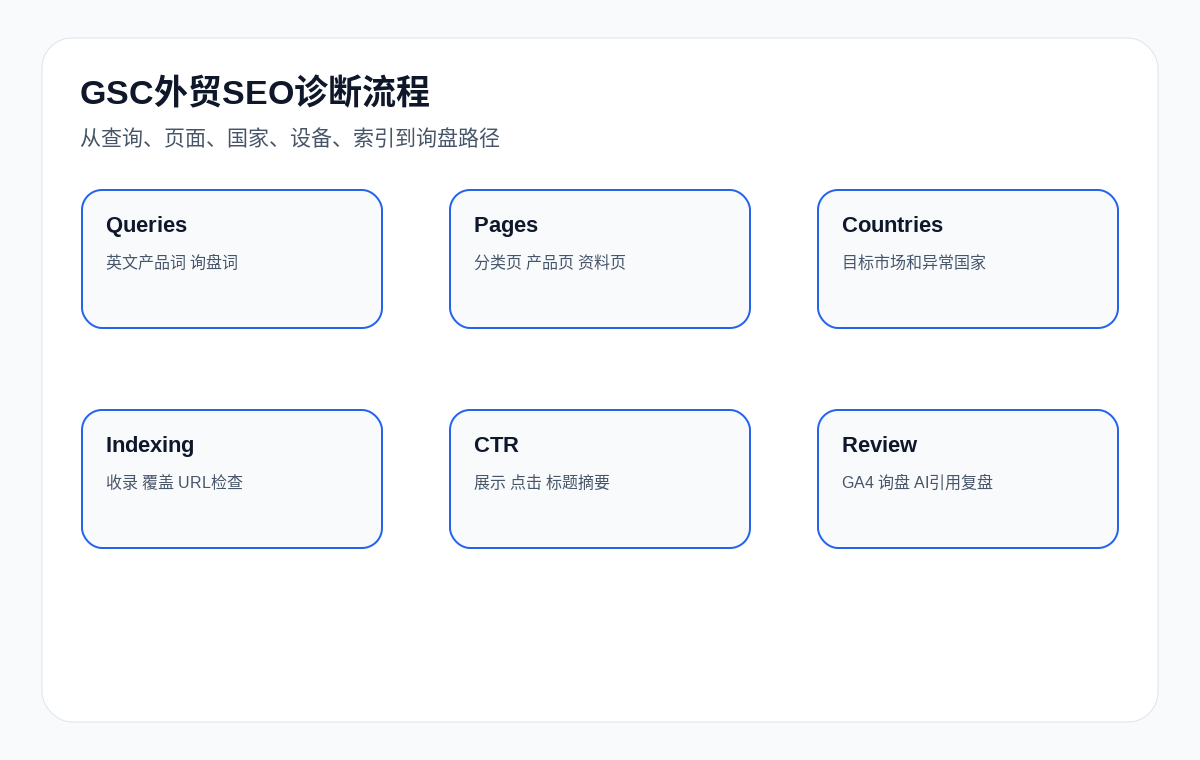
2. Top 1 / Official Benchmark Comparison: GSC Tutorials Usually Lack Business Judgment
Google’s official documentation defines the metrics most accurately: the Performance report explains clicks, impressions, CTR, average position and dimensions such as query, page, country, device and date; the URL Inspection and Page indexing documentation explains whether a page can be crawled, whether it is indexed, and whether there are canonical or enhancement issues. Third-party tutorials usually cover how to add a site, submit a sitemap, and view indexing and performance.
What these materials lack is that they rarely tell export businesses how to turn data into business actions. For example, if a query gets impressions but a low CTR, is it a title problem, a page-intent problem, a country-market problem, or a SERP type that does not fit? If a product page gets clicks but no inquiries, is it insufficient content evidence, a broken page path, or an RFQ form that does not ask the right fields? This article turns the official metrics into a diagnostic workflow for export websites.
GSC Benchmark Comparison Card
| Benchmark source | Strengths | Common gaps | What this article adds |
|---|---|---|---|
| Google Performance report | Accurate metric definitions and clear dimensions | Does not directly provide industry-specific actions | Adds export product terms and page-role judgment |
| URL Inspection / Indexing | Authoritative for index diagnosis | Does not explain business priority | Adds slow-indexing and page-value ranking |
| Sitemaps / Enhancements | Helps check discovery and enhancements | Does not connect to inquiry paths | Adds GA4 and inquiry review |
| General GSC tutorials | Complete menus, good for beginners | Tends to stop at screenshot explanations | Adds a 30-day diagnostic workflow and a misreading checklist |
3. First Understand the Four Core Metrics: Impressions, Clicks, CTR and Average Position
The four metrics most often watched in GSC Performance are impressions, clicks, CTR and average position. Impressions represent how many times your page was seen in search results; clicks represent users entering the website; CTR is clicks divided by impressions; average position is the average ranking position in search results. They all matter, but any single metric can mislead on its own.
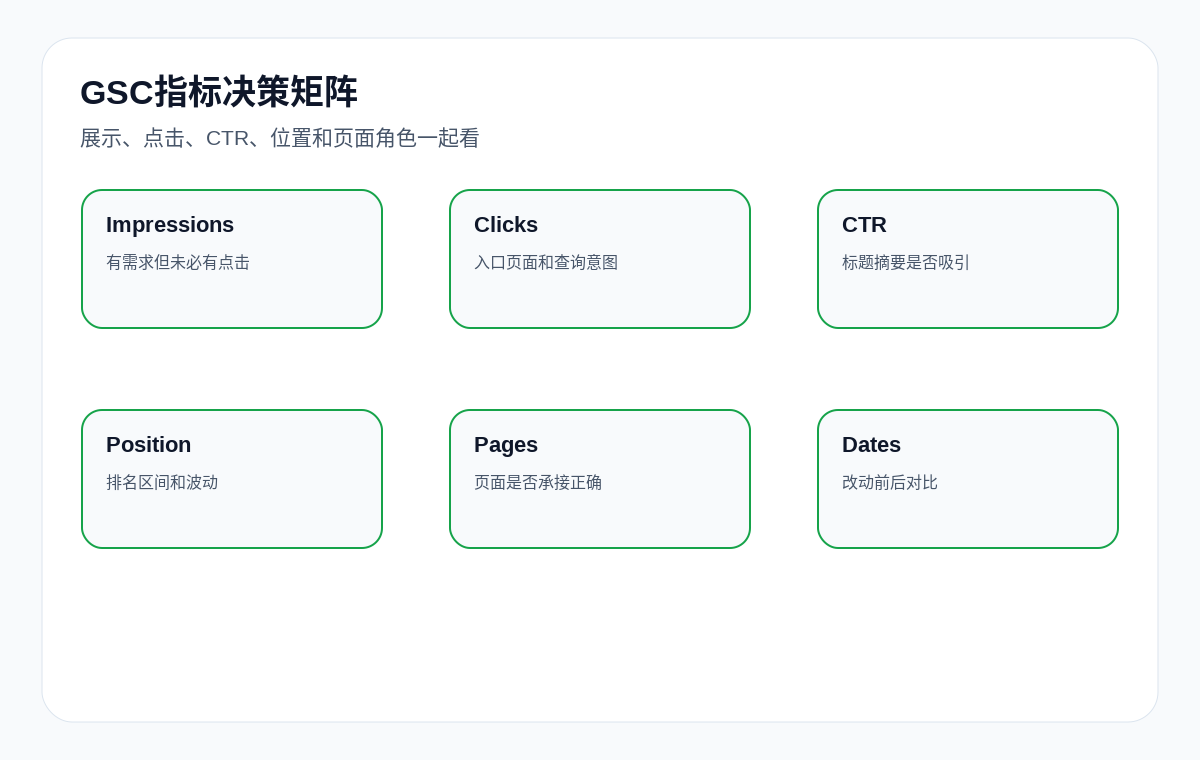
How to Judge the Four Core Metrics
| Metric | Description | Export example | Common misreading |
|---|---|---|---|
| Impressions | Number of appearances in search results | cnc machining parts tolerance gets impressions | High impressions do not mean the page meets demand |
| Clicks | Number of user visits to the website | warehouse LED flood light brings clicks | Clicks are not inquiries |
| CTR | Ratio of clicks to impressions | low CTR for ceramic dinnerware lead free | Low CTR does not always mean changing the title only; look at SERP intent |
| Average position | Average ranking of a query or page | average position 11 for waterproof connector IP67 | The average is pulled by different countries and long-tail queries |
4. Step One: Look at Queries — English Product Terms, Inquiry Terms and Question Terms
When an export website looks at GSC, the first step is not to look at total site clicks but to look at query terms. Query terms tell you which English demand Google is connecting your website to. You should divide queries into product terms, application terms, question terms, comparison terms, certificate terms, inquiry terms, brand terms and irrelevant terms.
GSC Query Term Classification Table
| Query type | Example | Description | Page action |
|---|---|---|---|
| Product term | custom metal parts manufacturer | Buyer is looking for a supplier or product | Check category and product pages |
| Application term | LED flood light for warehouse | Buyer has a specific scenario | Build application pages and selection content |
| Question term | how to choose packaging machine for powder | Buyer needs a way to judge | Write a guide and link internally to products |
| Certificate term | ceramic dinnerware lead free certificate | Buyer verifies compliance | Add a certificate resource page |
| Inquiry term | cnc machining parts quote drawing | Buyer is close to requesting a quote | Improve RFQ fields and product pages |
| Irrelevant term | Broad terms unrelated to the product | May bring low-quality traffic | Reduce page mismatch |
5. Step Two: Look at Pages — Which Pages Google Sees and Which Are Ignored
Switch to the Pages dimension to see which URLs get impressions and clicks. Export businesses should distinguish between the homepage, category pages, product pages, application pages, resource pages, article pages and inquiry pages. A healthy website should not have impressions only on blog articles while product and category pages show no signal at all.
Page Roles and GSC Diagnosis
| Page type | Metrics to watch | Abnormal signal | Suggested action |
|---|---|---|---|
| Category page | Impressions, query coverage, CTR | No impressions at all for major product terms | Add selection content, internal links and titles |
| Product page | Long-tail queries, clicks, countries | Clicks but no inquiries | Add specifications, FAQ and RFQ entry |
| Application page | Impressions for scenario terms | Application terms are handled by articles | Build or strengthen application pages |
| Resource page | Certificate terms, download paths | Resource pages get no impressions | Add HTML descriptions and internal links |
| Article page | Question terms, long-tail terms | Has traffic but does not lead to products | Add related products and inquiry paths |
6. Step Three: Look at Countries and Devices — Is Traffic Coming from Target Markets
Export websites cannot look only at global totals. The Countries dimension tells you which markets impressions and clicks come from; the Devices dimension tells you the difference between desktop and mobile. Few clicks from target countries and many clicks from non-target countries may indicate that keywords, language, page content or market positioning are inaccurate. Many mobile impressions but few clicks may indicate title truncation, page speed or mobile experience problems.
Country and Device Diagnosis Table
| Symptom | Possible cause | How to judge | Next step |
|---|---|---|---|
| Few impressions in target countries | Insufficient page language, product terms or market content | Filter core queries by country | Add target-market applications and certifications |
| Many clicks from non-target countries | Terms are too broad or pages mismatch | Check the query and page combination | Adjust titles and content scope |
| Low mobile CTR | Title truncation, slow speed, weak above-the-fold | Compare CTR by device | Improve titles and mobile above-the-fold |
| Many desktop clicks, few inquiries | Unclear purchasing path | Combine with GA4 form events | Add RFQ and resource entries |
7. Step Four: Look at Date Comparisons — Do Not Look at Only One Point in Time
One of the most valuable features of GSC is date comparison. You can compare changes before and after a redesign, before and after a content update, before and after a trade show, before and after a Google update, and between peak and off seasons. Looking only at the last 7 days is easily misled by fluctuations; it is better to combine 7-day, 28-day, 3-month, 6-month and 16-month data.
Date Comparison Scenarios
| Scenario | Comparison method | What to focus on | Possible conclusion |
|---|---|---|---|
| Fluctuation after redesign | 28 days before vs 28 days after the redesign | Page, query and index changes | Impact of URL or title changes |
| After a content update | 30-60 days before and after the update | Impressions and CTR for target queries | Whether the above-the-fold or FAQ works |
| Peak season assessment | Same period last year vs same period this year | Changes in product terms and countries | Seasonality or market change |
| Algorithm fluctuation | Compare core pages before and after | Whether site-wide or localized | Do not blindly overhaul the whole site |
| Trade show activity | Before and after the trade show | Brand terms, product terms, countries | Whether offline activity generates search demand |
8. Index Report and URL Inspection: Start Here to Diagnose Slow Indexing
Page indexing and URL Inspection are the core entry points for diagnosing indexing problems. Common problems for export businesses include new product pages not being discovered, pages discovered but not indexed, duplicate pages being given a different canonical, not being included in the sitemap, abnormal server status, content being too similar, or internal link entry points being too weak.
Index Problem Diagnosis Table
| GSC status | Possible meaning | Export example | Suggested action |
|---|---|---|---|
| Discovered – currently not indexed | Discovered but not yet crawled or processed | Many new product pages but weak internal links | Strengthen internal links, sitemap and page quality |
| Crawled – currently not indexed | Crawled but not indexed | Product page content is duplicated or too thin | Add specifications, applications and FAQ |
| Duplicate without user-selected canonical | Duplicate page has no selected main version | Model pages or filter pages are similar | Set canonical and differentiate pages |
| Alternate page with proper canonical | Alternate page points to the main page | Variant pages are consolidated into the category page | Confirm whether this matches the strategy |
| Submitted URL blocked by robots | Submitted in the sitemap but blocked by robots | Product directory blocked by mistake | Fix robots and sitemap |
9. Impressions Without Clicks: How GSC Guides Title and Above-the-Fold Rewrites
If a page gets a fair number of impressions but few clicks, first check whether the query terms and the page match. Many export page titles only contain a big product term and do not reflect application scenarios, materials, certifications, customization capability or purchasing questions. GSC can tell you which long-tail terms users actually searched, and you can then use those terms to correct the title, meta description, H1 and above-the-fold answer.
Impressions Without Clicks Diagnosis Table
| GSC signal | Possible cause | Export example | Suggested action |
|---|---|---|---|
| High impressions, low CTR | Title is unattractive or intent does not match | The LED flood light page does not mention the warehouse scenario | Add application and specifications to the title |
| Query is specific, page is generic | The page does not answer the long-tail question | waterproof connector IP67 temperature | Add FAQ and specification notes |
| Ranking between 8 and 20 | The page has potential but is not strong enough | packaging machine for powder | Add a selection table and application content |
| Large CTR differences by country | Target-market wording does not match | Low clicks in the US but high in other countries | Adjust target-market certifications and wording |
10. Clicks Without Inquiries: Read GSC Together with GA4 and Form Data
GSC can only tell you about clicks from search results to the website; it cannot tell you whether users submit an inquiry after arriving. Therefore, when there are clicks but no inquiries, you must combine GA4, form events, resource downloads, WhatsApp/email clicks and inquiry fields.
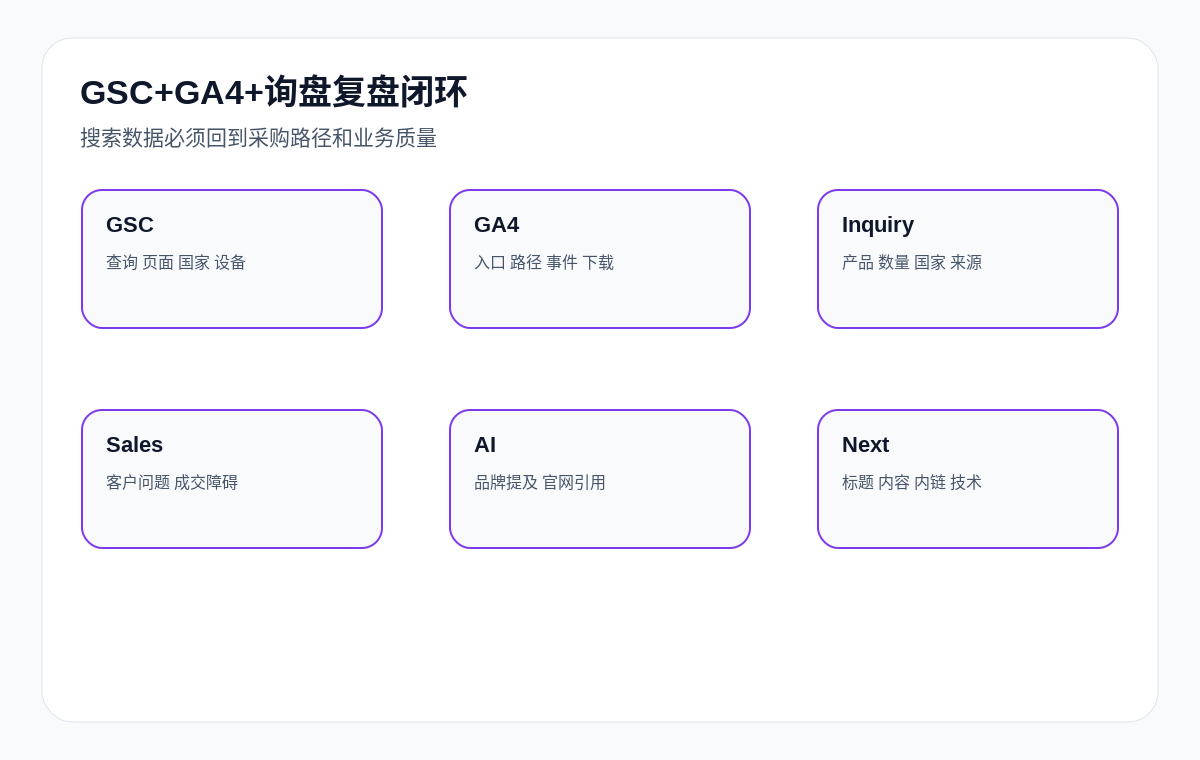
Joint Judgment with GSC + GA4 + Inquiries
| Symptom | What GSC shows | What GA4/inquiries show | Action |
|---|---|---|---|
| Many clicks, no inquiries | Which queries and pages bring clicks | Whether users enter product pages or forms | Add internal links and CTAs |
| Low inquiry quality | Whether queries are too broad | Product and quantity fields in the form | Add qualifying conditions and RFQ notes |
| High resource page visits | Query sources for resource pages | Download events and subsequent paths | Add product pages and inquiry entries |
| High article traffic | Question terms and entry pages | Whether users enter category pages | Add related product modules |
11. Finding Content Opportunities in GSC: Which Queries Deserve Their Own Pages
Content opportunities are often hidden in GSC query terms. Export businesses can look for three types of terms: long-tail terms with impressions but low rankings, terms with clicks but mismatched pages, and terms highly related to inquiry questions that have no dedicated page on the site.
GSC Content Opportunity Screening Table
| Opportunity type | How to judge | Example | Page action |
|---|---|---|---|
| Long-tail with impressions | Rankings of 20-50 but stable impressions | custom metal parts surface finish | Add a process resource page |
| Page mismatch | Query intent and entry page do not match | medical probe OEM lands on a blog page | Build a service/product landing page |
| Highly related to inquiries | Sales are often asked but the page does not cover it | packaging machine MOQ sample | Add FAQ or RFQ notes |
| Certificate resource terms | Certificate queries get impressions | ceramic dinnerware LFGB certificate | Build a certificate resource page |
| Application scenario terms | Scenario queries are growing | LED flood light for cold storage | Build an application page |
12. Technical Problems in GSC: Not Every Decline Is a Content Problem
If clicks and impressions suddenly drop, do not immediately conclude that the content is not good enough. Check index coverage, page status, mobile experience, Core Web Vitals, structured data, sitemap, robots, redesigns and server stability.
Technical Signals and Diagnostic Actions
| GSC section | Abnormal signal | Possible cause | Action |
|---|---|---|---|
| Page indexing | Fewer valid pages | noindex, canonical, deletion, duplication | Review by URL sample |
| Sitemaps | Few or incorrect submitted pages | Sitemap not updated or wrong | Regenerate and check core pages |
| Experience | Mobile experience or speed problems | Large images, heavy JS, slow above-the-fold | Prioritize core inquiry pages |
| Enhancements | Structured data errors | Missing fields or format errors | Fix product/FAQ/breadcrumb data |
| Manual actions | Manual actions appear | Policy violations or security issues | Follow official guidance |
13. A 30-Day GSC Diagnostic Workflow
30-Day GSC Diagnostic Plan
| Phase | Task | Deliverable | Acceptance focus |
|---|---|---|---|
| Days 1-3 | Confirm the site property, sitemap and index status | Base setup and index table | Whether data is complete |
| Days 4-7 | Group query terms and pages | Query-page mapping table | Whether export product terms are used for classification |
| Days 8-12 | Country, device and date comparison | Market and device diagnosis table | Whether abnormal markets are found |
| Days 13-17 | Index and URL Inspection sampling | Indexing problem list | Whether there is URL-level evidence |
| Days 18-23 | GSC + GA4 + inquiry review | Entry-to-inquiry path table | Whether it connects to business results |
| Days 24-30 | Set next month’s optimization priorities | Title, content, technical and internal link checklist | Whether it is actionable and re-testable |
14. Common Misreadings of GSC Data
Common Misreadings Table
| Misreading | Why it is inaccurate | Correct view |
|---|---|---|
| A drop in average position means rankings fell | The query mix and country changes affect the average | Look by core query and page group |
| Low CTR means only the title needs changing | It may be a page-intent, SERP-type or country problem | Look at queries and the SERP first |
| High impressions mean strong demand | It may be broad or irrelevant terms | Look at clicks, pages and inquiry quality |
| High clicks mean SEO success | Clicks are not valid buyers | Combine with GA4 and inquiry fields |
| Not indexed must be a technical error | It may also be duplicate content or insufficient value | Combine URL Inspection and page quality |
| Daily data fluctuations mean changes are needed | Short-term fluctuation is normal | Compare by 7 days, 28 days and the same period |
15. FAQ: Common Questions About Google Search Console for Export SEO Diagnosis
What do impressions mean in GSC?
Impressions are the number of times a page appears in search results, not the number of user visits. Export websites should read them together with clicks, CTR, query terms, pages and countries.
Why is the average position different from what I see in actual search?
GSC’s average position is affected by country, device, query, personalization and time. It is an average, not a screenshot of one particular search.
Will a new page definitely be indexed after I submit it through URL Inspection?
Not necessarily. URL Inspection can request crawling, but whether a page is indexed depends on page quality, duplication, internal links, overall site signals and the judgment of the search system.
If there are impressions but no clicks, what should I change first?
First check whether the query terms and the page match, then look at the title, meta description, above-the-fold answer and competing pages in the SERP. Do not just add keywords.
If there are clicks but no inquiries, does that mean SEO is useless?
Not necessarily. It may be a page path, product evidence, RFQ entry or inquiry field problem. You need to combine GA4 and inquiry data to judge.
Can GSC show all keywords?
No. GSC shows a large amount of query data, but it is not a complete keyword database, and it has privacy and sampling limits.
How often should an export website check GSC?
For basic monitoring, check once a week; for a formal review, once a month is recommended; you can also check temporarily after a redesign, a new page launch or an abnormal fluctuation.
Which is more important, GSC or GA4?
They have different roles. GSC looks at data before search results reach the website, while GA4 looks at the paths and events after users enter the website. They must be used together.
Can GSC guide AI search optimization?
It can provide clues about English sourcing queries and page performance, but AI answer citations still require separate sampling and observation, combined with brand mentions, official website citations and resource page quality.
Can I still do diagnosis without GSC access?
You can do a preliminary page and technical diagnosis, but you cannot accurately judge queries, impressions, CTR and index status. For a formal diagnosis, it is recommended to grant GSC access.
16. Final Checklist: Check These 12 Items in GSC Every Month
- Do core English product terms get impressions?
- Do category and product pages get query coverage?
- Which pages have high impressions but low clicks?
- Which entry pages have high clicks but no inquiries?
- Are impressions and clicks growing in target countries?
- Is mobile CTR abnormally low?
- Are new pages entering the index?
- Do important pages have indexing problems?
- Do long-tail question terms need new pages to handle them?
- Are resource and certificate pages being discovered?
- Is page performance abnormal before and after a redesign?
- Are next month’s title, content, internal link and technical priorities clear?
The value of GSC is not to make a company watch ranking fluctuations every day, but to help you judge from real search data: how Google is understanding your website, what overseas buyers are searching for, which pages already have opportunities, which pages have not yet been discovered, and which optimization actions should be done first.
17. Query Filtering Techniques: Do Not Look Only at the Site-Wide Total Table
If you look only at the default site-wide data in the GSC Performance report, it is easy to be misled by brand terms, broad terms, country differences and a few high-impression pages. Export businesses should use filters to break down queries and pages. Common filters include: contains core product terms, excludes brand terms, filter by country, filter by page directory, filter by device, compare by date, and filter by search appearance.
For example, if you work on custom metal parts, you can first filter query contains “custom metal” or “cnc machining” and then see which pages appear; you can also filter page contains “/custom-metal-parts/” to see which queries that page actually matches. If queries and pages do not match, it means the page role or internal links may need adjustment.
| Filter method | Suitable question | Export example | Possible action |
|---|---|---|---|
| Query contains product term | See search demand for a product line | waterproof connector | Add category pages and product FAQ |
| Page contains URL directory | See the performance of a page type | /products/ or /blog/ | Judge whether product pages are discovered |
| Country filter | See target-market performance | United States / Germany | Add certifications, units and market wording |
| Device filter | See whether mobile is weak | mobile CTR is clearly low | Adjust title length and mobile above-the-fold |
| Date compare | See the effect of a redesign or update | Before and after a product page update | Judge the effect of title and content changes |
| Search appearance | See rich result or video/image performance | FAQ, Product rich result | Check structured data and page modules |
The goal of filtering is not to build complex reports, but to reduce misjudgment. Site-wide total click growth does not mean core product pages grew; brand term growth does not mean non-brand sourcing terms grew; many clicks from one country do not mean the target market is effective.
18. Product Term Diagnosis: How to Find Page-Handling Mismatches in GSC
Page-handling mismatches are a common problem on export websites. For example, a buyer searches for “packaging machine for powder” and lands on a general introductory article instead of the powder packaging equipment category page; they search for “ceramic dinnerware lead free” and land on an about page instead of a certificate resource page. GSC can surface these mismatches through the Query + Page combination.
| Query | Actual entry page | Page that should handle it | Diagnostic conclusion | Action |
|---|---|---|---|---|
| packaging machine for powder | Blog article | Powder packaging equipment category/application page | The article captured commercial intent | Build a category page and link to it from the article |
| ceramic dinnerware lead free | Homepage | Certificate resource/product page | Certificate intent has no dedicated page | Add test standards and download entries |
| cnc machining parts tolerance | Product listing page | Tolerance resource/process page | Technical judgment lacks a resource to handle it | Build a tolerance table and process notes |
| medical probe OEM manufacturer | Ordinary article | OEM capability/product page | Supplier-screening intent is not handled | Add quality process and RFQ path |
After finding a mismatch, you do not necessarily have to delete the original page. A more common approach is: strengthen the correct handling page, adjust internal links, let articles explain the problem, let category and product pages handle purchasing judgment, and let resource pages handle certificates and specification evidence.
19. CTR Diagnosis: Title Rewrites Should Serve Buyer Judgment
A low CTR does not necessarily mean the title is bad; it may also be a ranking range, SERP competition, search intent or country-market problem. But if the same page has stable impressions for a target query and its CTR is clearly low, you should check whether the title and meta description state the value clearly.
Export titles should not just pile up product terms. A better title usually includes the product category, application scenario, key specifications, customization capability or purchasing judgment. For example, “LED Flood Light Manufacturer” can be changed, based on the page content, to “LED Flood Light for Warehouse and Outdoor Projects: Wattage, IP Rating and OEM Options”. Chinese pages should also remain readable to customers and should not be written for the internal team.
| GSC signal | Title problem | Rewrite direction | Review method |
|---|---|---|---|
| High impressions, low CTR | Title too broad | Add application, specifications or certificates | 28-day CTR comparison |
| Many long-tail terms but few clicks | Title does not cover purchasing questions | Add answers to questions in the above-the-fold and H2s | Query-level CTR and page clicks |
| Weak clicks in target countries | Market wording unclear | Add target-market certifications or scenarios | Review with a country filter |
| Low mobile CTR | The first half of the title is weak | Move core value to the front | Compare by device |
Do not judge success or failure the day after adjusting a title. It is better to observe for at least 2 to 4 weeks and to exclude seasonality, redesigns, algorithm fluctuations and page index changes. For core pages, change only one group of elements at a time so that you can review the results.
20. How GSC Reveals Content Decay and Demand Shifts
Content decay is not simply a drop in clicks. Export websites need to distinguish three situations: the page content is outdated, search demand has changed, or competitor content has become stronger. GSC’s date comparison and query changes can help you judge.
| Symptom | Possible cause | How to judge in GSC | Suggested action |
|---|---|---|---|
| Impressions decline for the same query | Rankings slipped or demand fell | Look at position and total impression trend | Check the SERP and competitor content |
| Impressions hold but clicks fall | Title appeal dropped or the SERP changed | Look at CTR and search appearance | Change the title, description and above-the-fold |
| Old queries decrease, new queries increase | How demand is expressed has changed | Compare query lists | Add new questions and FAQ |
| Product page clicks fall but articles grow | Commercial pages handle intent weakly | Compare by page | Strengthen category/product pages |
For example, a private label activewear manufacturer page used to mainly match “activewear manufacturer”, but now more queries such as “low MOQ”, “recycled fabric” and “custom label packaging” appear, which shows that buyers’ focus has changed. The page should add fabric, MOQ, packaging and sampling process information instead of continuing to write only big terms.
21. GSC and Product Line Priorities: Which Pages to Optimize First
Export businesses usually have many product lines and cannot optimize all pages at once. GSC can help screen priorities: see which pages already have an impression base, which queries are close to an inquiry, which countries are target markets, and which pages are related to high-margin or flagship products.
| Priority | GSC signal | Business signal | Suggested action |
|---|---|---|---|
| P1 | Target product terms have impressions, ranking 8-30 | High-margin or flagship products | Add content evidence, titles and internal links |
| P2 | Long-tail inquiry terms have impressions | Sales report high quality | Add FAQ, RFQ fields and resource pages |
| P3 | High traffic from non-target terms | Low inquiry quality | Narrow the page intent |
| P4 | Almost no impressions | The product is important but the page is thin | First add basic content and internal links |
| P5 | Both impressions and clicks are weak | Not a flagship or low value | Observe for now or consolidate |
This ranking avoids spreading effort evenly. For example, if waterproof connector is a flagship product and already has dozens of long-tail impressions but weak clicks, it should be optimized first; a low-value accessory page, even with a small number of impressions, is not necessarily a priority.
22. How to Read Images, Videos and Resource Pages in GSC
Export websites often rely on images, videos, PDFs and resource downloads, but the default GSC Performance view mainly shows web search data. You can also look at image search, video pages, resource page URLs and search appearance. In industries where product images matter a lot, such as ceramic dinnerware, LED lighting and private label activewear, image search may bring initial discovery, but it still needs to lead to product pages and inquiry paths.
| Asset type | What GSC shows | Diagnostic question | Optimization action |
|---|---|---|---|
| Product images | Image search performance, page clicks | Weak alt text, oversized images, no context | Add alt text, compress, add image-text descriptions |
| Video pages | Video enhancements and page performance | The video is isolated with no text explanation | Add a text summary and internal product links |
| PDF resources | Whether the URL gets impressions | The PDF is valuable but cannot lead to an inquiry | Build an HTML resource page and keep the download |
| Certificate pages | Impressions and clicks for certificate terms | Only images, no text explanation | Add certificate names, scope and market notes |
If a resource page gets impressions but has no onward path, it means you need to add related products, inquiry entries and download event tracking to the resource page. GSC tells you “someone found it”; GA4 and the inquiry system tell you “did they take further action”.
23. How to Do a Monthly Review After Exporting GSC Data
A monthly review does not require a complex model, but it does need a fixed structure. It is advisable to export query, page, country, device and date-comparison data, then mark them in a table: growth, decline, new opportunities, mismatches, to be observed, and needs technical review. The key is to keep the same definition every month so that trends can be seen.
| Review module | What to look at | Output | Owner |
|---|---|---|---|
| Query growth | New product/question terms with impressions and clicks | New content or page reinforcement checklist | Content/product owner |
| Page performance | Changes in impressions, clicks and CTR on core pages | Title and above-the-fold adjustment checklist | SEO/content owner |
| Index status | Newly unindexed, error and duplicate pages | Technical fix checklist | Technical owner |
| Market performance | Changes in target countries | Market content and certification additions | Sales/market owner |
| Business feedback | Inquiry quality and sales questions | FAQ, RFQ and resource page updates | Sales/operations owner |
When reviewing, avoid “reporting numbers only”. A better review should answer: which product lines show opportunities, which pages are dragging, which problems need technical handling, which queries deserve a resource page, and which traffic is not worth pursuing further.
24. Turning GSC Data into Client-Readable Conclusions
If you are a business owner or marketing manager, you do not need to look at a screen full of export tables. A good GSC diagnostic conclusion should be expressed in client-readable language: what the problem is, which pages it affects, where the evidence is, what is recommended, and when to review. Do not treat tool menus and internal operational details as conclusions.
| Raw data phrasing | Client-readable conclusion | Suggested action |
|---|---|---|
| Low CTR | The page is being seen, but the title and above-the-fold do not fully explain the purchasing value | Change the title, description, above-the-fold and FAQ |
| Crawled not indexed | Google has seen the page but does not currently consider it worth indexing | Add page differentiation, internal links and content evidence |
| Queries mismatch | The question users search for does not match the current handling page | Build the right page and adjust internal links |
| Country split abnormal | Visits come from non-target markets; terms may be too broad | Narrow the title and content scenario |
| Page drop after change | Some page signals were lost after the redesign | Check redirects, titles, content and internal links |
This way of expressing things helps the team make decisions quickly instead of getting stuck in terminology. The more complex the GSC data, the more the conclusions need to be translated into page actions and business impact.
25. Three Export GSC Diagnosis Examples
Example 1: A waterproof connector page stays unindexed for a long time
GSC shows the page was discovered but not indexed. When diagnosing, first check URL Inspection, then see whether the page is highly duplicated with other model pages and whether it lacks application notes, IP rating explanations, materials and a specification table. If the page just copies the same product introduction, you need to add differentiated content and internal links rather than repeatedly submitting index requests.
Example 2: A packaging machine guide has clicks but no inquiries
GSC shows the guide article brings clicks for “powder filling machine” and “packaging machine for granules”, but GA4 shows users rarely enter product pages. The conclusion is not that the article has no value, but that the path is broken. It is recommended to add a material compatibility table, related category pages, equipment comparisons and an RFQ entry to the guide.
Example 3: Ceramic dinnerware certificate terms get impressions but CTR is low
GSC shows “lead free ceramic dinnerware certificate” gets impressions but CTR is low. After checking, the page title only contains a company introduction and does not reflect the certificate and target market. It is recommended to build a certificate resource page that explains test standards, applicable products, download entries and related product links.
26. GSC Access and Data Boundaries: Clarify Before Diagnosis
Before formally using GSC for diagnosis, confirm the site property, permission level and data time range. A domain property covers all protocols and subdomains, while a URL-prefix property covers only the specified path. If an export website has www, non-www, http, https, an English site, subdirectories or subdomains at the same time, the choice of property affects data completeness.
| Check item | Why it matters | Common problem | Recommendation |
|---|---|---|---|
| Property type | Determines data coverage | Only one URL prefix was checked, missing subdomains | First confirm the domain property or all important prefixes |
| Permission level | Affects whether full data and settings can be viewed | Only partial screenshots are provided, so verification is impossible | Provide at least view access during diagnosis |
| Data period | Judge trends and seasonality | Only looking at the last 7 days | Combine 28 days, 3 months, 16 months and the same period |
| Site version | Avoid looking at the wrong website | New and old site data are mixed together | Note redesign, migration and launch dates |
| Data boundaries | Avoid over-interpretation | Treating GSC as a complete keyword database | Combine GA4, inquiries and sales feedback |
GSC is not a complete business analysis system. It can answer “what happened in Google search results”, but it cannot answer on its own “why the customer did not close”. Therefore, put GSC in the right position during diagnosis: it is search entry data, not the whole business truth.
27. When to Update a Page and When to Create a New One
GSC often exposes new query opportunities, but not every query requires a new page. The criteria are: whether an existing page can naturally handle the intent, whether the query has enough business value, whether it would cause page cannibalization, and whether it needs an independent evidence module.
| Situation | Recommendation | Example | Reason |
|---|---|---|---|
| Query highly matches an existing page | Update the existing page | New warehouse queries on the LED flood light page | Just add an application paragraph |
| Query is a standalone application scenario | Create an application page | LED flood light for cold storage | Needs scenario, specifications and image descriptions |
| Query has certificate or resource intent | Create a resource page | ceramic dinnerware LFGB certificate | Needs citable evidence and download entries |
| Query is a pre-quote question | Update the product page and RFQ | cnc machining parts quote drawing | Should guide submission of key fields |
| Query is unrelated to the business | Do not chase it or narrow the content | Generic tutorial terms bring low-quality visits | Avoid wasting page authority and content resources |
This judgment prevents the website from becoming more and more scattered. Export businesses should build pages around product lines and purchasing paths, rather than publishing an article every time they see a query.
28. GSC Review Cadence: What to Look at Weekly, Monthly and Quarterly
Different frequencies suit different questions. Weekly is good for checking anomalies and new page indexing; monthly is good for queries, pages, CTR and content opportunities; quarterly is good for product lines, country markets, seasonality, competitors and long-term assets.
| Frequency | Focus | What not to do | Output |
|---|---|---|---|
| Weekly | Index anomalies, core page fluctuations, new page discovery | Not suitable for frequent title changes | Anomaly list |
| Monthly | Queries, pages, CTR, countries, devices, inquiry paths | Do not report only total clicks | Page optimization checklist |
| Quarterly | Product line opportunities, seasonality, resource pages, market changes | Do not look only at short-term rankings | Content and technical roadmap |
A stable review cadence matters more than occasional anxiety. As long as every month can answer “which pages are closer to an inquiry, which queries deserve reinforcement, and which technical problems affect discovery”, GSC is truly participating in export website growth decisions.
Finally, remember: the value of GSC is not to turn all numbers into reports, but to help export businesses translate search demand into page improvements. Queries tell you how buyers ask, pages tell you how the website handles it, indexing tells you whether Google can discover it, CTR tells you whether the title and above-the-fold are attractive, and GA4 and inquiry data tell you whether these visits enter a real purchasing path. Connecting this information is the most valuable use of Google Search Console for export SEO diagnosis.
{
“@context”: “https://schema.org”,
“@type”: “FAQPage”,
“mainEntity”: [
{
“@type”: “Question”,
“name”: “GSC query intent and export diagnosis questionsnUser questionWhat to look at in GSCExport business scenarioNext actionnWhy a page is not indexedPage indexing, URL Inspection, SitemapsA newly launched waterproof connector product page is not indexedCheck noindex, canonical, internal links and content duplicationnWhy there are impressions but no clicksPerformance queries, pages, CTRThe LED flood light category page has many impressions but few clicksChange the title, description, above-the-fold and scenario termsnWhy there are clicks but no inquiriesGSC entry pages + GA4 pathThe packaging machine guide has visits but no form submissionsAdd internal product links, RFQ entry and application evidencenWhich terms deserve pagesQueries, Pages, Countriescustom metal parts shows many long-tail termsBuild resource pages, process pages or FAQnWhether a redesign affects SEODate compare, Pages, IndexingTraffic fell after a URL structure changeCheck redirects, title differences and old page statusnn2. Top 1 / Official Benchmark Comparison: GSC Tutorials Usually Lack Business JudgmentnGoogle’s official documentation defines the metrics most accurately: the Performance report explains clicks, impressions, CTR, average position and dimensions such as query, page, country, device and date; the URL Inspection and Page indexing documentation explains whether a page can be crawled, whether it is indexed, and whether there are canonical or enhancement issues. Third-party tutorials usually cover how to add a site, submit a sitemap, and view indexing and performance.nWhat these materials lack is that they rarely tell export businesses how to turn data into business actions. For example, if a query gets impressions but a low CTR, is it a title problem, a page-intent problem, a country-market problem, or a SERP type that does not fit? If a product page gets clicks but no inquiries, is it insufficient content evidence, a broken page path, or an RFQ form that does not ask the right fields? This article turns the official metrics into a diagnostic workflow for export websites.nGSC Benchmark Comparison CardnBenchmark sourceStrengthsCommon gapsWhat this article addsnGoogle Performance reportAccurate metric definitions and clear dimensionsDoes not directly provide industry-specific actionsAdds export product terms and page-role judgmentnURL Inspection / IndexingAuthoritative for index diagnosisDoes not explain business priorityAdds slow-indexing and page-value rankingnSitemaps / EnhancementsHelps check discovery and enhancementsDoes not connect to inquiry pathsAdds GA4 and inquiry reviewnGeneral GSC tutorialsComplete menus, good for beginnersTends to stop at screenshot explanationsAdds a 30-day diagnostic workflow and a misreading checklistnn3. First Understand the Four Core Metrics: Impressions, Clicks, CTR and Average PositionnThe four metrics most often watched in GSC Performance are impressions, clicks, CTR and average position. Impressions represent how many times your page was seen in search results; clicks represent users entering the website; CTR is clicks divided by impressions; average position is the average ranking position in search results. They all matter, but any single metric can mislead on its own.nFigure 2: GSC metrics must be interpreted together with query intent, page role, country, date and business path.nHow to Judge the Four Core MetricsnMetricDescriptionExport exampleCommon misreadingnImpressionsNumber of appearances in search resultscnc machining parts tolerance gets impressionsHigh impressions do not mean the page meets demandnClicksNumber of user visits to the websitewarehouse LED flood light brings clicksClicks are not inquiriesnCTRRatio of clicks to impressionslow CTR for ceramic dinnerware lead freeLow CTR does not always mean changing the title only; look at SERP intentnAverage positionAverage ranking of a query or pageaverage position 11 for waterproof connector IP67The average is pulled by different countries and long-tail queriesnn4. Step One: Look at Queries – English Product Terms, Inquiry Terms and Question TermsnWhen an export website looks at GSC, the first step is not to look at total site clicks but to look at query terms. Query terms tell you which English demand Google is connecting your website to. You should divide queries into product terms, application terms, question terms, comparison terms, certificate terms, inquiry terms, brand terms and irrelevant terms.nGSC Query Term Classification TablenQuery typeExampleDescriptionPage actionnProduct termcustom metal parts manufacturerBuyer is looking for a supplier or productCheck category and product pagesnApplication termLED flood light for warehouseBuyer has a specific scenarioBuild application pages and selection contentnQuestion termhow to choose packaging machine for powderBuyer needs a way to judgeWrite a guide and link internally to productsnCertificate termceramic dinnerware lead free certificateBuyer verifies complianceAdd a certificate resource pagenInquiry termcnc machining parts quote drawingBuyer is close to requesting a quoteImprove RFQ fields and product pagesnIrrelevant termBroad terms unrelated to the productMay bring low-quality trafficReduce page mismatchnn5. Step Two: Look at Pages – Which Pages Google Sees and Which Are IgnorednSwitch to the Pages dimension to see which URLs get impressions and clicks. Export businesses should distinguish between the homepage, category pages, product pages, application pages, resource pages, article pages and inquiry pages. A healthy website should not have impressions only on blog articles while product and category pages show no signal at all.nPage Roles and GSC DiagnosisnPage typeMetrics to watchAbnormal signalSuggested actionnCategory pageImpressions, query coverage, CTRNo impressions at all for major product termsAdd selection content, internal links and titlesnProduct pageLong-tail queries, clicks, countriesClicks but no inquiriesAdd specifications, FAQ and RFQ entrynApplication pageImpressions for scenario termsApplication terms are handled by articlesBuild or strengthen application pagesnResource pageCertificate terms, download pathsResource pages get no impressionsAdd HTML descriptions and internal linksnArticle pageQuestion terms, long-tail termsHas traffic but does not lead to productsAdd related products and inquiry pathsnn6. Step Three: Look at Countries and Devices – Is Traffic Coming from Target MarketsnExport websites cannot look only at global totals. The Countries dimension tells you which markets impressions and clicks come from; the Devices dimension tells you the difference between desktop and mobile. Few clicks from target countries and many clicks from non-target countries may indicate that keywords, language, page content or market positioning are inaccurate. Many mobile impressions but few clicks may indicate title truncation, page speed or mobile experience problems.nCountry and Device Diagnosis TablenSymptomPossible causeHow to judgeNext stepnFew impressions in target countriesInsufficient page language, product terms or market contentFilter core queries by countryAdd target-market applications and certificationsnMany clicks from non-target countriesTerms are too broad or pages mismatchCheck the query and page combinationAdjust titles and content scopenLow mobile CTRTitle truncation, slow speed, weak above-the-foldCompare CTR by deviceImprove titles and mobile above-the-foldnMany desktop clicks, few inquiriesUnclear purchasing pathCombine with GA4 form eventsAdd RFQ and resource entriesnn7. Step Four: Look at Date Comparisons – Do Not Look at Only One Point in TimenOne of the most valuable features of GSC is date comparison. You can compare changes before and after a redesign, before and after a content update, before and after a trade show, before and after a Google update, and between peak and off seasons. Looking only at the last 7 days is easily misled by fluctuations; it is better to combine 7-day, 28-day, 3-month, 6-month and 16-month data.nDate Comparison ScenariosnScenarioComparison methodWhat to focus onPossible conclusionnFluctuation after redesign28 days before vs 28 days after the redesignPage, query and index changesImpact of URL or title changesnAfter a content update30-60 days before and after the updateImpressions and CTR for target queriesWhether the above-the-fold or FAQ worksnPeak season assessmentSame period last year vs same period this yearChanges in product terms and countriesSeasonality or market changenAlgorithm fluctuationCompare core pages before and afterWhether site-wide or localizedDo not blindly overhaul the whole sitenTrade show activityBefore and after the trade showBrand terms, product terms, countriesWhether offline activity generates search demandnn8. Index Report and URL Inspection: Start Here to Diagnose Slow IndexingnPage indexing and URL Inspection are the core entry points for diagnosing indexing problems. Common problems for export businesses include new product pages not being discovered, pages discovered but not indexed, duplicate pages being given a different canonical, not being included in the sitemap, abnormal server status, content being too similar, or internal link entry points being too weak.nIndex Problem Diagnosis TablenGSC statusPossible meaningExport exampleSuggested actionnDiscovered – currently not indexedDiscovered but not yet crawled or processedMany new product pages but weak internal linksStrengthen internal links, sitemap and page qualitynCrawled – currently not indexedCrawled but not indexedProduct page content is duplicated or too thinAdd specifications, applications and FAQnDuplicate without user-selected canonicalDuplicate page has no selected main versionModel pages or filter pages are similarSet canonical and differentiate pagesnAlternate page with proper canonicalAlternate page points to the main pageVariant pages are consolidated into the category pageConfirm whether this matches the strategynSubmitted URL blocked by robotsSubmitted in the sitemap but blocked by robotsProduct directory blocked by mistakeFix robots and sitemapnn9. Impressions Without Clicks: How GSC Guides Title and Above-the-Fold RewritesnIf a page gets a fair number of impressions but few clicks, first check whether the query terms and the page match. Many export page titles only contain a big product term and do not reflect application scenarios, materials, certifications, customization capability or purchasing questions. GSC can tell you which long-tail terms users actually searched, and you can then use those terms to correct the title, meta description, H1 and above-the-fold answer.nImpressions Without Clicks Diagnosis TablenGSC signalPossible causeExport exampleSuggested actionnHigh impressions, low CTRTitle is unattractive or intent does not matchThe LED flood light page does not mention the warehouse scenarioAdd application and specifications to the titlenQuery is specific, page is genericThe page does not answer the long-tail questionwaterproof connector IP67 temperatureAdd FAQ and specification notesnRanking between 8 and 20The page has potential but is not strong enoughpackaging machine for powderAdd a selection table and application contentnLarge CTR differences by countryTarget-market wording does not matchLow clicks in the US but high in other countriesAdjust target-market certifications and wordingnn10. Clicks Without Inquiries: Read GSC Together with GA4 and Form DatanGSC can only tell you about clicks from search results to the website; it cannot tell you whether users submit an inquiry after arriving. Therefore, when there are clicks but no inquiries, you must combine GA4, form events, resource downloads, WhatsApp/email clicks and inquiry fields.nFigure 3: GSC covers the search entry, while GA4 and the inquiry system determine whether a purchasing action happens after arrival.nJoint Judgment with GSC + GA4 + InquiriesnSymptomWhat GSC showsWhat GA4/inquiries showActionnMany clicks, no inquiriesWhich queries and pages bring clicksWhether users enter product pages or formsAdd internal links and CTAsnLow inquiry qualityWhether queries are too broadProduct and quantity fields in the formAdd qualifying conditions and RFQ notesnHigh resource page visitsQuery sources for resource pagesDownload events and subsequent pathsAdd product pages and inquiry entriesnHigh article trafficQuestion terms and entry pagesWhether users enter category pagesAdd related product modulesnn11. Finding Content Opportunities in GSC: Which Queries Deserve Their Own PagesnContent opportunities are often hidden in GSC query terms. Export businesses can look for three types of terms: long-tail terms with impressions but low rankings, terms with clicks but mismatched pages, and terms highly related to inquiry questions that have no dedicated page on the site.nGSC Content Opportunity Screening TablenOpportunity typeHow to judgeExamplePage actionnLong-tail with impressionsRankings of 20-50 but stable impressionscustom metal parts surface finishAdd a process resource pagenPage mismatchQuery intent and entry page do not matchmedical probe OEM lands on a blog pageBuild a service/product landing pagenHighly related to inquiriesSales are often asked but the page does not cover itpackaging machine MOQ sampleAdd FAQ or RFQ notesnCertificate resource termsCertificate queries get impressionsceramic dinnerware LFGB certificateBuild a certificate resource pagenApplication scenario termsScenario queries are growingLED flood light for cold storageBuild an application pagenn12. Technical Problems in GSC: Not Every Decline Is a Content ProblemnIf clicks and impressions suddenly drop, do not immediately conclude that the content is not good enough. Check index coverage, page status, mobile experience, Core Web Vitals, structured data, sitemap, robots, redesigns and server stability.nTechnical Signals and Diagnostic ActionsnGSC sectionAbnormal signalPossible causeActionnPage indexingFewer valid pagesnoindex, canonical, deletion, duplicationReview by URL samplenSitemapsFew or incorrect submitted pagesSitemap not updated or wrongRegenerate and check core pagesnExperienceMobile experience or speed problemsLarge images, heavy JS, slow above-the-foldPrioritize core inquiry pagesnEnhancementsStructured data errorsMissing fields or format errorsFix product/FAQ/breadcrumb datanManual actionsManual actions appearPolicy violations or security issuesFollow official guidancenn13. A 30-Day GSC Diagnostic Workflown30-Day GSC Diagnostic PlannPhaseTaskDeliverableAcceptance focusnDays 1-3Confirm the site property, sitemap and index statusBase setup and index tableWhether data is completenDays 4-7Group query terms and pagesQuery-page mapping tableWhether export product terms are used for classificationnDays 8-12Country, device and date comparisonMarket and device diagnosis tableWhether abnormal markets are foundnDays 13-17Index and URL Inspection samplingIndexing problem listWhether there is URL-level evidencenDays 18-23GSC + GA4 + inquiry reviewEntry-to-inquiry path tableWhether it connects to business resultsnDays 24-30Set next month’s optimization prioritiesTitle, content, technical and internal link checklistWhether it is actionable and re-testablenn14. Common Misreadings of GSC DatanCommon Misreadings TablenMisreadingWhy it is inaccurateCorrect viewnA drop in average position means rankings fellThe query mix and country changes affect the averageLook by core query and page groupnLow CTR means only the title needs changingIt may be a page-intent, SERP-type or country problemLook at queries and the SERP firstnHigh impressions mean strong demandIt may be broad or irrelevant termsLook at clicks, pages and inquiry qualitynHigh clicks mean SEO successClicks are not valid buyersCombine with GA4 and inquiry fieldsnNot indexed must be a technical errorIt may also be duplicate content or insufficient valueCombine URL Inspection and page qualitynDaily data fluctuations mean changes are neededShort-term fluctuation is normalCompare by 7 days, 28 days and the same periodnn15. FAQ: Common Questions About Google Search Console for Export SEO DiagnosisnWhat do impressions mean in GSC?”,
“acceptedAnswer”: {
“@type”: “Answer”,
“text”: “Impressions are the number of times a page appears in search results, not the number of user visits. Export websites should read them together with clicks, CTR, query terms, pages and countries.”
}
},
{
“@type”: “Question”,
“name”: “Why is the average position different from what I see in actual search?”,
“acceptedAnswer”: {
“@type”: “Answer”,
“text”: “GSC’s average position is affected by country, device, query, personalization and time. It is an average, not a screenshot of one particular search.”
}
},
{
“@type”: “Question”,
“name”: “Will a new page definitely be indexed after I submit it through URL Inspection?”,
“acceptedAnswer”: {
“@type”: “Answer”,
“text”: “Not necessarily. URL Inspection can request crawling, but whether a page is indexed depends on page quality, duplication, internal links, overall site signals and the judgment of the search system.”
}
},
{
“@type”: “Question”,
“name”: “If there are impressions but no clicks, what should I change first?”,
“acceptedAnswer”: {
“@type”: “Answer”,
“text”: “First check whether the query terms and the page match, then look at the title, meta description, above-the-fold answer and competing pages in the SERP. Do not just add keywords.”
}
},
{
“@type”: “Question”,
“name”: “If there are clicks but no inquiries, does that mean SEO is useless?”,
“acceptedAnswer”: {
“@type”: “Answer”,
“text”: “Not necessarily. It may be a page path, product evidence, RFQ entry or inquiry field problem. You need to combine GA4 and inquiry data to judge.”
}
}
]
}
Official Sources and the Boundaries of GSC Diagnosis
Google Search Console is not a “results guarantee tool”. It is more like a set of observation windows. When export websites use it for diagnosis, they should look at queries, pages, indexing and events separately. If there are currently no query rows, that does not mean there is “no problem”; it can only be recorded as a baseline to be observed.
| Official entry | What questions it can answer | What it cannot directly prove |
|---|---|---|
| Search Console Performance report | Clicks, impressions, CTR and average position by query, page, country and device | Cannot prove inquiry quality on its own, nor explain every conversion reason |
| URL Inspection tool | The index status of a single URL, Google-selected canonical, enhancements and live test clues | Cannot replace a site-wide content audit, nor guarantee the next crawl result |
| About Search Console data | Understand data coverage, protocol properties, no-data states and report limits | Cannot turn zero-row data into ranking, traffic or inquiry conclusions |
| Google sitemap documentation | Confirm whether important URLs can be exposed to Google via the sitemap | Appearing in the sitemap does not guarantee indexing |
| GA4 events | Record post-visit clicks, forms, downloads and inquiry actions separately | Cannot replace GSC’s search impressions and query dimensions |
Export Website GSC Review Log Table
| Review field | How to write | Handling during low-data periods |
|---|---|---|
| Query row | Record only the queries GSC actually returns | If there are zero rows, write zero rows; do not add imagined keywords |
| Page row | Look at impression and click changes by URL | First check the sitemap, index/follow, canonical and page content |
| URL Inspection | Record indexing, crawling, canonical and enhancements | Use it only as single-URL evidence, not as a site-wide conclusion |
| GA4 events | Record forms, WhatsApp, email, downloads and other actions | If there are no events, fix collection first; do not write conversion results |
Continue Reading This SEO Series
If you are systematically working through export website SEO, it is worth continuing with the articles below. First clarify the relationships among crawling, indexing, content, links and review, then decide which page to change next.
- How to Do Hreflang and International SEO: A Guide to Index Matching for Multilingual and Multi-Regional Pages
- How to Monitor SEO Rankings: A Guide to Reviewing Keyword, Page and SERP Changes on Export Websites
- How to Use Google SEO Analysis Tools: How GSC, GA4 and Page Diagnosis Work Together to Read Export Inquiries
- How to Build an SEO Tool Stack: Crawling, Speed, Logs, Rankings, Content and Inquiry Review
- How to Validate Keywords with Google Trends: Export Product Terms, Seasonality and Regional Judgment
- Google Trends Usage Details: Region, Category and Time Window
Related reading: Troubleshooting Google indexing problems: the sticking points in three real cases
Related reading: What to Do When a Website Has Traffic but No Inquiries: A Real Review of Clicks Rising 4.7x and Inquiries Falling to 1/12
This page is machine-translated from the Simplified Chinese version and awaiting human review. It has not yet been proofread.
Further Reading on This B2B SEO & GEO Topic
- How to Analyze SEO Logs: Guide to Crawler, Status Codes, Crawling Budget, and Diagnosis of B2B Export Websites
- How to Do WooCommerce SEO: Guide to Categories, Products, Speed, and Indexing for B2B E-commerce Sites
- How to Do Enterprise SEO: Guide to Crawling, Structure, Permissions, and Team Governance for Large B2B Export Websites
- How to Do Programmatic SEO: A Guide to Scaling Pages and Managing Indexing Risks and Quality Thresholds for B2B Export Websites
- What does Google Website Diagnostic Service include: technical, content, indexing, and GSC diagnostic guidelines
- GSC Indexing Diagnostics and Googlebot Crawl Architecture Hub for B2B Websites
- B2B Google SEO Tutorials
- Google SEM Optimization for Export Manufacturers